Best DAWs by Genre: Which One Fits How You Make Music?
Different genres demand different workflows. Find the best DAW for your genre based on how you actually make music, from Ableton's clip launching to FL Studio's piano roll to Cubase's scoring tools, plus the plugins that work across all of them.

Get Co-Producer and Arcade with unlimited access to premium, royalty-free samples and instruments. Plus, unlock Portal, Thermal, and Movement.
Try it freeBest DAWs by Genre: Which One Fits How You Make Music?
Different genres pull you toward different tools because the workflows actually differ. Electronic producers need clip launching and real-time warping, hip-hop beatmakers need fast piano roll editing, bands tracking live need reliable comping, and composers scoring to picture need tight video sync and deep MIDI orchestration.
Our top picks for the best DAW for your genre
The best DAW for your genre is the one that matches how you actually work. Electronic producers gravitate toward session-based workflows with clip launching. Hip-hop beatmakers need fast piano roll editing and pattern-based arrangement. Bands tracking live instruments want reliable comping and punch-in tools. Composers scoring to picture need tight video sync and deep MIDI orchestration.
Genre associations exist because communities form around tools that solve their specific problems. But these are guidelines, not rules. The DAW you choose should support your decisions, not slow them down.
Best DAW for electronic music and club production
Ableton Live dominates electronic music because its workflow matches how club tracks get built. Session View lets you sketch ideas in clips, trigger them in real time, and move between experimentation and arrangement without stopping. Real-time warping keeps everything locked to tempo, so you can layer samples and loops without bouncing or pre-processing.
Max for Live opens the door to custom MIDI effects, generative sequencers, and sound design tools. Third-party Ableton Live plugins extend the DAW even further.
The built-in instruments cover synthesis from basic subtractive to complex wavetable and FM.
- Session View: Build and trigger clips without committing to a linear timeline
- Real-time warping: Time-stretch audio on the fly while staying locked to your project tempo
- Max for Live: Add custom devices, generative tools, and deep modulation routing
Bitwig Studio is worth considering if you want similar clip-based workflows with more modulation options. The right Bitwig plugins expand its already-flexible modulation system. Its modular grid lets you build custom instruments and effects from scratch, and per-note expression support makes it a strong choice for sound designers who want granular control over every parameter.
- Modular grid: Build custom synths and effects using a visual patching system
- Per-note expression: Apply pitch bend, pressure, and timbre to individual notes
- Clip-based workflow: Similar session view approach to Ableton with deeper modulation
Best DAW for hip-hop, trap, and type beats
FL Studio built its reputation in hip-hop and trap. The piano roll is fast, precise, and packed with tools for programming drums, 808s, and melodies. Pattern-based workflow lets you build loops quickly, then drag them into the playlist for arrangement.
The lifetime free updates policy means one purchase covers all future versions. Stock plugins like Gross Beat handle time manipulation and stutter effects, while Sytrus and Harmor cover synthesis from plucks to heavy bass. Third-party FL Studio plugins fill the gaps for mixing and sound design.
- Piano roll: Industry-favorite for drum programming and melody editing with ghost notes and slide tools
- Pattern-based workflow: Build loops first, arrange later without losing momentum
- Gross Beat: Real-time time manipulation for stutters, half-speed effects, and glitchy rhythms
Ableton Live works well if your workflow leans more toward sampling and chopping. Clip launching and audio-to-MIDI conversion make it easier to flip samples into new ideas without leaving the session. The Simpler and Sampler instruments turn any audio into a playable instrument quickly.
Best DAW for bands, vocals, and live recording
Pro Tools remains the standard for tracking and mixing live instruments. Comping across multiple takes is fast and intuitive. Edit tools are precise enough for detailed vocal tuning and drum editing without reaching for third-party plugins.
Session recall is reliable, which matters when you're working with clients or collaborating across studios. The AAX plugin format is required for Pro Tools, and most major plugin developers support it. The best Pro Tools plugins extend its mixing and sound design capabilities.
- Comping: Quickly assemble the best parts from multiple takes into a single performance
- Edit tools: Precise audio editing for vocals, drums, and live instruments
- Session recall: Reliable project files that transfer cleanly between studios
Logic Pro is a strong Mac-only alternative with excellent stock plugins and a lower price point. Third-party Logic Pro plugins push its capabilities even further. The Drummer track generates realistic drum performances that respond to your arrangement, and the stock compressors and EQs hold up against third-party options.
- Drummer track: AI-powered drum performances that follow your song's dynamics
- Stock plugins: High-quality compressors, EQs, and reverbs included
- Price: One-time purchase at a fraction of Pro Tools' subscription cost
Studio One offers similar recording and editing power on both Mac and Windows. The right Studio One plugins expand its mixing and sound design toolkit. Its drag-and-drop workflow speeds up mixing, and the integrated mastering page lets you finish projects without exporting to a separate session.
Best DAW for film scoring and sound to picture
Cubase and Logic Pro lead for composers working to video. Both offer deep MIDI orchestration tools, expression map support for articulation switching, and tight video sync. Cubase's score editor and tempo track make it easier to hit cue markers and adjust timing without breaking the arrangement.
Expression maps let you switch between articulations like legato, staccato, and tremolo without manual keyswitching. This keeps your workflow fast when you're writing for large orchestral templates.
- Expression maps: Switch articulations automatically based on MIDI data
- Video sync: Lock your session to timecode for precise scoring to picture
- Tempo track: Adjust tempo across the timeline without affecting video sync
Pro Tools is often used for the final mix and delivery in post-production, especially when working with surround formats. Many composers write in Cubase or Logic, then deliver stems to a Pro Tools mix stage for dubbing and final delivery.
How to choose the best DAW for your genre
Genre associations point you in a direction, but workflow preferences matter more. The DAW you pick should match how you think about music, not just what style you make.
- Workflow style: Do you build in loops and patterns, or do you work linearly from start to finish?
- Platform: Some DAWs are Mac-only (Logic Pro). Others run on both Mac and Windows (Ableton, FL Studio, Cubase, Pro Tools, Studio One, REAPER).
- Plugin ecosystem: Most third-party plugins work across DAWs, but Pro Tools requires AAX format. Check compatibility before buying.
- Stock tools: Strong stock instruments and effects reduce the need for third-party purchases early on.
- Community: A larger user base means more tutorials, templates, and troubleshooting help.
The best DAW is the one you'll actually use. If you're torn between options, download trials and spend time building real projects before deciding.
Sample workflows that work in any DAW
Your DAW handles arrangement, mixing, and export. But the tools you use inside it determine how fast you move from idea to finished track. Sample discovery and manipulation are where most producers lose time, and that's where DAW-agnostic plugins make the biggest difference.
Find samples that fit without leaving your DAW
Co-Producer listens to your session and recommends samples that match your track's harmony, rhythm, and tempo. Instead of browsing folders or scrolling through sample sites, you audition sounds in context and drag them directly into your arrangement. Search three ways: let Co-Producer analyze your audio and find complementary samples, use text descriptions like 'atmospheric ambient pulses,' or combine both for guided results.
The Re-imagine feature transforms any sample into one-of-a-kind variations, so you're not stuck with sounds everyone else is using. Co-Producer works in any major DAW and lives in your master track's FX insert, analyzing your session in real time.
- Session listening: Recommends samples based on what you're actually making
- Drag-and-drop: Pull samples directly into your DAW without leaving the plugin
- Re-imagine: Generate unique variations of any sample using ethically trained AI. Every sound created is one-of-a-kind and royalty-free, built to drop straight into your DAW.
Co-Producer is available through Output One alongside Arcade, Portal, Thermal, and Movement.
Turn samples into playable parts instead of one-shots
Arcade takes samples and turns them into playable instruments and kits. You can chop, flip, and manipulate loops in real time, locked to your session's key and tempo. Arcade organizes sounds into Lines—themed collections covering everything from live drums to found sounds. Each Line contains Kits (Arcade's presets), which come in two types: Samplers for loop-based performance and Instruments for chromatic playability. Macros and modifiers let you shape sounds quickly without deep editing.
Load Arcade as an instrument plugin on a software instrument track. From there, you can perform loops, trigger one-shots, and build custom kits from your own samples using the auto-chop feature. Set the Session Key to match your project, and Arcade automatically shifts all samples to play in tune with your track.
- Playable samplers: Load kits and perform loops with real-time control
- Auto-chop: Drag in your own samples and slice them into playable parts
- Macros and FX: Shape tone, texture, and movement without leaving the plugin
Arcade is included in Output One, which bundles Co-Producer, Portal, Thermal, and Movement for one subscription price.
How we picked these DAWs
We focused on workflow fit by genre, stock tools, plugin compatibility, stability, and community adoption. Every DAW on this list is used by working professionals and has a track record of reliable updates.
- Workflow fit: Does the DAW's structure match how producers in that genre actually work?
- Stock tools: Are the included instruments and effects good enough to start making music immediately?
- Plugin compatibility: Does the DAW support VST, AU, and AAX formats?
- Stability: Is the DAW reliable in complex sessions with high track counts?
- Community: Are there enough tutorials, templates, and forums to help you learn?
"Best" depends on how you work. A DAW that's perfect for one producer might slow down another. Use trials, build real projects, and trust your own experience.
Add signature Output sound design and FX processing to any DAW
Your DAW's stock effects handle the basics, but dedicated FX plugins let you push sounds further. These tools work in any major DAW and cover granular processing, distortion, and rhythmic modulation.
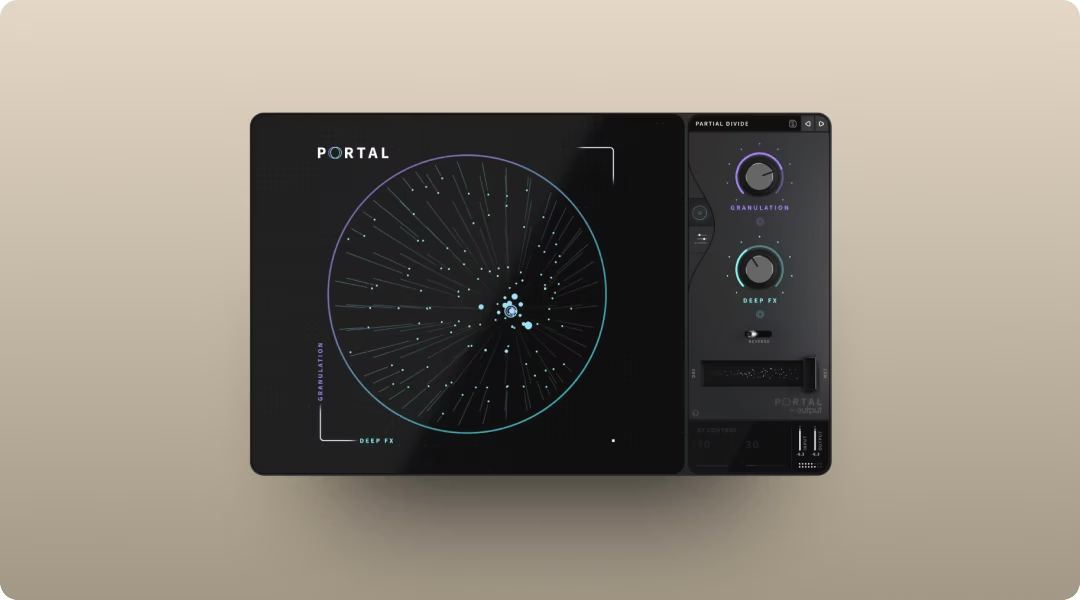
Portal is a granular FX plugin that transforms audio into evolving textures, glitches, and spatial effects. Scale-locked pitch modulation and tempo-synced grain delay keep results musical instead of chaotic. Insert it on any audio or instrument track to turn simple sounds into complex, moving textures.
- Granular engine: Break audio into grains and re-synthesize in real time. Control density, size, pitch, pan, and feedback to transform simple sounds into evolving textures.
- Scale lock: Keep pitch modulation musical and in key with your project
- Tempo sync: Grain delay snaps to exact musical values and feeds back into the granulator, creating rhythmic textures that stay locked to your session.
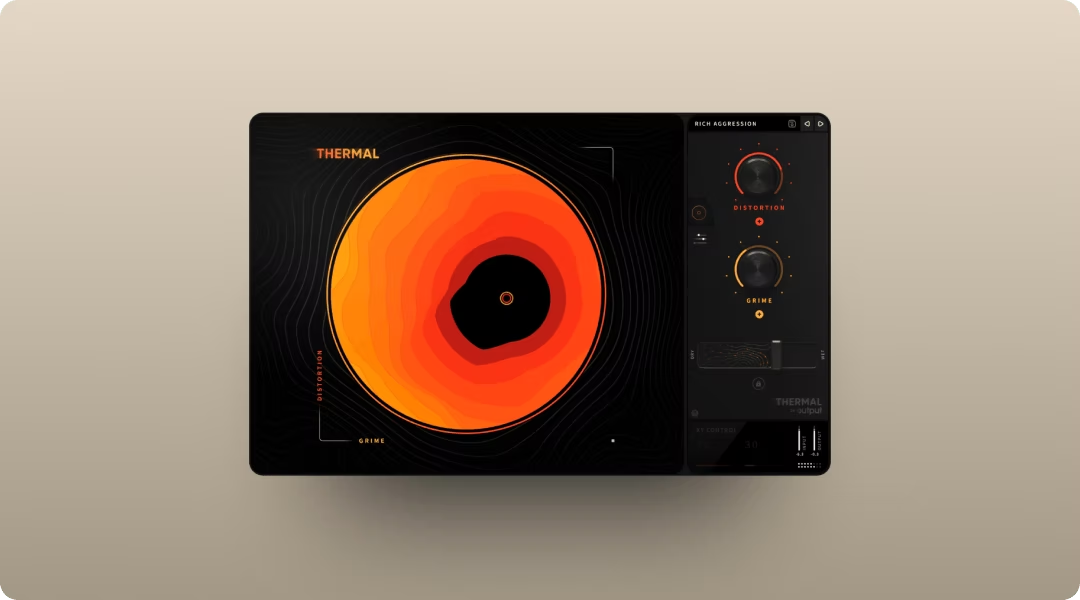
Thermal handles distortion and saturation with 15+ distortion types, mid-side processing, and an XY control for fast sound shaping. It's built for adding warmth, grit, or full-on destruction to any source.
- Multi-stage distortion: Stack multiple distortion types in series
- XY control: Blend parameters in real time for performable sound design
- Mid-side processing: Apply different distortion to the center and sides of your stereo image
- Band splitting: Apply different distortion types to specific frequency ranges, keeping lows clean while adding grit to mids and highs.
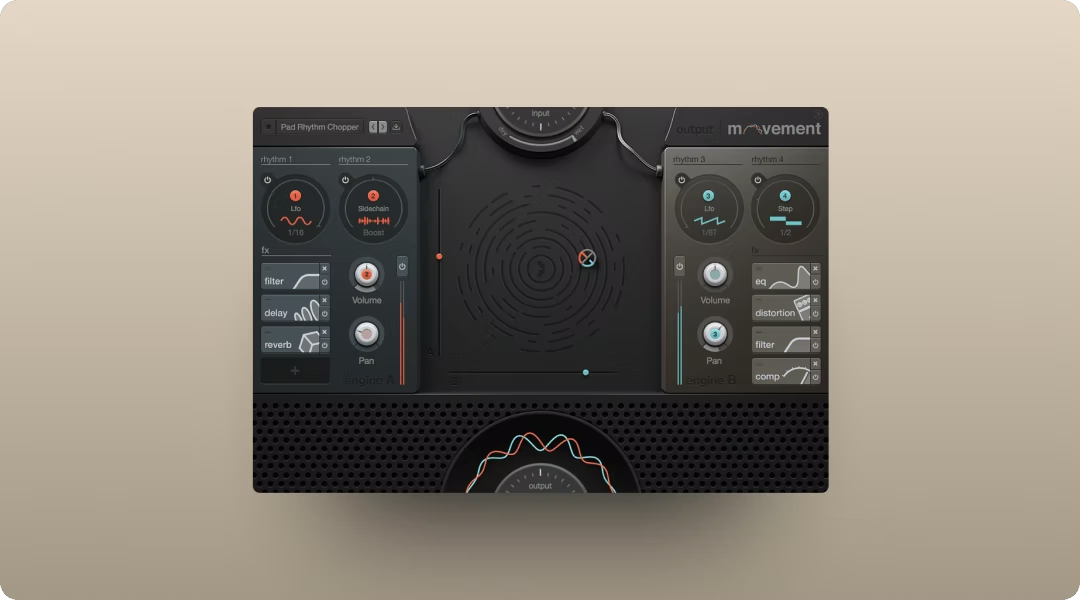
Movement adds rhythmic modulation to any source. Sidechain, LFO, and step sequencer options let you create pumping, gating, and evolving motion without manual automation.
- Rhythm engines: Sidechain, LFO, step sequencer, and Flux modes
- 152 parameters: Modulate nearly any parameter in real time
- XY pad: Perform rhythmic changes live or automate for the mix
All three are included in Output One, which also includes Co-Producer and Arcade.
Frequently asked questions about the best DAW for your genre
Does my genre actually determine which DAW I should use?
Workflow matters more than genre labels. DAWs become associated with genres because their tools solve specific problems, but any professional DAW can produce any style of music. Choose based on how you work, not what you make.
Which DAW do professional hip-hop producers actually use?
FL Studio dominates hip-hop and trap production because of its piano roll and pattern-based workflow. Ableton Live is popular for sample-heavy producers who flip and chop. Many producers use both depending on the project.
Can I use the same plugins across different DAWs?
Most third-party plugins work across DAWs if they support VST or AU formats. Pro Tools requires AAX format, so check compatibility before purchasing. Output plugins, including Co-Producer, Arcade, Portal, Thermal, and Movement, work in all major DAWs.
Wherever you create, Output One brings together Thermal, Arcade, Portal, Movement, and Co-Producer—everything mentioned in this guide—in one subscription, plus all FX expansions. Try the full toolkit together and find the fastest way to finish tracks in your genre.
Try it free