The Best Synth VST Plugins: Our Top Picks for 2026
We broke down the best synth plugins across wavetable, analog, FM, and hybrid categories—plus layering techniques and workflow tips to help you pick the right tool and actually finish tracks.

Get Co-Producer and Arcade with unlimited access to premium, royalty-free samples and instruments. Plus, unlock Portal, Thermal, and Movement.
Try it freeThe Best Synth VST Plugins: Our Top Picks for 2026
Synth plugins shape the core of modern production, but the right one depends on how you work and what you're chasing sonically. This breakdown covers the best options across wavetable, analog modeling, FM, and hybrid synthesis, plus practical tips for layering and workflow.
What makes a great synth plugin
A great synth plugin gets out of your way while giving you enough depth to shape something personal. The best ones balance immediate playability with room to grow.
Sound engine type matters more than feature count. Analog modeling excels at warmth and filter character. Wavetable synthesis handles aggressive, evolving textures. FM delivers bells, plucks, and metallic complexity. Hybrid synths combine multiple approaches.
Modulation architecture separates synths you'll actually use from ones that collect dust. Look for drag-and-drop routing, visual feedback on mod depth, and enough LFOs and envelopes to create movement without menu diving. Effects like Portal extend this philosophy—its clickable envelope modulation lets you draw custom LFO shapes by adding and dragging nodes, bringing the same intuitive modulation design to your effects chain.
- Preset quality: A deep library with expansion packs accelerates workflow. You should be able to start from a preset, tweak two or three parameters, and land on something usable.
- CPU efficiency: Oversampling and voice count affect how many instances you can run. Some synths offer draft modes for writing and high-quality modes for rendering.
- DAW compatibility: VST3, AU, and AAX support matters depending on your setup. Check Apple Silicon compatibility if you're on an M-series Mac.
Best synth plugins for sound design and texture
If you're chasing evolving pads, cinematic textures, or sounds that feel alive, these synths prioritize movement and depth over static presets.
Output Signal
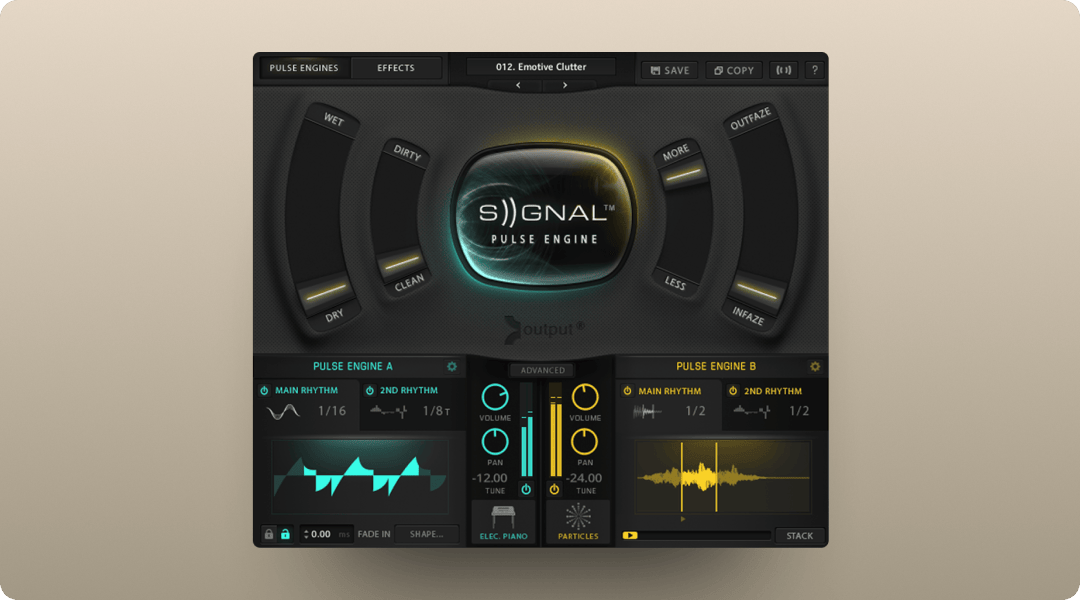
Signal takes a different approach than most soft synths. It blends analog synthesis with recorded live instruments, including brass, strings, and woodwinds, processed through tape and vintage gear.
The Rhythm and Flux engines add motion without requiring complex automation. Signal works particularly well for cinematic, ambient, and textural work where you want organic character without losing the control of synthesis.
- Four playable engines: Each engine offers distinct tonal character with deep modulation options built in.
- Live instrument integration: Recorded brass, strings, and woodwinds add organic texture that pure synthesis can't replicate.
- Macro-based control: Shape sounds quickly during arrangement without diving into submenus.
Signal is available standalone or through Output One alongside Portal, Thermal, Movement, Arcade, and Co-Producer.
Xfer Serum
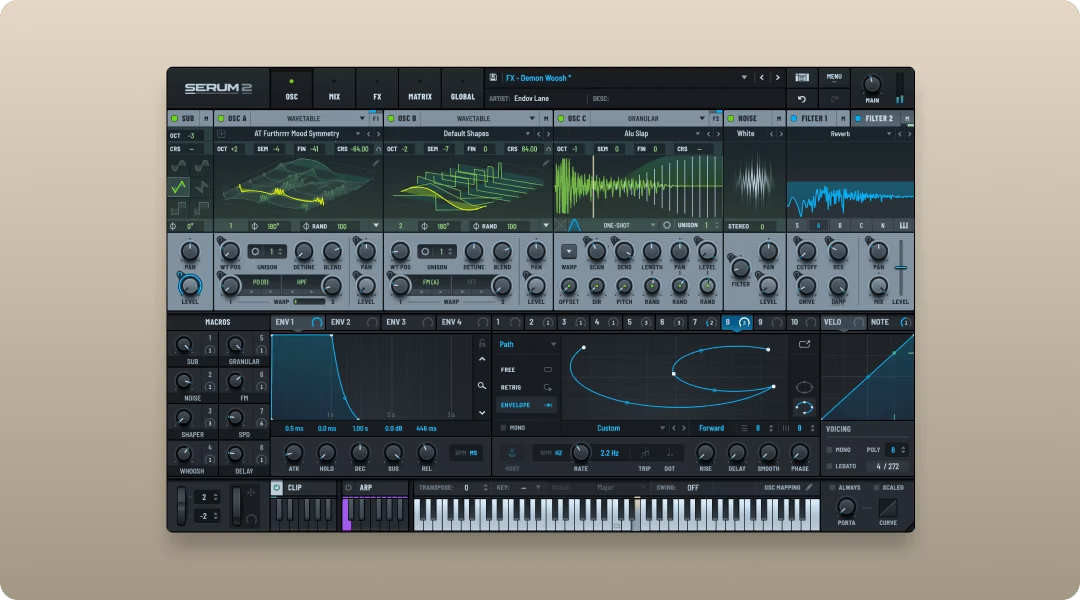
Serum remains the default recommendation for wavetable synthesis. The visual feedback on wavetable position, the drag-and-drop modulation system, and the massive preset ecosystem make it approachable without sacrificing depth.
The built-in effects are solid enough to finish sounds inside the plugin. Wavetable import lets you create custom sources from any audio.
- Visual wavetable editing: See exactly what your oscillators are doing and draw custom waveforms directly.
- Drag-and-drop modulation: Assign any modulator to any parameter by dragging, with visual depth indicators.
- Massive preset ecosystem: Thousands of third-party presets available across every genre.
Arturia Pigments
Pigments combines four engines: wavetable, virtual analog, granular, and harmonic. The visual modulation system shows exactly what's moving and by how much.
The granular engine turns simple samples into evolving textures. The harmonic engine handles additive synthesis without the typical learning curve.
- Multi-engine architecture: Switch between wavetable, analog, granular, and harmonic synthesis in one plugin.
- Visual modulation lanes: See all active modulation at once with color-coded routing.
- Sample import: Drop any audio into the granular or sample engines for custom sound sources.
Best analog-style synth VSTs
Analog modeling focuses on recreating the behavior of vintage hardware. This includes oscillator drift, filter saturation, and the nonlinear response that gives classic synths their character.
u-he Diva
Diva is the benchmark for analog authenticity in software. It models components from classic synths including the Minimoog, Jupiter, and Juno.
The filter models respond to resonance and self-oscillation like hardware. The oscillators drift slightly, which adds life to pads and leads. Diva trades efficiency for quality, so you may need to freeze tracks in dense sessions.
- Component-level modeling: Mix and match oscillators and filters from different vintage synths.
- Authentic drift and noise: Subtle instabilities add the organic movement of real hardware.
- Multiple quality modes: Draft mode for writing, high-quality mode for final renders.
TAL-U-NO-LX
TAL-U-NO-LX nails the Juno-60/106 sound at a fraction of the cost of a full-featured synth. The built-in chorus is the same BBD-style effect that defined the original hardware.
If you want that specific vintage poly sound for pads, arpeggios, or synthwave leads, this gets you there fast.
- Authentic Juno chorus: The BBD-style chorus that defined the original hardware sound.
- Simple interface: Mirrors the original hardware layout for fast programming.
- Low CPU usage: Run multiple instances without taxing your system.
Arturia V Collection
The V Collection covers a library of classic emulations, including the Minimoog, Prophet-5, Jupiter-8, and dozens more. Each instrument is modeled individually with modern additions like expanded modulation and effects.
- Breadth of coverage: Access to dozens of vintage synth emulations in one package.
- Modern additions: Expanded modulation, effects, and preset management beyond the originals.
- Consistent interface design: Similar workflow across all instruments speeds up learning.
Best wavetable synth plugins
Wavetable synthesis dominates contemporary electronic, pop, and hip-hop production. These synths excel at aggressive basses, evolving pads, and complex textures.
Native Instruments Massive X
Massive X rebuilt the original Massive from the ground up with a new engine, flexible routing, and the Performer modulation system.
The Performer system creates rhythmic modulation patterns that sync to tempo. Massive X works well for producers who want deep control over movement and texture.
- Performer modulation: Create complex rhythmic patterns that sync to your project tempo.
- Flexible routing: Build custom signal paths between oscillators, filters, and effects.
- Redesigned oscillators: New wavetable engine with more tonal range than the original Massive.
Vital
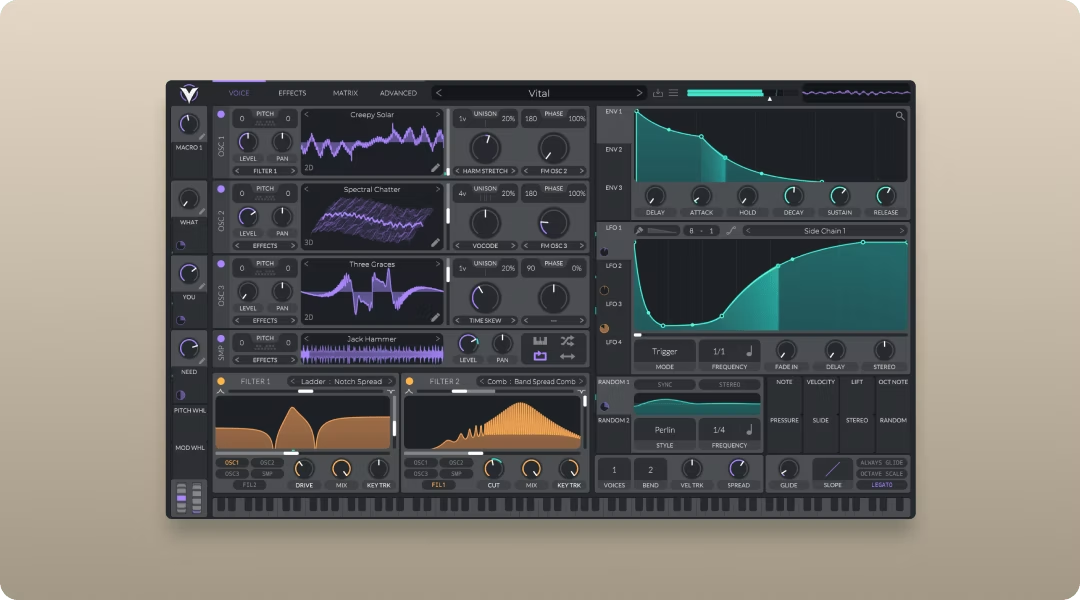
Vital offers a feature set comparable to Serum with a free tier that includes most of the core functionality. The visual modulation system, wavetable editing, and effects are all present.
For producers on a budget or those who want to try wavetable synthesis before committing, Vital is a strong starting point.
- Free tier available: Core functionality without cost, paid tiers add presets and wavetables.
- Visual modulation: Drag-and-drop routing with real-time visual feedback.
- Text-to-wavetable: Generate custom wavetables from text input for unique sound sources.
Best FM synth plugins
FM synthesis is frequency modulation, where one oscillator modulates another to create complex harmonics. It excels at bells, plucks, metallic textures, and evolving tones.
Native Instruments FM8
FM8 uses a matrix-based approach that simplifies traditional FM programming. Instead of memorizing algorithms, you route operators visually and hear the results immediately.
- Visual matrix routing: See and adjust operator relationships without memorizing algorithms.
- Built-in arpeggiator: Create rhythmic patterns directly inside the synth.
- Morph between sounds: Blend between different patches for evolving textures.
Arturia DX7 V
DX7 V emulates the original Yamaha DX7 with modern additions including expanded modulation, effects, and a redesigned interface.
- Authentic DX7 character: Captures the tone of the original hardware.
- Modern interface: Redesigned controls make FM programming more approachable.
- Added effects: Built-in processing that the original hardware lacked.
Best synth plugins for synthwave and retro sounds
Synthwave production relies on specific tonal characteristics: lush poly pads, detuned oscillators, chorus effects, and tape-style saturation.
TAL-U-NO-LX
The Juno emulation is a synthwave staple. The built-in chorus and the immediate "that sound" factor make it a go-to for pads, arpeggios, and leads.
u-he Repro
Repro covers the Prophet-5 and Pro-One in two separate instruments. The Prophet side handles poly pads and sequences. The Pro-One side delivers monophonic basses and leads with portamento.
- Two synths in one: Prophet-5 for poly sounds, Pro-One for mono leads and bass.
- Authentic instability: Captures the drift and character of vintage hardware.
- Deep modulation: More routing options than the original hardware allowed.
Cherry Audio Surrealistic MG
Surrealistic MG models the Minimoog for monophonic bass and lead sounds. The filter and oscillator behavior capture the weight of the original hardware.
- Minimoog character: The filter saturation and oscillator tone of the original.
- Affordable price point: Classic Moog sound without the premium cost.
- Simple interface: Three oscillators, one filter, fast results.
Best synth plugins for Ableton Live
Ableton's workflow emphasizes modulation, macro mapping, and MPE support. These synths integrate cleanly with that approach and pair well with other essential Ableton Live plugins.
- Wavetable (stock): Ableton's built-in wavetable synth handles most modern sound design needs without leaving the DAW.
- Xfer Serum: Drag-and-drop modulation mirrors Ableton's workflow philosophy.
- Arturia Pigments: MPE support and visual modulation routing work well in Ableton's environment.
- Output Signal: Macro-based control and hybrid sound sources complement Ableton's session view.
Best synth plugins for FL Studio
FL Studio's piano roll and pattern-based sequencing reward synths that respond well to detailed MIDI editing and automation—these synths complement other essential FL Studio plugins.
- Sytrus (stock): FL's built-in FM synth offers deep synthesis without additional cost.
- Xfer Serum: Works seamlessly with FL Studio and has massive community support.
- Output Signal: Layer-based architecture fits FL's pattern workflow.
- Vital: The free tier makes it accessible for FL producers at any budget level.
- Arcade: While not a traditional synth, Arcade's loop-manipulation engine and Kit Generator turn samples into playable instruments. The tempo and key-sync features integrate seamlessly with FL's pattern workflow, and the unlimited royalty-free sample library accelerates sound design.
How to layer synth plugins for bigger sounds
Layering separates amateur synth sounds from professional ones. The approach is straightforward: divide the frequency spectrum and assign each layer a specific role.
- Transient layer: One synth handles the attack and initial punch. Short envelopes, minimal sustain, focused on the first few milliseconds.
- Body layer: A second synth provides the sustain and harmonic content. This is where the tone lives.
- Air layer: A third synth adds high-frequency shimmer or texture. Subtle presence that fills out the top end.
Processing each layer separately gives you control over the final sound. Output Portal adds granular texture to any layer, turning static tones into evolving movement. Its grain engine slices audio into tiny pieces that can be stretched, pitched, panned, and delayed independently—perfect for transforming a simple pad into something alive and breathing. Output Thermal adds saturation and width to the body layer, helping it cut through a mix. Its three-stage processing lets you apply different distortion types to separate frequency bands—saturate the low-mids for warmth while keeping the highs clean, or vice versa.
Both are available through Output One alongside the full suite of Output tools.
Synth plugin workflow tips
The best synth in the world won't help if your workflow keeps you stuck in sound design instead of finishing tracks.
- Start from presets: Tweak two or three parameters to make a preset yours instead of building from init. Most professional producers work this way. For sample-based production, Co-Producer takes this further—it analyzes your track and recommends complementary samples automatically, letting you build arrangements faster without endless browsing.
- Assign macros early: Map your most-used parameters to macro controls for faster sound shaping during arrangement.
- Commit and move on: Bounce synth parts to audio when you're happy to free CPU and avoid endless tweaking.
- Add motion with FX:Output Movement injects rhythmic modulation without drawing automation curves. The XY pad lets you control multiple modulation parameters simultaneously, and the preset library gets you to animated textures fast—ideal for adding motion during arrangement without menu-diving.
All Output plugins, including Signal, Portal, Thermal, and Movement, are available in Output One.
FAQ
What is the difference between VST3, AU, and AAX plugin formats?
VST3 works in most DAWs on Windows and macOS. AU is macOS-only and required for Logic Pro. AAX is exclusive to Pro Tools.
Do synth plugins run natively on Apple Silicon Macs?
Most major synth plugins now run natively on Apple Silicon. Check the developer's website for M1, M2, or M3 compatibility before purchasing.
How many different synth plugins does a producer actually need?
One versatile wavetable synth and one analog-style synth cover most production needs. Add specialized tools like FM or granular synths as your sound evolves.
If Portal, Movement, Co-Producer, Thermal, and Arcade made your shortlist, get them all in Output One—plus every FX expansion. One subscription lets you combine them for faster sound design, stronger hooks, and more finished tracks.
Try it free