The Best Hip-Hop VST Plugins for Modern Beats
From 808 design to vocal processing, here are the best hip-hop VSTs for every stage of your beat — drums, bass, sampling, saturation, and mix — with the workflows that actually make them hit.

Get Co-Producer and Arcade with unlimited access to premium, royalty-free samples and instruments. Plus, unlock Portal, Thermal, and Movement.
Try it freeThe Best Hip-Hop VST Plugins for Modern Beats
Hip-hop production rewards the right tools: plugins that deliver hard-hitting drums, 808s that translate on any speaker, and FX that add movement without cluttering the mix. We'll walk through the VSTs that help you build beats from loop to delivery, covering drums, bass design, sampling workflows, saturation, and vocal processing.
What makes a hip-hop beat sound like hip-hop?
Hip-hop production starts with loops, heavy low end, and space for the voice. The genre builds from short, repeating ideas rather than long compositions. Drums hit hard but stay sparse. The 808 carries the harmonic weight. Melodies sit behind the rapper rather than competing for attention.
- Loop-first workflow: Most beats start as an 8 to 16 bar idea. Arrangement comes from muting and filtering, not writing new sections.
- Low-end dominance: The 808 and kick relationship defines the track's weight. Sub-bass frequencies carry the groove.
- Sparse drums: Snares, claps, and hi-hat rolls leave room rather than fill it. Every hit has a purpose.
- Sample-driven texture: Chops, flips, and found sounds add character. How you manipulate source material creates the vibe.
- Vocal space: Melodies and pads sit behind the voice. The mid-range stays open for the artist.
Understanding these elements shapes every plugin choice. The best hip-ho VSTs help you achieve these outcomes faster while keeping the sound yours.
How do you build drums that hit hard and leave room for vocals?
Hip-hop drums need punch without clutter. The goal is impact that translates on car speakers and earbuds while leaving the mid-range clear for vocals.

Output Arcade gives you a fast path from vibe to playable drum pattern. Load a hip-hop drum kit, play patterns in real time, and reshape sounds with the macro controls. You can drag in your own samples and auto-chop them into playable kits. Arcade loads as an instrument plugin on a Software Instrument or MIDI track. It's available through Output One alongside Co-Producer, Portal, Thermal, and Movement.
- Playable kits: Perform patterns rather than programming them step by step. The black keys trigger Modifiers for real-time effects like stutters and pitch shifts—perfect for adding live variation to your drum patterns.
- Macro controls: Shape tone, attack, and texture without diving into menus.
- Auto-chop: Turn any sample into a playable kit instantly. Arcade's Sampler Generator offers four different slice algorithms—letting you control exactly how your sample gets divided across the keyboard.
Native Instruments Battery 4 offers deep sample editing for building custom kits from scratch.
- Layer editing: Stack multiple samples per pad for complex drum sounds.
- Envelope control: Shape attack and decay precisely for each hit.
- Cell matrix: Organize and trigger samples across a visual grid.
XLN Audio XO uses pattern building to surface drum combinations you might not find manually.
- AI-driven selection: Finds drums that work together based on sonic characteristics.
- Pattern sequencer: Build grooves quickly with drag-and-drop simplicity.
- Sample organization: Visualizes your entire drum library by sound similarity.
The core drum elements in hip-hop: kicks with punchy transients and short decay, layered snares for crack and body, hi-hats with swing and velocity variation, and sparse percs for ear candy. Light saturation on the drum buss glues the kit together without squashing dynamics.
What's the best way to design 808s that translate everywhere?
The 808 is the low-end engine of modern hip-hop and trap. Getting it right means tuning to key, adding harmonics for small speakers, and keeping the sub mono for club systems.
Future Audio Workshop SubLab XL is purpose-built for 808 design.
- X-Sub engine: Generates sub frequencies that translate across playback systems.
- Distortion section: Adds harmonics without muddying the low end.
- 808 presets: Hundreds of starting points organized by style and character.
Xfer Records Serum offers wavetable flexibility for custom bass patches.
- Wavetable editor: Build unique bass tones from scratch or imported audio.
- Filter options: Multiple filter types for shaping tone and movement.
- Modulation matrix: Route any parameter to LFOs, envelopes, or macros.
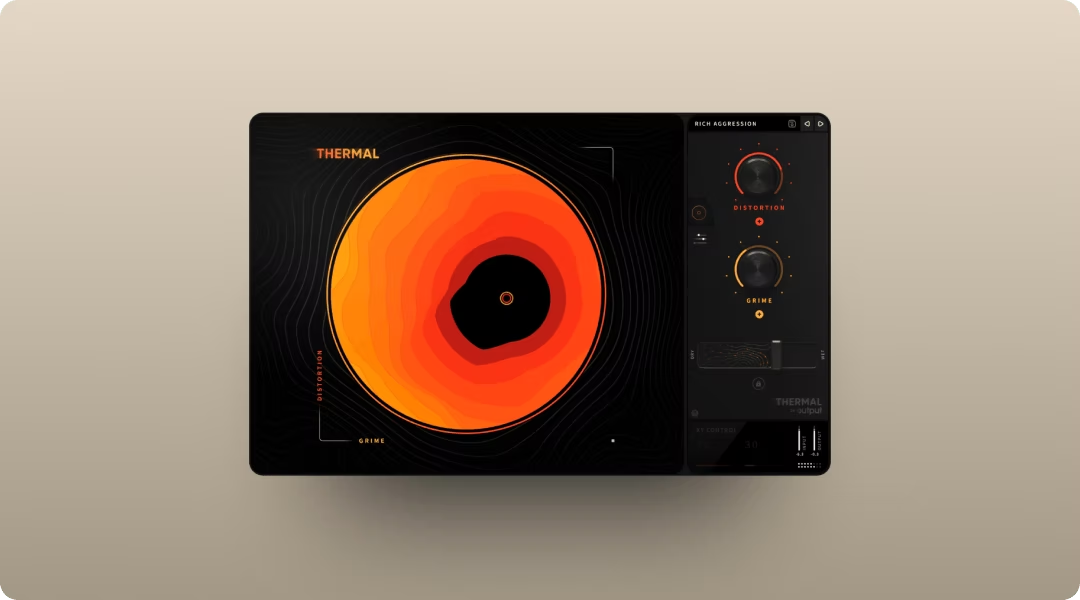
Output Thermal handles 808 processing with precision. Insert it on your 808 track and use multiband mode to drive the mids while keeping the sub clean. Set your crossover points using the Low and High parameters—try keeping everything below 80-100Hz untouched while saturating the mid frequencies for speaker translation. The XY macro lets you dial in harmonic saturation quickly. Thermal is an FX plugin that works on any Audio or Instrument track insert.
- Multiband distortion: Target specific frequency ranges for controlled saturation.
- XY macro: Blend multiple parameters with one control for fast sound shaping.
- 15+ distortion types: From subtle warmth to aggressive digital grit.
Best practices: tune the 808 to your track's key, add harmonics in the mid-range so it cuts through on laptops, keep sub frequencies mono, and sidechain or duck so the kick punches through.
How do you create melodies that leave space for the vocal?
Hip-hop melodies work best when they're simple and sit behind the voice. A single bell line or piano loop can carry an entire track. The goal is texture and mood rather than complexity.
Spectrasonics Omnisphere 2 offers deep sound design and a massive preset library.
- Sound sources: Thousands of patches spanning synths, acoustic instruments, and textures.
- Granular synthesis: Turn any audio into evolving, playable textures.
- Hardware integration: Control parameters from supported synth hardware.
Arturia Analog Lab V provides vintage synth sounds with fast preset browsing.
- Curated presets: Best sounds from Arturia's V Collection in one interface.
- Smart browsing: Filter by style, type, or character to find sounds quickly.
- Macro controls: Shape any preset without deep editing.
Output Arcade lets you browse melodic Lines, lock them to key and tempo, and tweak with macros. The playable workflow means you're performing and shaping ideas rather than dragging files. Arcade's Playable Pitch feature lets you retune samples in real-time as they play—write chord progressions and melodies directly from your loops without bouncing or resampling. Load it as an instrument plugin on a Software Instrument track.
The melodic approach: simple motifs that loop and stick, counter-melodies that respond without competing, texture over complexity, and leaving the mid-range open for vocals.
How do producers sample and chop in a modern hip-hop workflow?
Sampling is foundational to hip-hop. The faster you can audition, manipulate, and commit to samples, the more ideas you can try.

Output Co-Producer listens to your session and surfaces royalty-free samples that fit your track's key, tempo, and vibe. Drag and drop directly into your DAW without leaving the session. It lives on the Master Track's FX insert for whole-session analysis.
- Session listening: Analyzes your track and recommends samples that fit.
- Drag and drop: Pull samples directly into your DAW timeline.
- Re-imagine: Create one-of-a-kind variations of any sample. See the Co-Producer User Guide for details on the Re-imagine feature.
Pro tip: Co-Producer supports three search modes—audio-only (let it listen to your track), text-only (describe what you need), or combined. For specific sounds, try the structure: Descriptor + Genre + Vibe + Instrument (e.g., 'dark trap hi-hats').
Once you've found a sample, load it into Output Arcade to chop, flip, and play it as a kit. Learn how to use Arcade's Sampler Generator to turn any sample into a playable kit. Both tools are available together through Output One.
Serato Sample offers pitch and time manipulation with a crate-digging workflow.
- Pitch and time: Stretch and tune samples independently.
- Pad mode: Trigger chops from your MIDI controller.
- Key sync: Lock samples to your project key automatically.
Native Instruments Kontakt provides deep sampling capabilities for building custom instruments.
- Scripting engine: Create complex, playable instruments from any audio.
- Library ecosystem: Access thousands of third-party sample libraries.
- Time machine: Advanced time-stretching for natural-sounding manipulation.
Two main approaches: chop workflow where you slice the sample into hits and rearrange them, or time-stretch workflow where you warp the sample to fit your tempo without slicing. Either way, lock samples to your project so everything plays in tune and in time.
What FX add movement and ear candy without cluttering the mix?
Hip-hop uses FX selectively. Throws, delays, filter sweeps, and transitions punctuate the track rather than dominate it.
Valhalla VintageVerb delivers lush reverb for vocal sends.
- Multiple algorithms: Nine reverb modes from tight rooms to infinite spaces.
- Color control: Shift the reverb tone from dark to bright.
- Low CPU: Runs efficiently even with multiple instances.
Soundtoys EchoBoy offers flexible delay with analog character.
- 30+ styles: Emulations of classic hardware delays and tape machines.
- Rhythm mode: Sync delays to musical subdivisions easily.
- Saturation: Built-in analog warmth and grit.
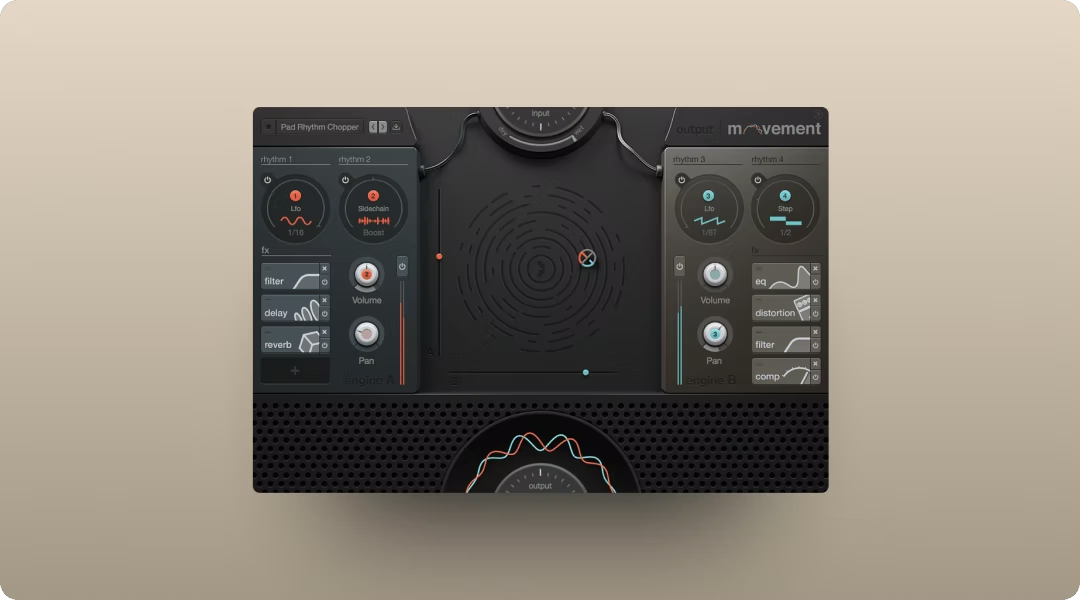
Output Movement adds rhythmic motion to any element with tempo-synced LFOs, step sequencers, and sidechain modulation. Use the sidechain mode to make pads pump against your kick without drawing automation—essential for that classic hip-hop groove. Insert it on a pad or synth track to create pumping, evolving textures without drawing automation by hand. Output Portal handles granular processing for creating ear-candy textures, stutters, and pitch-shifted throws. The Scale feature quantizes pitch shifts to musical intervals, so your granular throws stay in key—perfect for melodic hip-hop production. Both are FX plugins available through Output One.
- Movement: Modulate any parameter with rhythm using sidechain, LFO, or step sequencer.
- Portal: Break audio into grains and reshape pitch, time, and texture in real time.
The FX approach: short delay or reverb throws on phrase endings, rhythmic gating to make pads pulse, risers and sweeps for transitions, and restraint. Use FX as punctuation, not constant decoration.
How do you use saturation and distortion to make elements pop?
Saturation adds harmonics and presence without turning everything into a guitar amp. The key is targeting harmonics where you need them while keeping the sub clean.
FabFilter Saturn 2 provides multiband saturation with deep modulation.
- Multiband processing: Apply different saturation to different frequency ranges.
- Modulation system: Animate saturation with envelopes, LFOs, and followers.
- Linear phase: Option for transparent crossovers in mastering contexts.
XLN Audio RC-20 Retro Color adds lo-fi texture, noise, and wobble.
- Six modules: Noise, wobble, distortion, digital degradation, space, and magnetic.
- Flux knob: Adds random variation for organic, evolving texture.
- Preset browser: Organized by intensity and character.
Output Thermal offers multi-stage distortion with multiband control and stereo width tools. Each distortion stage includes a feedback section with envelope following—use it to add controlled resonance to 808 tails that responds dynamically to your playing. Insert it on 808s, processing drums, or shaping vocals to add controlled aggression. The multiband mode lets you drive the mids for presence while leaving the low end intact.
The saturation approach: multiband drive to saturate mids while keeping sub clean, parallel processing to blend distorted signal with dry for clarity, soft clipping on the drum buss for glue, and keeping low-end distortion mono while letting high-frequency harmonics spread.
How do you mix vocals to sit on top of a dense beat?
Vocals are the focal point. Every processing choice should help the voice cut through while maintaining its character.
FabFilter Pro-Q 3 handles surgical EQ for carving space.
- Dynamic EQ: Bands that respond to input level for transparent correction.
- Spectrum analyzer: Visual feedback for identifying problem frequencies.
- Mid-side mode: Process center and sides independently.
Waves CLA-2A provides smooth optical compression.
- Simple controls: Just two knobs for fast, musical compression.
- Optical character: Smooth, program-dependent response.
- Analog warmth: Subtle harmonic enhancement.
Antares Auto-Tune Artist offers pitch correction as a creative effect or transparent tuning.
- Low latency: Real-time performance without noticeable delay.
- Flex-Tune: Natural correction that preserves expression.
- Classic mode: The hard-tuned sound that defines modern hip-hop vocals.
Output Thermal works well on a vocal bus for subtle saturation that adds presence and grit. Use the XY macro to dial in warmth without harshness.
The vocal chain: de-ess to tame sibilance before compression, compress to even out dynamics, boost upper mids for presence, pan ad-libs and doubles wide with subtle delay, and automate FX moments on specific phrases.
How do you arrange a full track from an 8-bar loop?
Beat-centric production means the arrangement emerges from the loop. You're not writing new sections. You're revealing and concealing elements to create energy and contrast.
- Intro: Strip the beat down. Let one or two elements set the vibe.
- Verse: Pull back melodies to leave room for the vocal. Keep drums and bass driving.
- Hook: Bring everything in. This is the fullest section.
- Bridge: Drop elements for contrast. Maybe just 808 and vocal.
- Outro: Mirror the intro or fade out.
Arrangement in hip-hop is about muting and filtering rather than writing new parts. Automate volume, filters, and FX to create movement. The loop stays the same. The arrangement reveals different facets of it.
How do you deliver beats to artists and engineers?
Clean delivery makes collaboration easier and protects your work.
- Two-track: A stereo bounce of the full beat with a few dB of headroom.
- Stems: Individual tracks or groups for the mixing engineer.
- Headroom: Leave peaks below 0 dBFS. Many engineers request around -6 dB.
- Tagged bounce: A version with your producer tag for beat leases.
- Alt mixes: Versions with and without hooks for artist flexibility.
Clear labeling and consistent organization save time for everyone involved.
Quick picks for a modern hip-hop and trap plugin palette:
- Sample discovery: Output Co-Producer
- Playable sampler and drums: Output Arcade
- 808 and bass design: Future Audio Workshop SubLab XL, Xfer Records Serum
- Synths and melodies: Spectrasonics Omnisphere 2, Arturia Analog Lab V
- Saturation and processing distortion: Output Thermal, XLN Audio RC-20 Retro Color
- Rhythmic FX processing: Output Movement
- Granular texture processing: Output Portal
- EQ and compression: FabFilter Pro-Q 3, Waves CLA-2A
- Reverb and delay: Valhalla VintageVerb, Soundtoys EchoBoy
- Pitch correction: Antares Auto-Tune Artist
All of Output's flagship plugins are available together in Output One.
FAQ
What VST plugins do professional hip-hop producers use
Professional hip-hop producers commonly use Omnisphere for pads, Serum for bass design, Kontakt for sampled instruments, and Output tools like Co-Producer and Arcade for sample-based workflows. The specific combination varies by producer.
Do you need expensive plugins to make hip-hop beats
No. Free options like Vital and stock DAW plugins can produce professional results. Workflow and creativity matter more than price.
What's the difference between a VST instrument and a VST effect
A VST instrument generates sound, like synths and samplers. A VST effect processes existing audio, like EQ and reverb. Instruments load on MIDI tracks. Effects load on insert slots.
You’ve seen how Output Thermal, Arcade, Portal, Movement, and Co-Producer can level up drums, hooks, and transitions—Output One includes all of them, plus every FX expansion. Get the full toolkit in one subscription and see what happens when everything works together.
Try it free