Building a Nettspend Type Beat From Scratch in Your DAW
Nettspend type beats thrive on lo-fi grit, distorted 808s, and pitched samples that feel slightly broken on purpose. This walkthrough covers tempo, drum programming, 808 design, sample flipping, and the exact processing chain that gives the style its texture.

Get Co-Producer and Arcade with unlimited access to premium, royalty-free samples and instruments. Plus, unlock Portal, Thermal, and Movement.
Try it freeBuilding a Nettspend Type Beat From Scratch in Your DAW
Nettspend type beats blend lo-fi grit, pitched samples, and distorted 808s into something raw and emotionally charged. This walkthrough covers tempo, drum programming, sample flipping, 808 design, and the processing that gives the style its signature texture.
What Defines the Nettspend Type Beat Sound
A Nettspend type beat is a lo-fi, sample-heavy hip-hop instrumental that blends plugg, rage, and phonk influences into something raw and emotionally charged. This means you're working with pitched-down samples, sparse drums, and distorted 808s that prioritize vibe over polish.
The sound comes from Texas underground hip-hop and SoundCloud rap culture. Everything feels slightly degraded on purpose, with tape saturation, vinyl noise, and intentional grit layered throughout.
- Sample-driven melodies: Pitched vocal chops, soul loops, or synth phrases that sound washed out and distant
- Sparse drums: Bouncy kick patterns, snappy snares on beat three, and rolling hi-hats with velocity variation
- Distorted 808s: Saturated bass with glide that cuts through on any speaker
- Lo-fi texture: Intentional grit from tape effects, bitcrushing, or vinyl simulation
- Ear candy: Vocal chops, risers, and transition FX scattered throughout
The goal is controlled chaos. The groove stays tight while everything around it sounds slightly broken.
Nettspend Type Beat Tempo and Groove Settings
Most Nettspend type beats sit between 140 and 160 BPM. The halftime snare placement makes them feel much slower than the actual tempo, which is part of what gives the style its signature drag.
Swing matters here. Add light shuffle to your hi-hats, somewhere between 5% and 15%, while keeping kicks and snares tighter to the grid. This creates human feel without making the pattern sloppy.
- BPM range: 140 to 160 with halftime snare placement
- Swing: Light shuffle on hi-hats, straight quantization on kicks
- Snare position: Beat three instead of two and four creates the laid-back bounce
- Grid setting: Triplet grid helps with hi-hat rolls and 808 slides
Set your tempo before programming drums. The groove you establish early shapes everything that follows.
How to Build a Nettspend Type Beat Drum Pattern
Drums in this style are about pocket and space. You want each hit to feel intentional, with room for the 808 and sample to dominate.
Kick and Snare Pocket
Place your kick to complement the 808 pattern rather than duplicate it. The snare lands on beat three in halftime, often layered with a clap or rimshot for extra snap.
- Kick placement: Syncopated hits that lock with the 808 rhythm
- Snare character: Punchy and present with a short reverb tail
- Ghost hits: Subtle velocity variations on secondary kicks add feel
The relationship between kick and 808 defines your low end. If they fight, the beat falls apart.
Hi-Hat Motion
Hi-hats create forward momentum. Rolling patterns with velocity ramps, triplet bursts, and occasional open hat accents keep things moving without overwhelming the mix.
Program your hats with velocity variation. Start rolls quiet and ramp into accents, or reverse the pattern for a different feel. Motion matters more than complexity.
Percussion and Ear Candy
Shakers, rim clicks, and foley textures fill spaces between main drum hits. Vocal chops work as both melodic elements and percussive accents.
Transition FX like risers and reversed hits mark section changes. These elements separate a loop from a beat that feels arranged.
Nettspend Type Beat 808 and Bass Design
The 808 is the foundation. It needs to hit hard, translate on small speakers, and have enough harmonic content to cut through the lo-fi texture.
- 808 selection: Choose a sample with upper harmonics, not just sub frequencies
- Tuning: Match the root note of your sample or chord progression exactly
- Glide: Slides between notes add melodic movement
- Saturation: Add harmonics so the 808 translates on phone speakers
Keep your 808 in mono below 150 Hz for punch and clarity. Some producers let the kick and 808 overlap intentionally for a dirtier feel, but sidechain compression prevents mud if you want cleaner separation.
RC-20 Retro Color from XLN Audio works well for adding analog character to 808s.
- Noise and wobble: Adds tape-style degradation to any signal
- Distortion module: Warm saturation that doesn't destroy transients
- Magnetic section: Simulates tape compression and flutter
Nettspend Type Beat Sample and Melody Workflow
The sample is often the starting point. Whether you're flipping an existing loop or building something original, the melody needs emotional weight while leaving room for drums and bass.
How Co-Producer Finds Samples That Fit Your Track

Co-Producer listens to your session and surfaces samples that match your track's tempo and harmonic content. Instead of scrolling through folders, you get recommendations based on what you're actually building.
- Session listening: Analyzes your track and recommends fitting samples. Tip: For best results, capture 8 bars when possible—this gives Co-Producer more harmonic and rhythmic content to analyze. Use 4-bar captures when working with shorter loop sections.
- Re-imagine feature: Creates unique variations of any sample
- Drag-and-drop: Pull samples directly into your DAW without leaving your session
The Re-imagine feature transforms any sample into one-of-a-kind variations. This means your beats won't sound like everyone else pulling from the same packs.
How Arcade Turns Loops Into Playable Instruments

Once you've found a sample, Arcade lets you chop, manipulate, and perform it in real time. Sampler mode auto-chops loops into playable kits, while Instrument mode turns samples into chromatic instruments you can play melodically.
- Auto-chop: Slices loops into playable kits using four different slice algorithms—experiment with each to find patterns that fit the lo-fi, sample-heavy Nettspend aesthetic. FX presets let you dial in texture before saving.
- Built-in FX: Reshape sounds without leaving the plugin
- Kit Generator: Create custom samplers from your own audio
The Kit Generator creates custom samplers from your own recordings, giving you a fast path from raw material to finished part.
Key matching tip: Set Arcade's Session Key to match your 808 and sample root note. Arcade automatically pitch-shifts all samples in a kit to your selected key, keeping everything harmonically locked without manual tuning.
Sample Flip Techniques in Your DAW's Sampler
If you prefer your DAW's native sampler, slice your sample to transients and rearrange the chops. Pitching down adds lo-fi character, while reversing sections creates ear candy.
Serato Sample handles chopping and pitch-shifting well for this workflow.
- Auto-slice: Detects transients and creates playable pads
- Key and tempo sync: Matches samples to your project automatically
- Crate Dig feature: Finds similar samples in your library
Warp markers let you stretch sections without affecting pitch, useful for fitting samples to tempo without losing their original feel.
Co-Producer, Arcade, and the FX plugins covered below are all available together in Output One.
Nettspend Type Beat Arrangement That Keeps Moving
A static loop isn't a beat. Arrangement turns your eight-bar idea into something an artist can write to.
- Intro: Strip back to just the sample or a filtered version of the beat
- Verse sections: Pull back drums or melody to leave room for vocals
- Hook: Bring in all elements with added ear candy and transition FX
- Switch-ups: Mute the 808 for a bar, drop the drums, or flip the sample
Automation keeps sections distinct. Filter sweeps, volume rides, and FX throws mark transitions without requiring new musical ideas.
The goal is energy management. You're creating peaks and valleys that give vocalists space to work.
Nettspend Type Beat Mix and Sound Design
Texture and character come from processing. The lo-fi aesthetic isn't about making things sound bad. It's about adding controlled grit that makes the beat feel lived-in.
How Portal Adds Granular Texture to Samples
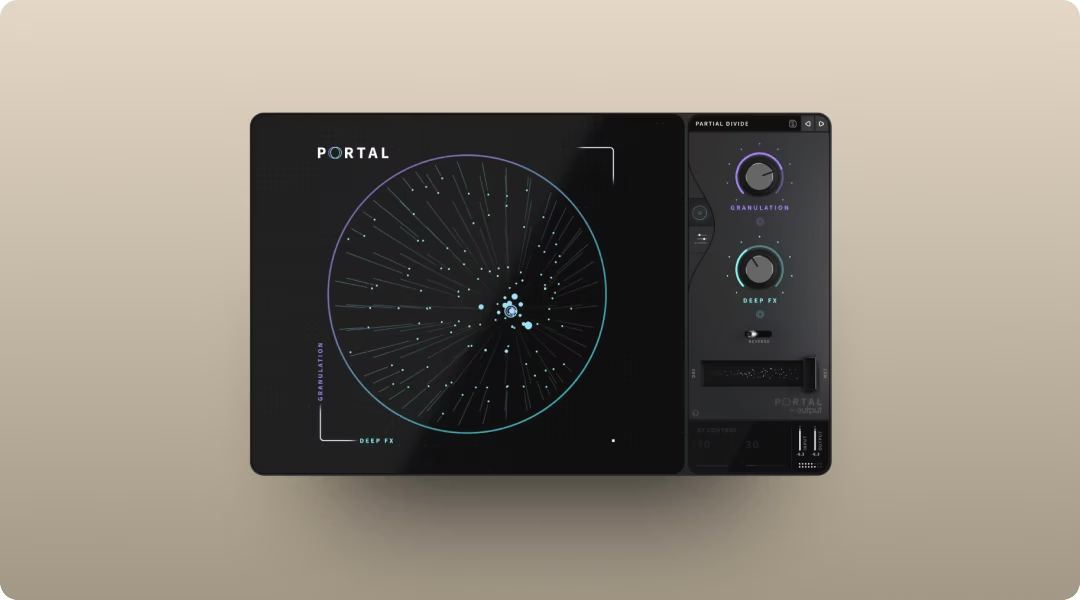
Portal's granular processing smears, scatters, and transforms melodic elements into atmospheric textures. Use it to create glitchy transitions, ambient pads from simple loops, or unique ear candy from any source.
- Tempo-synced grain delay: Keeps results locked to your project tempo
- Scale-locked pitch modulation: Stays in key while transforming sounds
- XY control: Perform granular effects in real time
You can push sounds into abstract territory while staying musical. The scale lock prevents random pitch chaos.
For Nettspend-style textures, try low density with longer grain sizes to create washed-out, distant atmospheres. The Scale lock ensures pitch-shifted grains stay musical even at extreme settings.
How Thermal Adds Controlled Distortion to 808s and Drums
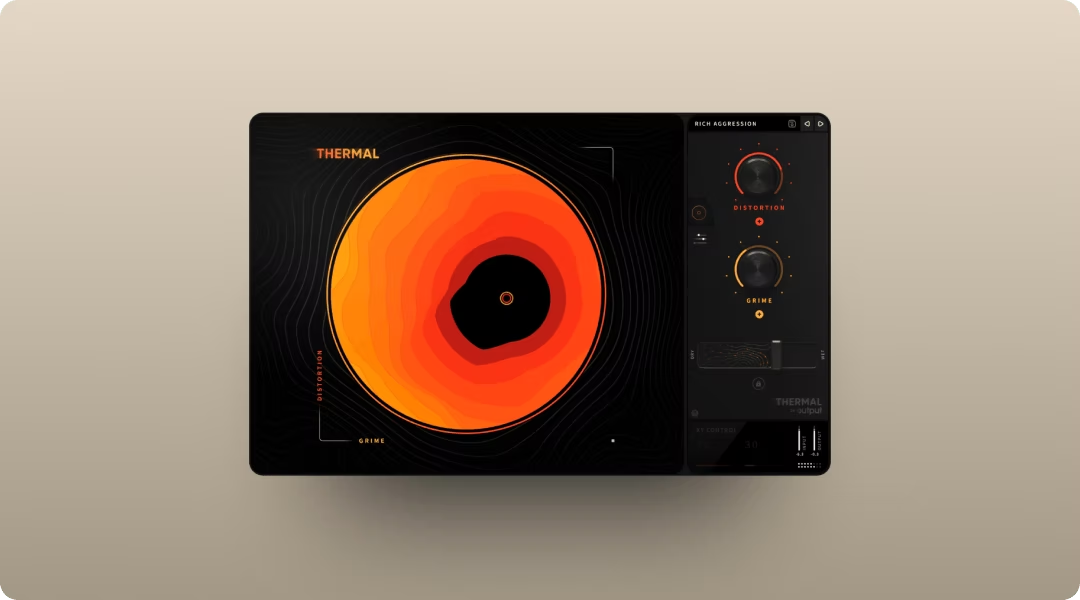
Thermal's multi-stage distortion adds harmonics exactly where you want them. Use it on the 808 for upper-frequency content that translates on small speakers, or on the drum bus for cohesive grit.
- 15+ distortion types: Analog-inspired and digital flavors
- XY control: Dial in aggression without guessing
- Onboard FX: Shape the entire character in one plugin
The XY control lets you find the right amount of saturation quickly. Multiple distortion types mean you can match the texture to your beat's vibe.
808 tip: Use the AUTO gain compensation when pushing DRIVE hard—this prevents volume spikes while adding upper harmonics. The FEEDBACK section with synced TIME can add rhythmic grit that locks to your beat's tempo.
How Movement Adds Rhythmic Motion to Melodies
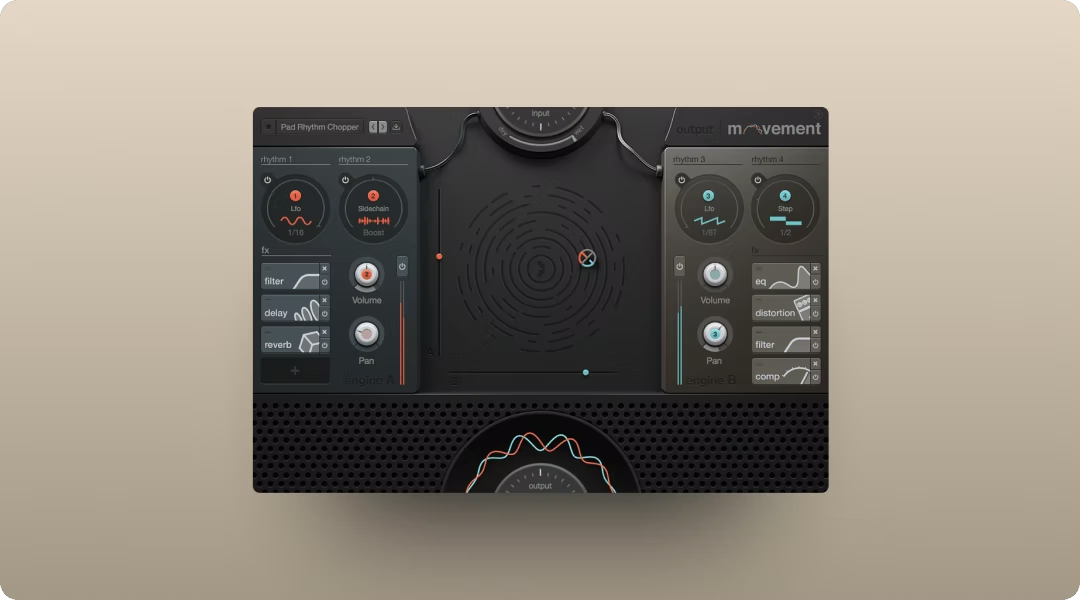
Movement adds pumping, filtering, and rhythmic modulation to melodic elements. The LFO, sidechain, and step sequencer options create evolving textures that keep loops interesting.
- Four rhythm engines: LFO for smooth sweeps, step sequencer for choppy patterns, sidechain for pumping against your kick, and Flux mode for evolving, unpredictable movement. Layer engines for complex motion that keeps sparse Nettspend-style arrangements interesting.
- 152 parameters: Modulate almost anything in real time
- XY pad: Perform modulation instead of programming it
Use it for subtle filter movement on a sample or aggressive pumping on a synth pad. The XY pad makes it playable.
Nettspend Type Beat Export and Licensing Basics
When your beat is finished, export settings and licensing determine how it gets used.
- Export format: WAV at your session's sample rate for quality, MP3 for previews
- Stems: Bounce separate drum, 808, and melody stems for artists
- Royalty-free samples: Samples from Co-Producer and Arcade are cleared for commercial use. Re-imagined samples are generated using ethically-trained AI on Output's owned library—each variation is unique to you and fully cleared for sale.
- Beat licensing: Leases allow multiple artists to use the beat, exclusives transfer full rights
Understand what "free for profit" means before posting. If you're using samples from outside sources, verify clearance before selling your beats.
All the tools covered in this guide, including Co-Producer, Arcade, Portal, Thermal, and Movement, are available together in Output One. Try it free and start building your next beat.
Frequently Asked Questions
What BPM works best for a Nettspend type beat?
Most Nettspend type beats sit between 140 and 160 BPM with halftime snare placement, which makes them feel significantly slower than the actual tempo.
What kind of samples fit the Nettspend type beat aesthetic?
Pitched-down vocals, nostalgic soul loops, and lo-fi synth phrases work well. The key is emotional weight and texture that complements sparse drum programming.
Can I sell beats made with royalty-free samples?
Samples from libraries like Co-Producer and Arcade are cleared for commercial use, meaning you can sell beats made with them without additional clearance.
You used Co-Producer, Arcade, Portal, Thermal, and Movement to shape your Nettspend type beat—Output One includes all of them in one subscription, plus every FX expansion. Get the full toolkit working together and stay in a creative flow from the first idea to the final bounce.
Try it free