
Vocal Chops 101: From Raw Sample to Finished Hook
Learn how to find royalty-free vocal chop sounds, turn them into playable instruments, and shape them with granular, distortion, and rhythm FX — from raw sample to a hook that's unmistakably yours.

Get Co-Producer and Arcade with unlimited access to premium, royalty-free samples and instruments. Plus, unlock Portal, Thermal, and Movement.
Try it freeVocal Chops 101: From Raw Sample to Finished Hook
Vocal chops can carry a hook, add rhythmic texture, or become the signature element that makes a track stick. This breakdown covers where to find royalty-free samples, how to turn them into playable instruments, and which FX plugins shape raw chops into something that sounds like yours.
Where to find royalty-free vocal chop samples
Vocal chop sounds are short, edited pieces of vocal recordings that producers use as melodic or rhythmic elements in a track. This means you're not using a full vocal performance. You're using slices, stabs, and phrases that add texture, hooks, or ear candy to your music.
The fastest way to find chops that actually fit your track is to audition them against your session in real time. When you preview samples locked to your project's key and tempo, you hear exactly how they'll sit before you commit. That single workflow shift cuts hours of searching and pitch-correcting down to minutes.
Not every sample source is worth your time. Before you dive into a library, check a few things:
- Royalty-free licensing: You need to release commercially without clearance headaches or sync fees.
- Key and tempo sync: Samples should lock to your session so you can audition in context, not guess. Look for tools that let you set a session key and automatically transpose all samples to match—this eliminates pitch-correction work after the fact.
- Format variety: Look for one-shots, loops, and longer phrases to cover melodic hooks and rhythmic stabs.
- Regular updates: A growing library means fresh material instead of the same overused chops showing up in every other release.
Free vocal packs scattered across the internet can work in a pinch, but quality and licensing terms vary wildly. If you're building tracks you plan to release, a curated library with clear rights saves you from pulling a sample at the last minute because the license was murky.
Use Co-Producer to find vocal chops that fit your track

Co-Producer is a plugin that listens to your session and recommends samples based on what you're already making. This means you don't type keywords into a search bar and hope for the best. You play your track and the plugin surfaces chops that already belong.
Load Co-Producer on your master track's FX insert. Play your session and let it analyze the key, tempo, and groove. Browse the recommended vocal chops while they preview against your track in real time. Samples automatically sync to your DAW's BPM and loop from bar 1 of your session, so you hear exactly how they'll sit in context without manual tempo matching. When you find something that works, drag it directly into your arrangement.
The Re-imagine feature generates entirely new versions of any sample using ethically trained AI. You're not stuck with the same chop that landed in a hundred other tracks last month. Every variation is one-of-a-kind. Re-imagine is trained exclusively on Output's royalty-free library and Creative Commons-licensed content, so every generated variation is 100% copyright-free and unique to you.
- Session-aware recommendations: The plugin listens to your music and suggests samples that fit harmonically and rhythmically.
- Drag-and-drop workflow: Preview in context, then drop directly into your DAW without leaving the session.
- Re-imagine variations: Create unique versions of any sample so your chops don't sound like everyone else's.
Co-Producer is available standalone or as part of Output One, which bundles it with Arcade, Portal, Thermal, and Movement.
Use Arcade to play vocal chop kits like an instrument

Once you've found the right samples, the next step is shaping them into something that feels like yours. Arcade is a playable sampler and instrument plugin. This means you can trigger vocal chops via MIDI, perform them in real time, and manipulate them on the fly.
Load a curated vocal kit and trigger slices from your keyboard or pads. Switch to chromatic mode and play melodic phrases across the keys. The modifier system lets you resequence, repeat, and reverse slices during playback, turning a static loop into a performance.
- Samplers: Load curated vocal chop kits with 15 unique samples mapped to the white keys between C2-C4, and trigger slices via MIDI. Each kit is designed to work as a cohesive set.
- Instruments: Play chromatic vocal patches melodically across the keyboard, layering up to three sound sources.
- Macros: Shape tone, filter, and effects with a single knob. Fast tonal changes without menu diving. Each macro can control unlimited parameters simultaneously—slide the fader up to intensify the effect across all assigned controls at once.
- Kit Generator: Drag in your own vocal recordings, auto-chop them, and build custom playable kits.
Arcade lives on a Software Instrument or MIDI track in your DAW. It's included in Output One alongside Co-Producer and Output's FX plugins.
Other places to find vocal samples
Splice offers a massive catalog of vocal loops and one-shots with a credit-based download system. You search by key, BPM, and tags, then download samples to your hard drive. The library is huge, but you're rationing credits and auditioning outside your session.
- Credit-based access: Pay monthly for a set number of download credits.
- Extensive tagging: Filter by key, tempo, genre, and mood.
- Offline workflow: Download samples to your drive, then import into your DAW.
Loopcloud takes a similar approach but adds a plugin that syncs previews to your session tempo. You can audition loops in context before spending credits. The library pulls from multiple labels, so variety is solid.
- In-DAW preview: Audition samples synced to your project tempo.
- Multi-label catalog: Access content from dozens of sample labels in one place.
- Points system: Download samples using monthly points.
Both platforms work well for building a sample library over time. The tradeoff is that you're managing credits and downloads rather than working from an unlimited, always-available pool.
Vocal chop effects that make your chops hit
Raw chops rarely sit perfectly in a mix. They need processing to cut through, blend with the arrangement, or transform into something entirely new. Creative FX turn a generic sample into a signature hook that sounds like it belongs to your track and no one else's.
Three categories of processing cover most vocal chop work:
- Granular processing: Slice, stretch, and scatter audio into evolving textures. Useful for pads, risers, and ambient washes built from vocal material.
- Saturation and distortion: Add harmonics, warmth, or aggressive bite. Helps chops cut through dense mixes or sit in lo-fi contexts.
- Rhythmic modulation: Gate, stutter, or pulse the chop in sync with your track. Creates movement and groove without manual automation. Repeater-style effects let you lock stutters to exact beat divisions while sequencing volume per repeat—useful for builds, transitions, or adding rhythmic interest to sustained vocal phrases.
Use Portal for granular slices and motion
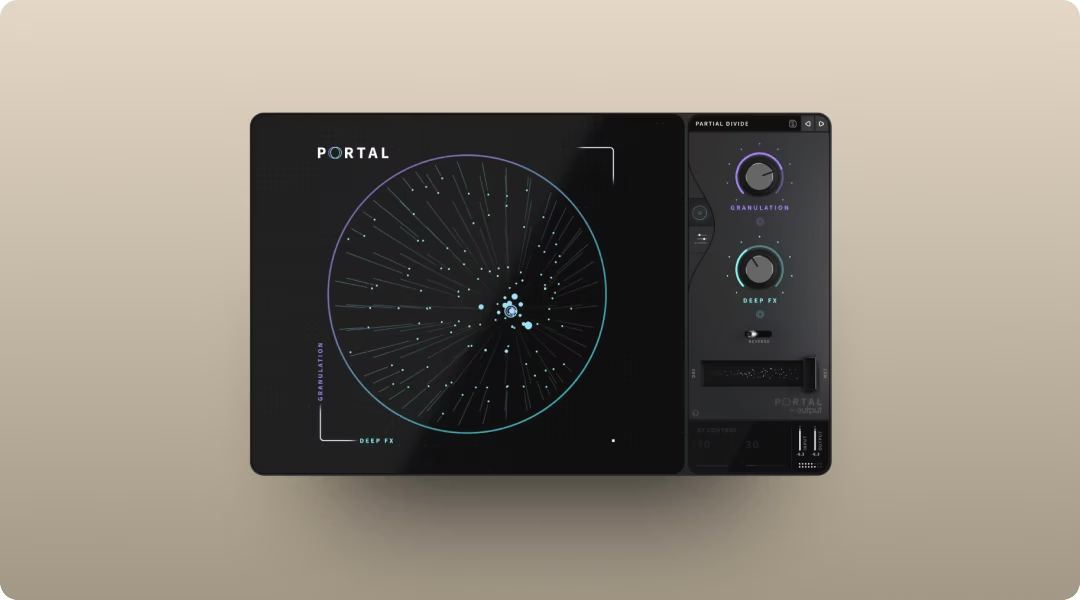
Portal is a granular FX plugin that breaks audio into tiny pieces called grains and re-synthesizes them in real time. This means you can stretch, scatter, or pitch-shift vocal material while keeping results musical.
Feed Portal a vocal chop and stretch the grains to turn a short stab into a pad-like wash. Randomize grain position for glitchy, unpredictable textures. Pitch-shift the material while staying locked to a musical scale so everything stays in key. Portal's scale quantization locks pitch shifts to your chosen scale, interval, or chord—set it to a major chord, for example, and each pitch step jumps a musical third or fifth rather than random semitones.
- Scale-locked pitch: Shifted grains stay in key even when you push them an octave up or down.
- Tempo-synced grain delay: Rhythmic elements lock to your session BPM. When using grain delay with high feedback, keep density moderate and grain size controlled—extreme settings can cause volume spikes that build quickly in the feedback loop.
- XY performance control: Tie granular parameters to a single pad for real-time manipulation.
The XY control lets you perform changes live and print the results. Portal is available standalone or via Output One.
Use Soundtoys Crystallizer for shimmer and space
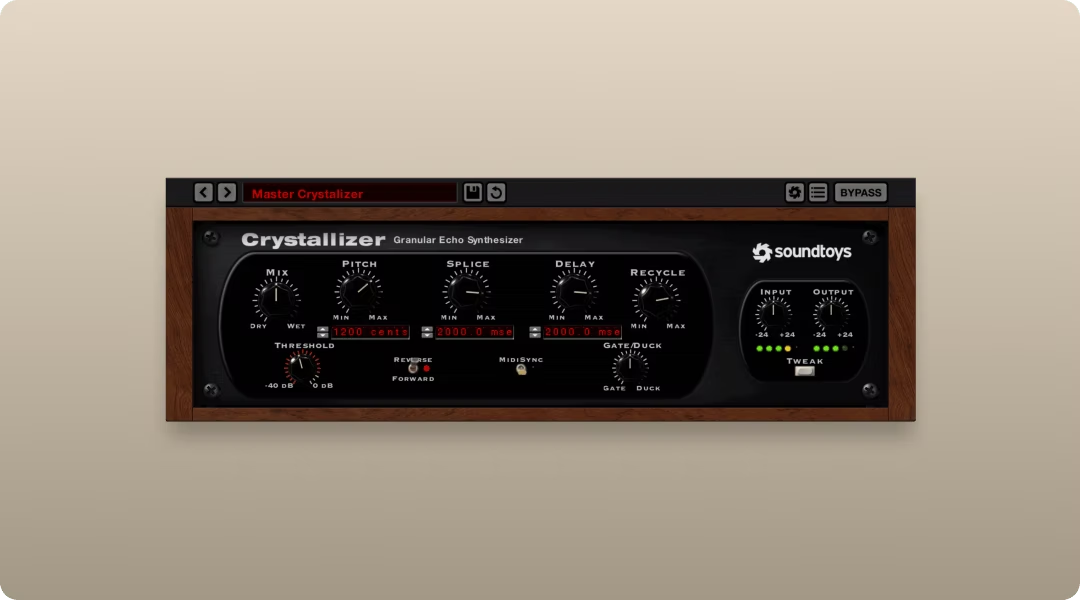
Crystallizer is a pitch-shifting delay based on classic hardware reverse-shift effects. This means you get shimmering, ethereal textures that sit behind the original chop and add depth.
Run a vocal chop through Crystallizer and you'll hear pitched echoes that trail off into space. The effect works well for adding atmosphere without cluttering the mix. It's a specific sound, not a Swiss Army knife, but it nails that vibe.
- Pitch-shifted delays: Echoes shift up or down in pitch for crystalline textures.
- Reverse mode: Flip the delay tail for backward, dreamy effects.
- Splice control: Adjust the granular splice size for smoother or choppier results.
Use Thermal for harmonics and bite
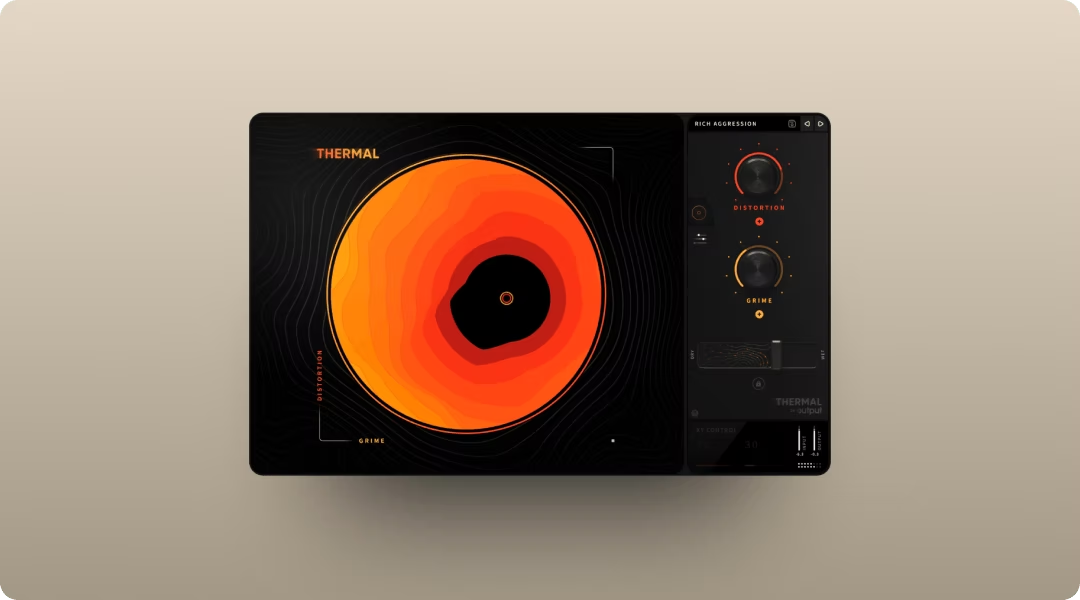
Thermal is a multi-stage distortion engine built for adding character without losing control. This means you can isolate frequency bands so distortion hits only the mids or highs, leaving low-end clean.
Push a vocal chop through Thermal and dial in warm saturation to help it cut through a dense mix. Crank it harder for aggressive crunch that works in lo-fi or industrial contexts. The mid-side processing lets you distort the center differently from the sides for width control.
- 15+ distortion types: Analog-inspired and digital flavors for any texture. Use the Shape control to dial in harmonic intensity—higher values add more overtones. The Clip parameter introduces bit-crushing textures or smooths wave shapes depending on the distortion type you've selected.
- Multiband control: Isolate frequency ranges so distortion hits exactly where you want it. Set crossover points with the Low and High parameters, then enable Band Split to isolate exactly which frequencies get processed. Use Refilter to clean up any harsh harmonics the distortion creates outside your target range.
- XY macro: Blend multiple distortion parameters on the fly.
Thermal is included in Output One.
Use iZotope Vinyl for lo-fi texture
.avif)
Vinyl is a free plugin that adds turntable-style degradation to any audio. This means you can make a clean vocal chop sound like it came from a dusty record.
Drop Vinyl on your vocal chop track and dial in some dust, scratches, and warp. The effect is subtle or heavy depending on your settings. It's a quick way to add character without complex processing chains.
- Dust and scratches: Add vinyl noise and surface imperfections.
- Warp and mechanical noise: Simulate turntable motor wobble and rumble.
- Year selector: Choose a decade for era-appropriate degradation.
Use Movement for rhythm and gating
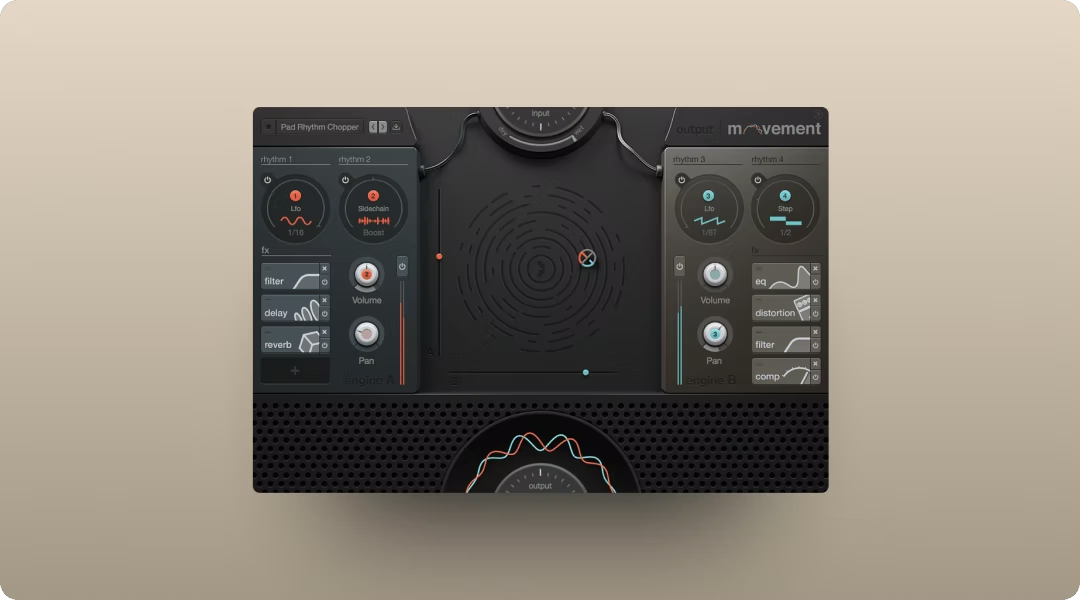
Movement is a rhythm FX plugin that modulates any parameter in sync with your track. This means you can chop a sustained vocal phrase into rhythmic slices without touching a blade tool.
Feed Movement a vocal chop and use the step sequencer to gate it into a new pattern. Set up sidechain ducking so the chop pumps against the kick. Automate filter cutoff in tempo-locked patterns for evolving motion.
- Step-sequencer gating: Chop sustained audio into rhythmic slices.
- Sidechain modulation: Make chops pump against any element in your mix.
- XY performance pad: Record filter and gate changes as you go.
Movement is part of Output One.
Use Cableguys ShaperBox for modular rhythm effects
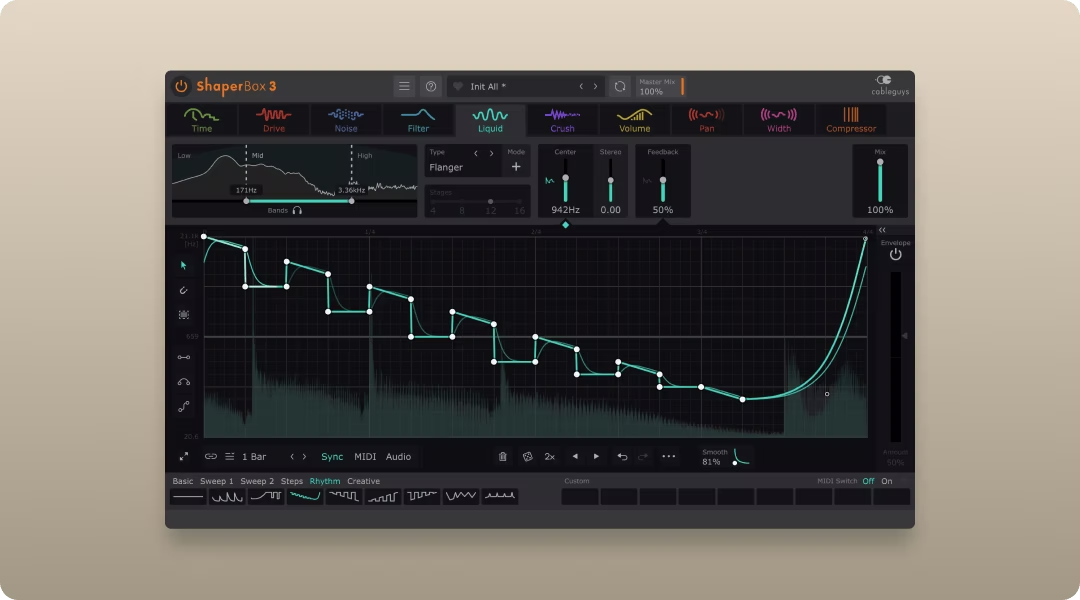
ShaperBox is a modular effects rack with individual shapers for volume, filter, time, and more. This means you can build complex rhythmic effects by stacking modules.
Load the VolumeShaper module and draw a custom gating pattern. Add FilterShaper for synchronized filter sweeps. The modular approach gives you deep control, though it takes more setup than a single-purpose plugin.
- Modular rack: Stack multiple effect modules for complex processing.
- Custom LFO curves: Draw your own modulation shapes.
- Multi-band processing: Apply effects to specific frequency ranges.
Start shaping vocal chops in your next session
The fastest path from idea to finished hook combines smart sample discovery, playable manipulation, and creative FX. Co-Producer finds chops that fit your track. Arcade turns them into instruments you can perform and reshape. Portal, Thermal, and Movement push the material into textures, tones, and rhythms that sound like yours.
All five plugins are bundled in Output One. Try it free and see how the workflow changes your next session.
Take your chops further with Arcade for quick inspiration, Portal for instant vocal magic, and Thermal + Movement for bold motion and texture—all included in Output One, along with Co-Producer and every FX expansion. Get everything in one subscription and build your full vocal-chop chain in minutes.
Try it free