Lil Tony Type Beat Breakdown: Keys, BPM, and Production Tips
Build a Lil Tony type beat that actually knocks—this breakdown covers BPM range (140–160), halftime drum programming, 808 tuning, key selection, and sound design workflows using Co-Producer, Arcade, and Thermal.

Get Co-Producer and Arcade with unlimited access to premium, royalty-free samples and instruments. Plus, unlock Portal, Thermal, and Movement.
Try it freeLil Tony Type Beat Breakdown: Keys, BPM, and Production Tips
Lil Tony type beats hit hard with halftime drums, sliding 808s, and dark melodies that sit between aggressive and emotional. This breakdown covers BPM, drum programming, sample selection, and sound design using tools like Co-Producer, Arcade, and Thermal to help you build beats that knock.
Lil Tony type beat BPM and groove
A Lil Tony type beat runs between 140 and 160 BPM, but the halftime feel makes it pocket like a 70–80 BPM track. This means your drums hit at the higher tempo while the kick and snare land on every other beat, creating that slow, heavy bounce the style is known for.
The groove comes from balancing tight programming with subtle human feel. Some producers lock everything to the grid for a hard, mechanical punch. Others push hi-hats slightly off-grid to add swing without losing the bounce.
What BPM range works for this style?
Most Lil Tony instrumentals sit between 145 and 155 BPM. At this tempo, halftime drums feel slow and heavy while hi-hat rolls stay fast enough to keep energy moving.
Start at 150 BPM and adjust based on how your 808 sits. Faster tempos push energy up but can make long 808 slides feel rushed. Slower tempos give melodies more room but risk losing drum momentum.
Swing vs. straight grid
Straight quantization gives you that hard, punchy feel where every hit lands exactly on the beat. This works well for aggressive, in-your-face beats.
Swing loosens the groove. A 5–10% swing on hi-hats adds human feel without making the beat sound sloppy. Too much swing and you lose the tightness that defines the style.
Lil Tony type beat drum and 808 choices
Drums carry the weight here. The kick and 808 relationship determines whether your beat hits hard or falls flat. Hi-hats add movement, and the right clap gives the backbeat its snap.
Building a solid Lil Tony drum kit means finding sounds that work together. You want punch without mud, presence without harshness.
Kick and 808 relationship
The kick and 808 need to work as one unit. Short, punchy kicks paired with longer 808 tails give you attack and sustain without frequency clashing.
- Sidechain compression: Duck the 808 when the kick hits for clean separation
- EQ carving: Cut low end from the kick and let the 808 handle everything below 80 Hz
- 808 tuning: Match your 808 to the track's key so slides land on notes that fit the chords
Untuned 808s sound amateur fast. Take the time to pitch them correctly.
Hi-hat rolls and percussion placement
Triplet hi-hat patterns define the rhythmic character—a signature of modern hip hop drum loops. Program rolls that speed up and slow down, using velocity changes to create dynamics. A flat velocity roll sounds lifeless.
Percussion fills the gaps. Rimshots, shakers, and subtle perc hits add texture without cluttering the mix. Place them on off-beats for syncopation or use them to accent transitions.
Clipping vs. limiting for loud drums
Soft clippers add harmonic saturation while controlling peaks. They work well on individual drum hits and on the drum bus for glue and loudness.
Limiters catch peaks but can sound transparent or pumpy depending on settings. For this style, try a soft clipper on the 808 and a limiter on the drum bus. The clipper adds bite while the limiter keeps overall levels consistent.
Lil Tony type beat sample and melody approach
Melodies range from dark and aggressive to emotional and melodic. The sample you choose sets the entire mood. Key and scale selection matter as much as the actual notes you play.
Whether you're chopping samples or building from scratch, aim for a top melody that cuts through without fighting the 808.
Key and scale selection
Minor keys dominate this style. Natural minor works for straightforward dark vibes. Harmonic minor adds tension from the raised seventh. Phrygian gives you an aggressive, almost Middle Eastern flavor.
- Natural minor: Clean, dark feel that works for most beats
- Harmonic minor: Extra tension that sounds dramatic
- Phrygian: Aggressive edge that stands out
- Dorian: Melancholic but with a brighter quality
Pick a key that lets your 808 hit hard. F, G, and A minor give you 808 notes that translate well on most speakers and headphones.
Chop vs. loop and when to re-sample
Full loops work when the sample fits your vision exactly. Chopping gives you more control. You can rearrange phrases, isolate specific moments, and build something that feels original.
Re-sampling takes it further. Bounce your chopped arrangement to audio, then process it with effects or pitch-shift it. This creates distance from the source and makes the final result harder to trace back.
Lil Tony type beat variations
The style branches into several directions. Hard and drill variations push aggression. Melodic and sad variations lean into emotion. Understanding these helps you target specific moods.
Many producers search for free type beats when starting out. Free-for-profit beats allow monetization with credit. Leased beats come with specific usage terms and often require payment.
Hard and drill variations
Hard variations increase drum density and distortion. Hi-hat patterns get busier, 808s hit harder, and the overall mix pushes louder. Drill variations borrow from UK and Chicago drill with sliding 808s and sparse, aggressive melodies.
For these sub-styles, saturation on the drum bus adds grit—drill loops often come pre-saturated for this reason. Processing your 808 with multiband distortion lets you add bite to upper harmonics while keeping the sub clean.
Melodic and sad variations
Melodic variations prioritize chord progressions and counter-melodies. The drums still hit, but they support the harmonic content rather than dominating.
Sad variations use minor keys, slower chord movement, and ambient textures to create emotional depth. Layering pads and atmospheric elements adds space without cluttering the mix.
How to find samples that fit with Co-Producer

Searching for samples that match your track's key, tempo, and energy takes time. Co-Producer speeds this up by listening to your session and surfacing samples that fit.
Load it on your master track's FX insert, and it analyzes what you're building in real time. Co-Producer offers three search modes: audio-only (capture your session and find complementary samples), text-only (describe what you're looking for), or combined audio and text search for the most targeted results. Play your track, browse the recommendations, and drag samples directly into your DAW.
- Session listening: Co-Producer hears your track and recommends samples that match
- No credits: Audition as many options as you need without rationing
- Re-imagine feature: Generate unique variations of any sample for one-of-a-kind sounds
Filter by texture and energy
Tags let you narrow results by instrument type, mood, and texture. Need a dark piano loop? Filter for it. Want aggressive 808 one-shots? The library has them.
The goal is spending less time browsing and more time building. Co-Producer handles the search so you can focus on creative decisions.
Match key and tempo, then commit
Previews sync to your project's key and tempo automatically. What you hear is what you get. When something works, drag it in and move on.
Decision fatigue kills momentum. Audition a few options, pick the one that fits, and commit. Progress matters more than perfection in the early stages.
How to flip and perform parts with Arcade

Once you have samples, Arcade turns them into playable instruments. Load it on a Software Instrument track and import your samples. The auto-chop feature slices audio into playable pieces mapped across your keyboard.
- Auto-chop: Import any sample and Arcade slices it into playable pieces
- Key and tempo lock: Everything stays in sync as you experiment
- Custom kits: Build your own sample collections from Arcade content or your own audio
This workflow transforms static loops into performance-ready kits. You can trigger individual slices, rearrange phrases, and build variations without bouncing to audio first.
Turn one sample into multiple sections
A single loop can become your verse, hook, and bridge. Chop it into pieces, rearrange the order, and process each section differently.
Building custom kits from your own samples means your beats sound like you, not like everyone using the same preset packs. Your custom kits and imported samples are saved in Arcade's 'Your Stuff' section, making it easy to build a personal library of go-to sounds organized alongside your downloaded and favorited content.
Add movement without over-arranging
Arcade's modifiers and FX macros add variation without complex automation. The Repeater modifier loops segments in real time. The Resequence modifier rearranges playback order on the fly. These modifiers are mapped to the black keys (C#2-A#3), so you can trigger them while samples play on the white keys—hold a modifier to affect any currently playing or newly triggered samples.
These tools keep parts interesting across an entire track without cluttering your arrangement with dozens of automation lanes.
Sound design with Portal, Thermal, and Movement
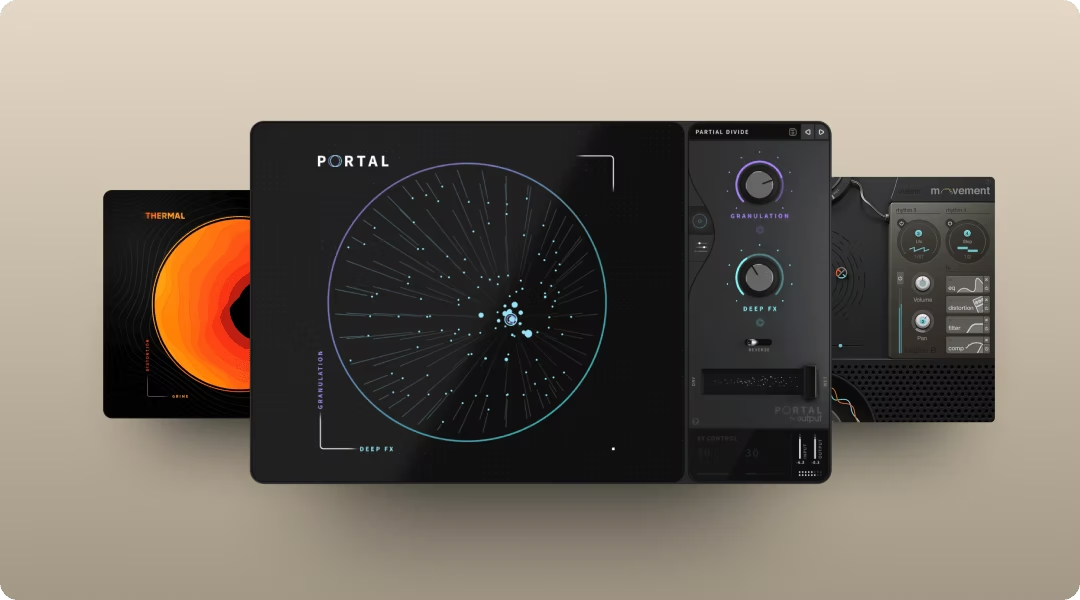
Output's FX plugins add character and texture to any source. Insert them on individual tracks or buses to shape your sound. Each serves a different purpose, and they work well together.
All three are available through Output One, which bundles them with Co-Producer and Arcade for one subscription price.
Portal for granular texture and transitions
Portal breaks audio into grains and re-synthesizes it in real time. Use it on melody tracks to create shimmering textures, or on transitions to build ear candy between sections.
- Tempo-synced grain delay: Keeps results locked to your project tempo
- Scale-locked pitch modulation: Quantize pitch shifts to specific scales, intervals, or chords—when set to a scale like Major Chord, each step equals a scale degree rather than semitones, keeping everything musical
- XY control: Move the pad to find new textures quickly
You get controlled chaos, not random noise.
Thermal for multiband saturation and bite
Thermal adds harmonic content exactly where you want it. The multiband design lets you saturate the mids without muddying the lows. Thermal's Band Split feature lets you define exact frequency ranges for each distortion stage, and the Refilter option cleans up unwanted harmonics—essential for keeping 808s punchy without adding mud.
- 15+ distortion types: From subtle warmth to aggressive clipping
- Multiband processing: Target specific frequency ranges
- XY control: Find the sweet spot by moving until it sounds right
Use it on 808s to add presence, or on the drum bus for glue and loudness.
Movement for rhythmic modulation and bounce
Movement adds pulse and animation to static sounds. Use it on pads to create pumping motion, or on synths to add rhythmic filter sweeps.
- Sidechain, LFO, and step sequencer: Layer multiple modulation sources—use sidechain for pumping dynamics synced to your kick, LFOs for smooth sweeps, or step sequencers for rhythmic patterns, all routed through built-in filters, delay, and compression
- Flux and Randomizer: Organic variation without manual automation
- Built-in FX: Filters, delay, distortion, compression, and reverb in one plugin
Set it and let it evolve.
Arrangement and mix checks before you upload
Before you export, check your arrangement and mix. A solid beat needs clear sections, proper gain staging, and export settings that translate across platforms.
Section structure and transitions
Standard structure works: 8 or 16 bar sections for intro, verse, hook, and outro. Transitions matter. Use risers, filter sweeps, or drum drops to signal changes.
Variation keeps listeners engaged. Add or remove elements between sections. A hook should feel different from a verse, even if the core loop stays the same.
Gain staging and headroom
Keep your mix peaks around -6 dB on the master bus. This leaves room for mastering and prevents clipping on export.
If your drums hit too hard, pull them back. If your 808 gets lost, check for frequency masking with other elements.
Export settings for upload
Export as WAV for maximum quality. Use 44.1 kHz sample rate and 24-bit depth for standard distribution.
Tag your files clearly. Include BPM, key, and your producer name in the filename. This helps buyers find your beats and gives you credit when they use them.
What is a Lil Tony type beat?
A type beat is a production style reference, not a claim of official affiliation. When producers tag a beat as "Lil Tony type beat," they're signaling it fits the sonic aesthetic associated with that artist.
Type beat meaning
Type beats help artists and producers find each other. The tag communicates style, mood, and production approach in a few words.
Drawing inspiration from an artist's sound is different from copying. The goal is capturing a vibe while adding your own perspective. Your beats should sound like you, informed by influences but not limited to imitation.
Dial in keys, tempo, and bounce with Co-Producer, stack hooks in Arcade, and add movement and grit using Portal, Thermal, and Movement. Output One includes all of them—plus every FX expansion—so you can try the full Lil Tony type beat workflow in one subscription.
Try it free