Pooh Shiesty Type Beat: Sound Design Breakdown
Learn exactly how to build a Pooh Shiesty type beat from scratch, ranging from dark minor-key melodies, sliding 808s, half-time drum programming, and mixing techniques that translate on any speaker.

Get Co-Producer and Arcade with unlimited access to premium, royalty-free samples and instruments. Plus, unlock Portal, Thermal, and Movement.
Try it freePooh Shiesty Type Beat: Sound Design Breakdown
Pooh Shiesty type beats blend Memphis rap DNA with modern trap production: dark minor-key melodies, aggressive sliding 808s, and sparse arrangements built to leave room for vocals. This breakdown covers the sound design, drum programming, 808 techniques, and mixing workflow you need to nail the style, plus how tools like Co-Producer, Arcade, and Output's FX plugins fit into the process.
What defines a Pooh Shiesty type beat
A Pooh Shiesty type beat is a hard trap beat built on Memphis rap DNA. It combines dark minor-key melodies, aggressive sliding 808s, and punchy drums that leave room for vocals.
The sound sits between melodic and menacing. Simple piano or bell loops repeat over hard-hitting kicks and snappy snares while the bass does most of the harmonic work.
What makes this style distinct is restraint. The arrangement stays sparse on purpose. You're building a pocket for the rapper, not competing with them.
- Dark minor-key melodies: Simple motifs on piano, bells, or pads that stay out of the vocal range
- Sliding 808s: Bass lines that glide between notes instead of sitting static
- Hard-hitting drums: Punchy kicks, layered snares, and rolling hi-hats
- Sparse arrangement: Intentional space for vocals to dominate
Tempo, swing, and the half-time bounce
Most Pooh Shiesty type beats sit between 140 and 155 BPM, but the feel is half-time. The snare lands on beat three instead of two and four. This creates that signature weight and bounce.
The tempo looks fast on paper, but the groove feels slow and deliberate. That contrast is the whole point.
Swing matters here. A slight push on the hi-hats keeps things from sounding robotic. You don't need much. A few percentage points of swing or some manual nudging on the grid gives the drums a human pocket.
Quantize your kicks and 808s tight to the grid. Let the hats breathe. That contrast between locked low end and loose top end makes these beats feel alive.
Drum selection and programming for hard trap beats
Drum selection sets the tone before you write a single note. The kick needs to punch through the 808 without fighting it. Short, clicky kicks with fast transients work best.
The snare or clap should have crack in the high-mids and enough body to fill the stereo field. Layer your snare with a clap to add width and texture. Two or three layers is usually enough.
Hi-hat rolls and triplet patterns
Hi-hats carry the energy in this style. Program rolling patterns with triplet variations and velocity changes to create movement.
Velocity is your friend. Accent certain hits and pull back on others. This gives the pattern dynamics instead of a flat, mechanical feel.
Place open hats on off-beats or at the end of phrases to signal transitions. Keep closed hats tight and open hats short. You want energy, not wash.
808 bass lines with slides and glides
The 808 is the backbone of a Pooh Shiesty type beat. It needs to hit hard, sustain long enough to carry the groove, and slide between notes with intention.
Start with a well-tuned 808 sample or synth patch. Make sure it's in key with your melody before you start programming.
Slide notes vs. pitch bends
Slide notes glide from one pitch to another using portamento or legato mode in your sampler. Pitch bends are automation curves that shift the pitch of a single note.
Both work, but slide notes are faster to program and easier to edit. Use slides sparingly. A slide on every note loses impact. Place them at the end of phrases or on notes leading into the downbeat.
Making the 808 translate on small speakers
Low-end translation is a real problem. Phones and laptops don't reproduce sub frequencies, so your 808 can disappear on smaller systems.
Add subtle saturation to generate upper harmonics that cut through on any playback device. Layer a short, punchy kick under the 808 to give it attack. High-pass the kick around 80-100 Hz so it doesn't compete with the sub.
Dark melodies and texture layers
Melodies in this style are simple and repetitive. A four-bar piano or bell loop in a minor key is often enough. The goal is mood, not complexity.
Stay out of the vocal range. Leave space for the rapper to work.
Counter-melodies and hook placement
Introduce a counter-melody in the hook to keep the beat from feeling static. This could be a higher octave variation of the main motif, a pad swell, or a subtle arpeggio.
Keep it sparse. Pull counter-melodies back during verses so they don't compete with vocals.
Texture layers like vinyl noise, ambient pads, or filtered risers add depth without cluttering the mix. Use them to fill gaps between sections or add atmosphere during breakdowns.
Sample flip workflow for type beats
Flipping samples is a fast way to build a vibe. Find source material that fits the mood and chop it into usable pieces.
You don't need a complex arrangement. A few slices that loop well and leave room for drums is all you need.
Chopping samples into usable slices
Identify the strongest melodic or textural moments in your source material. Isolate them. Two to four slices is usually enough for a loop. Arcade's Sampler Generator offers four slice algorithms to match different source material—experiment with each to find the one that captures the transients and phrases you want. The built-in FX presets let you immediately add character to your chops through the Macro sliders.
Trim start and end points to avoid clicks. Set your loop points so the phrase breathes naturally.
Time-stretch and pitch to match the pocket
Warp your samples to match your session tempo. Most DAWs handle this automatically, but you may need to adjust the warp mode for cleaner results.
Pitch-shift the sample to match your key if needed. Be aware that large pitch shifts can introduce artifacts.
Find drums and melodic samples fast with Co-Producer

Digging for samples mid-session kills momentum. Co-Producer listens to your track and surfaces drums, melodic loops, and textures that fit your session's vibe.
You can drag samples directly into your DAW without leaving your project. No credits, no rationing. Just sounds that fit.
- Session-aware recommendations: Co-Producer analyzes your track and suggests samples that match your key, tempo, and groove
- Drag-and-drop workflow: Pull samples directly into your DAW without browser diving
- Unlimited access: No credits or download limits on royalty-free, musician-made sounds
Co-Producer offers three search modes: audio-only search (capture your session and find complementary samples), text-only search (describe what you're looking for), or combined audio and text search for the most targeted results. For best results, place Co-Producer on your master bus and capture 8 bars when possible—this gives the analysis more harmonic and rhythmic content to work with, resulting in better-matched sample suggestions.
Building a starter kit for each beat
Before you start writing, pull a small set of drums and melodic elements into a folder or session template. This keeps you from digging mid-flow.
Co-Producer makes this fast by surfacing relevant sounds based on what you're already building.
Play and manipulate samples with Arcade

Once you've found your sounds, Arcade lets you play and reshape them. Load a loop, lock it to your session's key and tempo, and perform variations in real time.
Arcade is an instrument plugin. Load it on a Software Instrument or MIDI track in your DAW.
- Key and tempo lock: Everything syncs to your session automatically
- Playable sampler workflow: Perform and record variations instead of just dragging loops
- Auto-chop: Drop in your own samples and slice them into playable kits
Auditioning lines in key and tempo
Arcade syncs everything to your session automatically. Every Sampler is built with a particular key in mind, and Arcade's Session Key selector shifts all samples to match your song's key. You can audition melodic lines, drum loops, and textures in context without pitch or tempo mismatches—critical when working in dark minor keys typical of Pooh Shiesty type beats.
This keeps you in flow. You make decisions based on how the sample actually sounds in your track.
Replacing the main motif without rewriting drums
If your melody isn't working, swap it out without touching your drums. Arcade's playable sampler workflow lets you audition new ideas quickly and commit when something clicks. Simply drag a new sample onto any key in your loaded Kit to replace it instantly—no need to rebuild your arrangement or lose your drum programming.
This is faster than rebuilding from scratch.
Arrangement: intro, hook, verse, and drop
An 8-bar loop is a starting point, not a finished beat. Arrangement is where you turn a loop into a track.
Map out your sections: intro, verse, hook, verse, hook, outro. Use mutes, fills, and transitions to create contrast.
Energy mapping with mutes, fills, and drops
Pull elements in and out to create dynamics. Mute the 808 for the first four bars of a verse, then bring it back on the downbeat.
Add a drum fill before the hook. Drop everything but the melody for a two-bar breakdown. Simple moves, big impact.
Two-bar transitions that sound industry-ready
Use risers, reverse hits, filter sweeps, and snare rolls to smooth section changes.
A white noise riser into the hook or a reverse cymbal before the drop signals the transition without being heavy-handed. Keep these elements short and purposeful.
Mixing for punch and translation
A loud, punchy mix starts with gain staging. Keep your individual tracks peaking around -12 to -6 dB so you have headroom on the master.
This gives you room to push the mix without clipping.
Gain staging and headroom targets
Set your levels early and leave headroom for processing. If your master is clipping before you've added any bus processing, you're already in trouble.
Pull everything down and mix into your headroom, not out of it.
Clipper vs. limiter for loud beats
A soft clipper shaves transients and adds harmonic density. A limiter catches peaks and increases overall loudness.
Use a clipper on your drum bus or master to control transients. Follow with a limiter for final loudness. This combination gives you punch and volume without squashing dynamics.
Add grit, width, and motion with Thermal, Portal, and Movement
FX processing is where you add character. Thermal, Portal, and Movement are all available together in Output One, which bundles Co-Producer, Arcade, and all FX expansions in a single subscription.
Thermal for parallel saturation and multiband bite
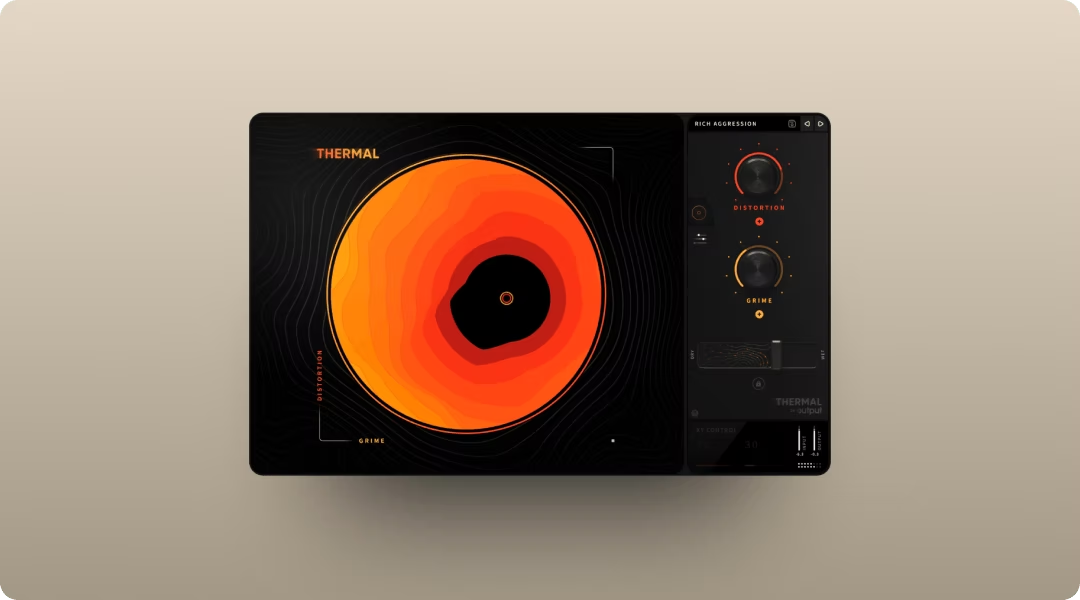
Insert Thermal on a parallel bus and blend it with your dry signal. Use multiband mode to add saturation to mids and highs without muddying the low end. Enable Band Split on each stage and set the LOW and HIGH crossover points to isolate the frequency ranges you want to distort—keeping your 808 sub frequencies clean while adding grit to the upper harmonics.
- 15+ distortion types: Analog-inspired and digital flavors for different textures
- XY control: Dial in the right amount of grit quickly by moving one control
- Multiband processing: Target specific frequency ranges without affecting others
Portal for ear-candy transitions
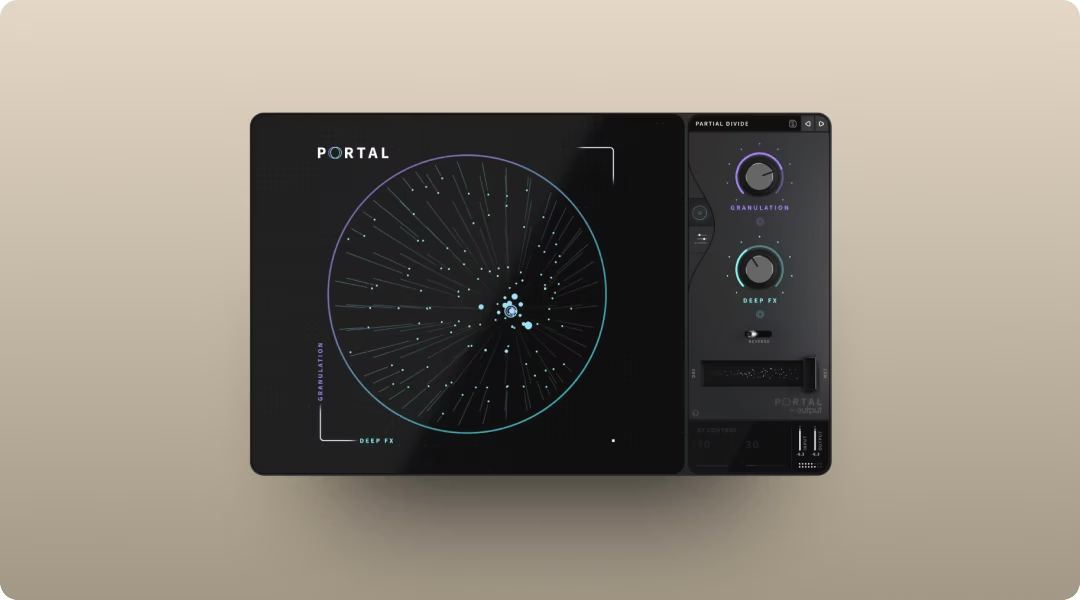
Portal's granular engine turns any audio into textured, evolving sounds. Use it sparingly on risers, vocal chops, or melodic elements during transitions.
- Tempo-synced grain delay: Granular effects that stay locked to your session
- Scale-based pitch modulation: Pitch shifts that stay musical
- 250+ presets: Fast starting points for creative processing
For type beat transitions, try setting Density to match your beat division (1/8 or 1/16), then use the Scale parameter to quantize pitch shifts to your minor key—this keeps granular textures musical rather than chaotic.
A little goes a long way. You're adding ear candy, not rebuilding the sound.
Movement for rhythmic motion without automation overload
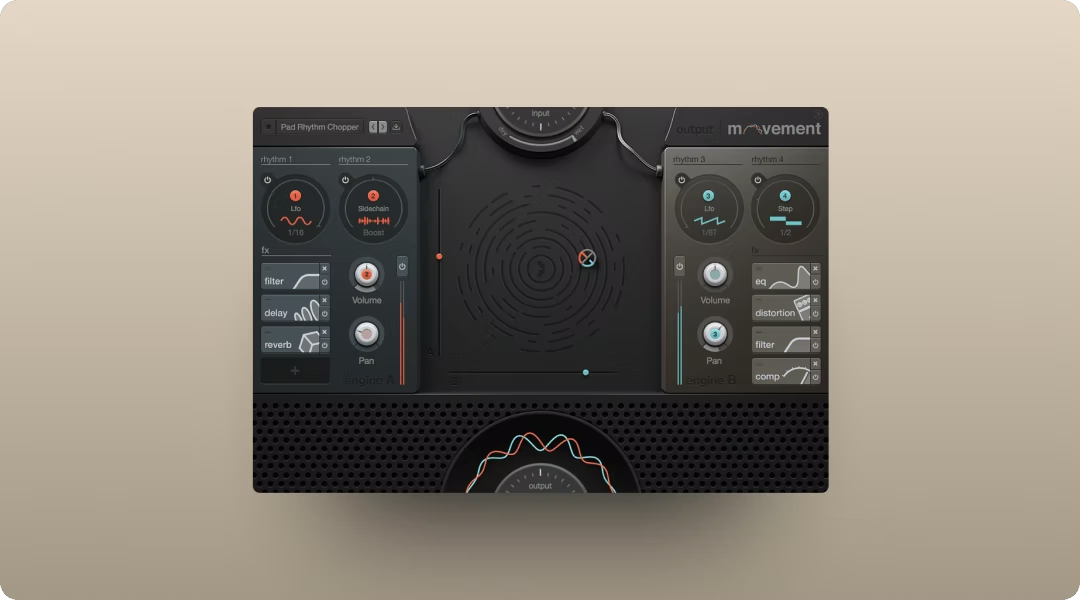
Movement adds pulse and groove to static sounds. Use it on pads or melodic elements to create rhythmic motion without drawing automation curves.
- Four rhythm engines: LFOs, step sequencers, sidechains, and Flux mode working together
- XY pad performance: Shape the effect in real time
- 300+ presets: Instant rhythmic textures you can tweak
The sidechain engine is particularly useful for trap production—use it to create pumping effects on pads or melodic elements that duck with your kick pattern, adding movement without competing with the 808.
The preset library is a fast starting point. The XY pad lets you perform changes in real time.
Upload, metadata, and licensing for type beats
Titling and tagging your beat correctly is how buyers find you. The standard format is artist type, mood, BPM, and key.
For example: "Pooh Shiesty Type Beat 'Dark Side' 145 BPM F Minor."
Titling your beat for discovery
YouTube and beat store algorithms rely on your title and tags. Include the artist name, genre, mood, and tempo.
Be specific but not cluttered. A clear, searchable title gets more plays than a clever one.
What "free for profit" means (and what it doesn't)
Free for profit means the beat can be used commercially without an upfront payment, but you retain ownership. This is different from a lease, which grants limited usage rights, or an exclusive, which transfers full ownership.
Know the difference before you upload.
Get Arcade, Co-Producer, and Output FX in one plan
Output One bundles Co-Producer, Arcade, Portal, Thermal, Movement, and all FX expansions in a single subscription. You get unlimited access to royalty-free samples, playable instruments, and creative FX for one price.
- Output One includes: Co-Producer, Arcade, Portal, Thermal, Movement, and all FX expansions
- One subscription, unlimited access: No credits, no rationing, new content added regularly
- Works in all major DAWs: VST, AU, and AAX support
Output One bundles Co-Producer, Arcade, Thermal, Portal, and Movement from this breakdown—plus Output One exclusives and every FX expansion. Get the full sound-design chain in one subscription and try everything together.
Try it free