Lucki Type Beat Breakdown: The Sounds That Define the Style
Every element of a Lucki type beat — tempo, swing, 808 tuning, hazy textures, negative space — broken down into a step-by-step recipe with specific settings and production techniques you can open a session and use right now.

Get Co-Producer and Arcade with unlimited access to premium, royalty-free samples and instruments. Plus, unlock Portal, Thermal, and Movement.
Try it freeLucki Type Beat Breakdown: The Sounds That Define the Style
Lucki type beats live in the space between notes, built on hazy textures, minimal drums, and 808s that breathe. This breakdown covers the tempo, swing, melodic choices, and production techniques that define the style, plus how tools like Co-Producer, Arcade, Portal, Thermal, and Movement fit into the workflow.
What makes a Lucki type beat feel right
A Lucki type beat is a hazy, minimal hip-hop instrumental built around negative space, hypnotic melodies, and understated drums. The style comes from Chicago but sits apart from drill. It's slower in feel, more atmospheric, and leaves room for the vocal to float.
The sound works because of what it leaves out. You won't hear busy hi-hat patterns or aggressive 808 distortion. Instead, elements drop out intentionally. Reverb tails bleed together. Tape saturation softens everything.
- Negative space: Mute elements for a bar or two. The silence creates tension without adding new parts.
- Hazy texture: Long reverb, gentle saturation, and background noise give the mix a worn-in quality.
- Minor key melodies: Simple motifs that loop without demanding attention. The melody supports the mood.
- Understated drums: Soft hits and careful velocity work. The pocket matters more than complexity.
This style rewards restraint. If you're used to filling every bar with new ideas, you'll need to pull back. The vibe comes from repetition and atmosphere, not from stacking layers.
Lucki type beat tempo, swing, and drum patterns
Most Lucki type beats sit between 130 and 150 BPM. The laid-back feel makes them sound slower than they actually are. That's intentional.
Swing is what separates a stiff beat from one that breathes. Add five to fifteen percent swing to your hi-hats before you start programming. This small adjustment changes everything about how the groove feels.
Hi-hat patterns often include rolls and triplets, but velocity variation sells the groove. Randomize your velocities slightly so the hats don't sound mechanical. Ghost notes on the snare or rimshot add texture without pushing the drums forward.
- BPM range: 130 to 150 BPM works best. Fast enough to move, slow enough to feel chill.
- Swing: Five to fifteen percent on hi-hats and snares. The drums should feel human.
- Hi-hat rolls: Triplets and 16th-note variations. Keep velocities uneven.
- Soft snares: Rimshots and ghost notes add movement. Avoid hard-hitting snares that cut too aggressively.
The drums in this style sit back in the mix. They support the melody and bass rather than leading the track.
808s and bass notes in Lucki type beats
The 808 should feel warm and supportive, not distorted or overpowering. Tuning matters here. A bass note that clashes with your chords will undermine the entire vibe.
Use a tuner plugin if you're unsure about your 808's pitch. Match the bass to your root notes. This is non-negotiable for the style.
Glides and slides add melodic movement. Portamento connects notes smoothly rather than jumping between pitches. This creates that signature melodic 808 sound you hear in Lucki's catalog.
Saturation can help the 808 translate on smaller speakers. Light saturation adds harmonics and presence. Heavy clipping sounds aggressive and fights the chill vibe you're building.
- 808 tuning: Match the bass to your key. Use a tuner if needed.
- Glides: Portamento between notes creates melodic movement.
- Light saturation: Adds warmth and helps translation. Avoid harsh clipping.
- Mono compatibility: Check your low end in mono to ensure the sub translates.
Melodies, chords, and texture choices for Lucki type beats
Melodic elements favor simplicity and atmosphere. Open chord voicings leave room for the bass and vocals. Dense chords compete with the vocal space and work against the style.
Detuned synths and chorus effects add width and haze. A few cents of detune or light chorus processing makes synths and keys feel wider without cluttering the mix.
Pads with long reverb tails create the ambient foundation. Let the reverb decay naturally. Don't cut it short.
Texture layers make the beat feel lived-in. Tape hiss, vinyl crackle, and noise beds add analog character. Keep these elements low in the mix. They should be felt more than heard.
- Open voicings: Simple chords that leave space. Avoid dense harmonies.
- Detune and chorus: Adds width and warmth to synths.
- Long reverb tails: Washy pads create atmosphere.
- Texture layers: Tape noise and vinyl crackle add character.
Sample choices for Lucki type beats
Samples are central to this style. Soul chops, ambient textures, and vocal snippets all work when processed to fit the hazy aesthetic.
The key is making samples your own. Chop them differently than the original. Pitch-shift them to fit your key. Resample through effects to add unique character.
Finding samples that match your track's key and tempo speeds up the process. Co-Producer listens to your session and surfaces samples that fit, so you spend less time digging through folders. You can search using audio capture alone, text descriptions, or combine both methods—try descriptive searches like 'soulful piano melodies' or 'atmospheric ambient pulses' to find samples that match the Lucki aesthetic.
- Sample sources: Soul, R&B, ambient recordings, and lo-fi textures fit the vibe.
- Chopping: Rearrange loops to create something original. Reverse sections and isolate hits. Arcade's Resequence modifier lets you place up to 16 markers on any sample and trigger them in custom order—perfect for creating unique chops from soul samples while maintaining the hypnotic, looping quality essential to Lucki type beats.
- Pitch-shift and time-stretch: Adjust samples to match your project without artifacts.
- Resampling: Process through effects, then re-record to add unique character.
Step-by-step Lucki type beat recipe
Building a Lucki type beat follows a predictable flow. Start with the groove, add the low end, layer in melodies, and arrange with intention.
Step 1: Set the pocket
Set your tempo between 130 and 150 BPM. Add swing to your grid before programming anything. This establishes the laid-back feel from the start.
Step 2: Build the drum loop
Program a simple pattern with kick, snare or clap, and hi-hats. Keep velocities soft and uneven. Leave gaps where elements drop out.
Step 3: Shape the 808
Add your 808 and tune it to the track's key. Program glides between notes where it feels natural. Use light saturation for warmth.
Step 4: Add melodic layers
Layer in chords, pads, or a chopped sample. Apply detune, reverb, and texture processing. For the detuned synth sound characteristic of Lucki type beats, Arcade's built-in Chorus effect can add subtle width and movement—keep the depth low and adjust spread to taste for that hazy, wide stereo image without cluttering the mix. Keep the melody simple and hypnotic.
Step 5: Arrange drops and negative space
Build out the arrangement with intentional mutes and drops. Remove elements for a bar or two before the hook. Use silence as a compositional tool.
Step 6: Rough mix and print a demo
Balance your levels and leave headroom on the master. Bounce a rough demo to review on different speakers before committing.
Sound design tools in Output One for Lucki type beats
Output One bundles Co-Producer, Arcade, Portal, Thermal, and Movement together. Each tool fits naturally into this workflow.
Co-Producer for track-matched samples

Co-Producer analyzes your session and recommends samples that fit your track's key, tempo, and vibe. Drag and drop directly into your DAW without leaving the session.
- Session analysis: Listens to your track and surfaces matching samples. For Lucki type beats with their hypnotic, repetitive nature, use 8-bar captures when possible—the longer sample gives Co-Producer more harmonic and rhythmic content to analyze for better matches.
- Re-imagine: Creates one-of-a-kind variations of any sample.
- No credits: Unlimited access without rationing downloads.
Arcade for playable loops and kits

Arcade turns samples into playable instruments. Auto-chop your own audio into kits, manipulate loops in real time, and build custom samplers.
- Auto-chop: Drop in any sample and slice it into playable pieces. When using Kit Generator to chop samples, experiment with the four different slice algorithms to find rhythmic variations that fit the laid-back pocket of Lucki type beats.
- Key and tempo lock: Everything syncs to your session automatically.
- Modifiers: Reshape playback with repeaters, resequencers, and playhead controls.
Portal for granular texture
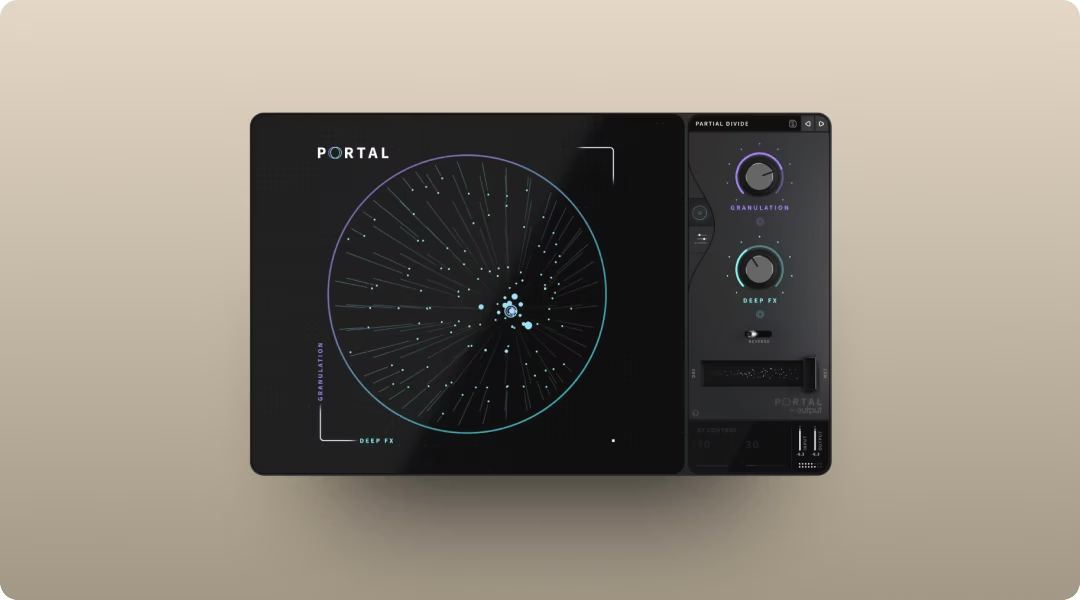
Portal adds haze, shimmer, and spatial effects to melodic elements or drums. Process pads through Portal to create evolving, ambient textures. For the washy, hazy textures in Lucki type beats, granular processing with lower density settings and longer grain sizes creates spacious, evolving pads. Use the stretch controls to slow down the audio buffer for that signature time-stretched atmosphere.
- Granular processing: Breaks audio into grains and re-synthesizes in real time.
- Scale-locked pitch: Keeps pitch modulation musical.
- Tempo-synced delay: Grain delay locks to your session BPM. When using Portal's grain delay for atmospheric effects, keep feedback moderate—with small density and large grain sizes, feedback can spike unexpectedly, which works against the controlled, chill vibe of Lucki type beats.
Thermal for controlled saturation
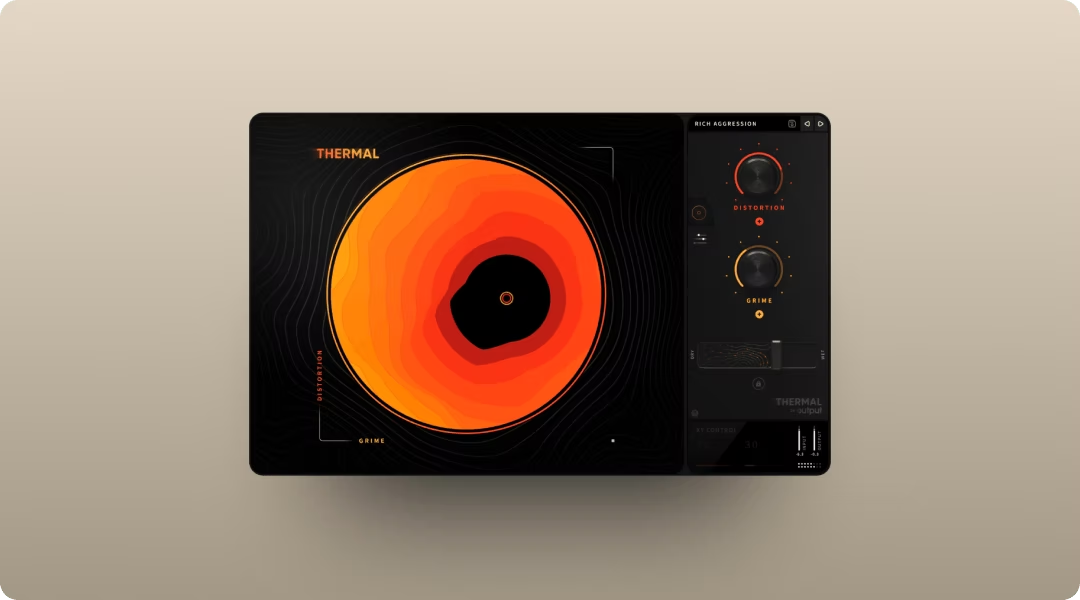
Thermal adds warmth, grit, and presence to 808s, drums, or the mix bus. The multi-stage distortion lets you dial in subtle saturation or more aggressive color. Use Thermal's AUTO gain compensation to maintain consistent levels while adding warmth, and enable REFILTER to tame harsh harmonics that could fight the chill vibe you're building.
- 15+ distortion types: Analog-inspired and digital flavors. Each distortion type in Thermal offers wave shape controls and a dedicated feedback section—for 808 warmth in Lucki type beats, focus on subtle shape adjustments rather than aggressive feedback to maintain that supportive, not overpowering, low end.
- XY control: Blend multiple parameters at once.
- Mid-side processing: Shape the stereo field while adding harmonics.
Movement for rhythmic motion
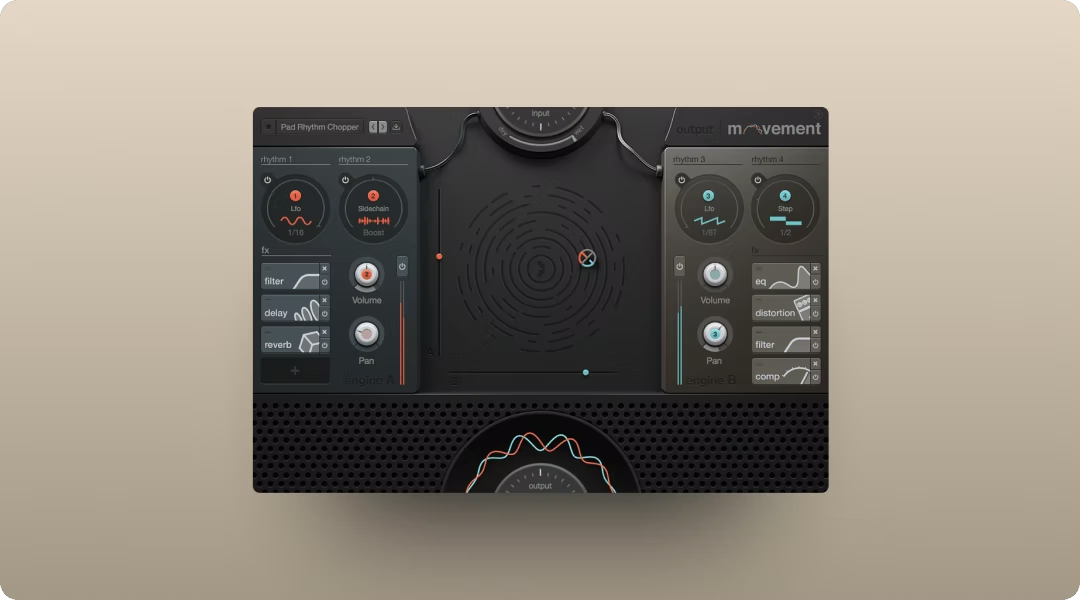
Movement adds subtle pulse, filter sweeps, or evolving motion to pads and melodic layers. Use it to bring life to static sounds without drawing automation. Movement's rhythm engines let you draw custom modulation curves—create subtle, evolving motion by adding just a few nodes with gentle curves rather than dramatic shapes, matching the understated aesthetic of the style.
- Four rhythm engines: LFO, step sequencer, sidechain, and Flux mode.
- 152 parameters: Modulate nearly anything in real time.
- Built-in effects: Filters, delay, compression, and reverb in one plugin.
Titles, tags, and licensing for Lucki type beat uploads
Naming and tagging your beats correctly determines whether they get found. Include the artist name, vibe descriptors, BPM, and key in your title.
A title like "Lucki Type Beat 2026 | Chill Melodic | 140 BPM | F Minor" covers the essentials. Tags should include genre, mood, and related artists.
Understand the difference between free for profit and exclusive licenses. Free for profit beats allow artists to use them without payment but typically require credit. Exclusives transfer full rights to one buyer for a higher price.
- Free for profit: Builds exposure. Artists credit you in exchange for free use.
- Exclusive: Higher revenue per sale. One buyer owns the beat outright.
- Deliverables: MP3 for free downloads, WAV for paid leases, stems for premium tiers.
Download royalty-free sounds for Lucki type beats
Royalty-free samples eliminate clearance headaches. Every sample in Co-Producer and Arcade is cleared for commercial use.
Samples are labeled by key and BPM, making it fast to find content that fits your session. Drum kits, one-shots, and loops cover everything you need for type beats.
Try Output One free
Output One brings Co-Producer, Arcade, Portal, Thermal, and Movement together for one price. You get access to a growing library of royalty-free sounds, all the FX preset expansions, and tools that help you move from idea to finished beat faster.
Get the same toolkit from this breakdown—Co-Producer, Arcade, Portal, Thermal, and Movement—together in Output One, plus all FX expansions. One subscription lets you move faster from idea to finished beat by trying everything in one place.
Try it free