How Granular Synthesis Turns Any Sound Into Something New
Granular synthesis chops audio into tiny fragments and rebuilds them into textures, pads, and effects that standard processing can't touch. Here's how the core parameters work and how to use tools like Output Portal to turn any sound into something entirely new.

Get Co-Producer and Arcade with unlimited access to premium, royalty-free samples and instruments. Plus, unlock Portal, Thermal, and Movement.
Try it freeHow Granular Synthesis Turns Any Sound Into Something New
Granular synthesis breaks audio into tiny fragments and rebuilds it into textures, pads, and effects that standard processing can't touch. This breakdown covers how the technique works, the parameters you'll find in any granular plugin, and how to use tools like Output Portal to turn simple sounds into evolving, playable material.
What is granular synthesis?
Granular synthesis is a method of sound design that chops audio into tiny pieces called grains, then plays them back in new ways to create textures you can't get from normal processing. Each grain is usually between 1 and 100 milliseconds long. The magic happens when you stack hundreds of these grains together, overlap them, scatter them, or stretch them across time.
This technique separates pitch from time completely. You can slow a sound down without dropping its pitch. You can transpose a melody without changing its speed. You can freeze a single moment and hold it indefinitely. Traditional samplers and timestretching algorithms can't do this with the same level of control.
You've probably heard granular synthesis without knowing it. Your DAW's warp modes use grain-based processing under the hood. The difference with a dedicated granular synth or granular FX plugin is that you control every parameter yourself. You decide how the grains behave, how they overlap, and how they evolve over time.
How granular synthesis works
The process starts with a source sample. This can be anything: a vocal phrase, a synth pad, a field recording, a drum loop.
The granular engine reads small windows of audio from this source at intervals you define. Each window becomes a grain.
The plugin then plays these grains back in rapid succession. When grains overlap, they blend into a continuous texture called a grain cloud. The density of this cloud depends on how many grains play at once. Sparse clouds sound pointillistic and exposed. Dense clouds sound thick and immersive.
What makes granular synthesis powerful is the manipulation layer between extraction and playback. You control where in the source file grains come from, how fast they play, whether they're pitched up or down, and how much randomization scatters them across the stereo field.
- Source sample: Any audio you feed into the engine
- Grain extraction: The plugin reads small windows at adjustable intervals
- Overlap and density: Grains stack based on how many generate per second
- Playback manipulation: Position, speed, pitch, and randomization reshape the output
Composers like Iannis Xenakis pioneered these techniques in the 1960s. Researcher Curtis Roads formalized the theory in the 1970s and 1980s. But you don't need to understand the academic history to use granular synthesis today. Modern plugins handle the math. You just shape the sound.
Common granular synthesis parameters
Every granular synthesizer shares a core set of controls. Learning these parameters lets you move between different tools without starting from scratch each time.
Grain size and grain density
Grain size determines the fundamental character of your output. Short grains, under 20 milliseconds, produce clicky, glitchy textures. They sound almost percussive because each grain is too brief to contain a recognizable pitch. Longer grains, above 50 milliseconds, create smoother results. They blur the source material into sustained, pad-like tones.
Density controls how many grains play at once. High density fills the stereo field with a thick, clouded sound. Low density creates sparse textures where you can hear individual grains as separate events.
- Short grains: Rhythmic artifacts, percussive clicks, glitch textures
- Long grains: Sustained, smeared, pad-like tones
- High density: Thick, immersive clouds that fill the mix
- Low density: Sparse, exposed output where individual grains become audible
Playback position and randomization
Position sets where in the source file grains come from. A static position loops a single moment indefinitely. This is useful for freezing a specific timbre and holding it as a drone or pad. A scanning position moves through the sample over time, creating evolving textures that shift as the playhead advances.
Randomization, often labeled spray or jitter, introduces variation to grain timing and location. This scatters grains across the sample, producing organic movement that keeps textures from sounding mechanical or repetitive.
- Static position: Loops a single moment of the sample
- Scanning position: Moves through the sample over time
- Spray/jitter: Adds controlled chaos to grain timing and location
Pitch controls and scale locking
Pitch parameters let you transpose grains without affecting playback speed. This is where granular synthesis diverges most dramatically from traditional sampling. You can shift a vocal up an octave without chipmunk artifacts. You can drop a synth line down without slowing it to a crawl.
Scale locking constrains pitch shifts to musical intervals. This feature keeps results usable in a mix by snapping transpositions to a chosen key and scale. For instance, when locked to a major chord, pitch steps map to chord tones—one step equals a major third, two steps a perfect fifth—so even aggressive pitch randomization produces harmonically coherent results. Formant preservation maintains natural vocal or instrumental character when shifting, preventing the uncanny artifacts that plague basic pitch algorithms.
Envelope shape and smoothing
Each grain has an amplitude envelope that fades it in and out. This envelope is often called a window. Smooth envelopes like Hanning windows create seamless blending between grains. Sharper envelopes add attack and edge. Rectangular windows produce hard clicks useful for glitch and stutter effects.
- Smooth/Hanning window: Gentle fades, seamless blending
- Triangular window: Slightly more defined transients
- Rectangular window: Hard edges, audible clicks for glitch textures
What granular synthesis sounds like in real music
Granular processing shows up across genres. Ambient and cinematic composers use it for evolving pads and drones. Electronic producers use it for glitch effects and rhythmic stutters. Sound designers use it to transform mundane recordings into otherworldly textures.
The technique excels at creating sounds that evolve over time without requiring dense automation or layered arrangements. A single vocal note can become a shifting, breathing texture that fills an entire verse. A simple synth chord can stretch into a cinematic bed that moves and changes without any additional programming.
Common applications include:
- Evolving pads and drones: Turn a single note into a shifting, cinematic bed
- Glitch and stutter effects: Fragment vocals or synths into rhythmic bursts
- Time-stretch without pitch change: Slow audio dramatically while keeping the original key
- Pitch-shift without time change: Transpose melodies without altering tempo
- Granular delay: Create diffused, scattered echoes that blur into texture
One caveat worth noting: granular processing can soften or destroy sharp transients. Drums and percussive material often lose punch when granulated. This can be a feature or a problem depending on your intent. If you need rhythmic clarity, layer granular textures with dry elements rather than replacing them entirely.
How to use granular synthesis without losing the groove
Source material selection matters more in granular synthesis than in most other processing. Sustained sounds granulate cleanly because they lack sharp transients that get smeared into mush. Pads, vocals, bowed strings, and ambient recordings all work well. Percussive material can work too, but expect the attack to blur.
The key to keeping granular textures musical is layering. Don't replace your dry signal entirely. Run a parallel granular track alongside the original, then blend to taste. This preserves rhythmic clarity while adding the evolving texture that makes granular synthesis interesting.
Automation brings granular textures to life. Static settings sound static. Automate position and density over time to create movement that evolves across a song section. Sweep the playhead through the source sample. Modulate grain size to shift between smooth and glitchy textures.
Tempo-sync keeps everything locked to your session. Most granular plugins offer tempo-synced grain timing, which locks textures to your BPM. This is essential for rhythmic material. Without sync, grain timing drifts against the beat and creates a muddy, unfocused result. In Portal, the density parameter controls how often grains are sampled, and you can add per-grain randomization to introduce organic variation while maintaining the underlying tempo lock.
- Choose sustained sources: Pads, vocals, and bowed strings granulate cleanly
- Layer with dry elements: Keep a parallel dry signal for punch
- Automate position and density: Create evolving textures that shift over time
- Use tempo-sync: Lock grain timing to your session BPM
- Filter and reverb: Shape the output to sit in the mix
Granular synthesis plugins worth exploring
Output Portal
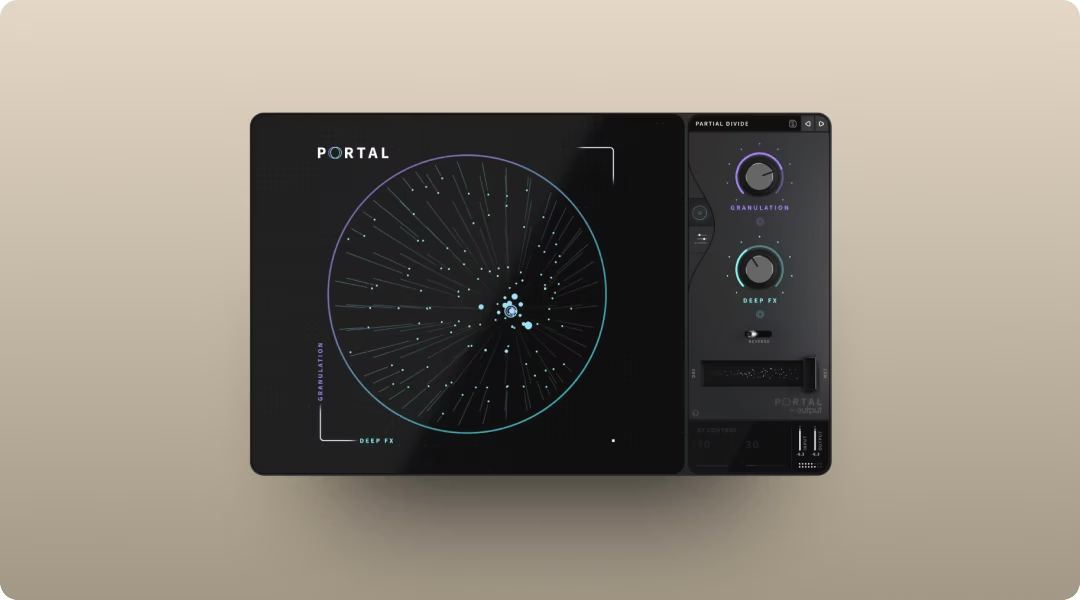
Output Portal is a granular FX plugin built for musical results. It breaks incoming audio into grains and resynthesizes it in real time, shaping pitch, time, density, and stereo distribution. The scale-locked pitch modulation keeps transpositions musical and in key by quantizing pitch shifts to your chosen scale, interval, or chord—so random grain pitch variations still produce harmonically usable results. The tempo-synced grain delay locks textures to your session, with the grain delay feeding processed audio back into the granulator's input, creating evolving feedback loops that stay rhythmically locked to your project tempo. The XY control makes real-time performance intuitive. The XY pad lets you control both macro parameters simultaneously by dragging a single handle, with the visual display dynamically reflecting your granulator settings.
- Scale-locked pitch modulation: Keeps transpositions musical and in key by quantizing pitch shifts to your chosen scale, interval, or chord—so random grain pitch variations still produce harmonically usable results
- Tempo-synced grain delay: Locks textures to your session BPM
- XY control: Makes real-time performance intuitive and playable
- 250+ presets: Get to usable sounds fast without deep programming
- Drawable modulation envelopes: Create custom LFO shapes by clicking to add nodes and dragging curves, enabling complex parameter automation that evolves with your music
Portal is available standalone or as part of Output One, which bundles it with Co-Producer, Arcade, Thermal, and Movement. If you're building a production toolkit that covers sample discovery, playable instruments, and creative FX like Portal, Output One covers the full workflow.
Arturia Efx FRAGMENTS
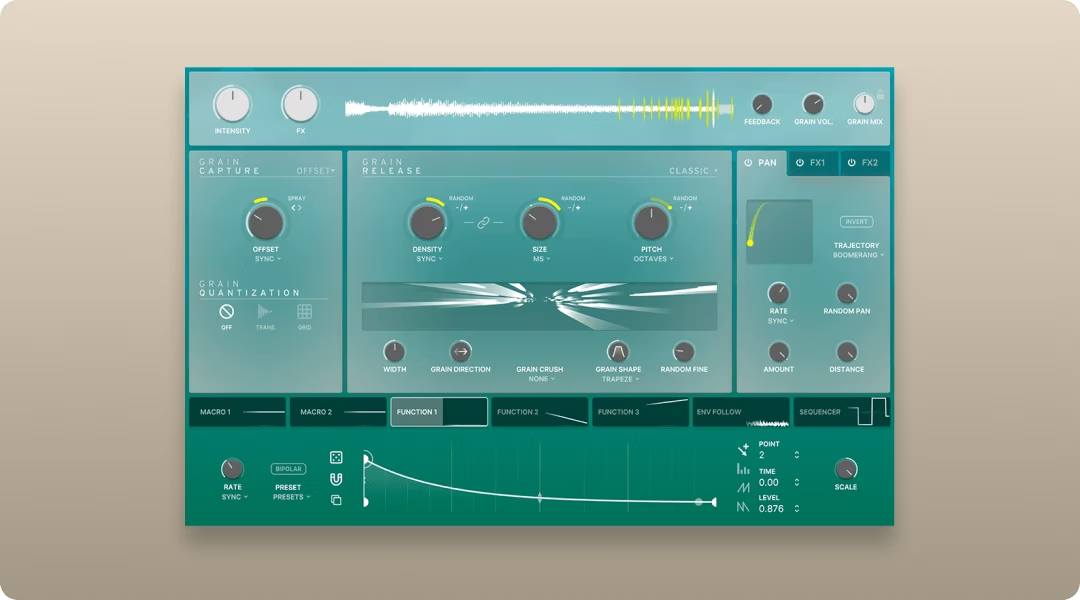
Arturia Efx FRAGMENTS is another strong option for granular processing. It leans into glitch, texture, and ambience with a visual interface that shows grain activity in real time.
- Visual grain display: See exactly what the engine is doing
- Multiple grain modes: Switch between different granular algorithms
- Deep modulation: Assign LFOs and envelopes to any parameter
Audio Damage Quanta 2
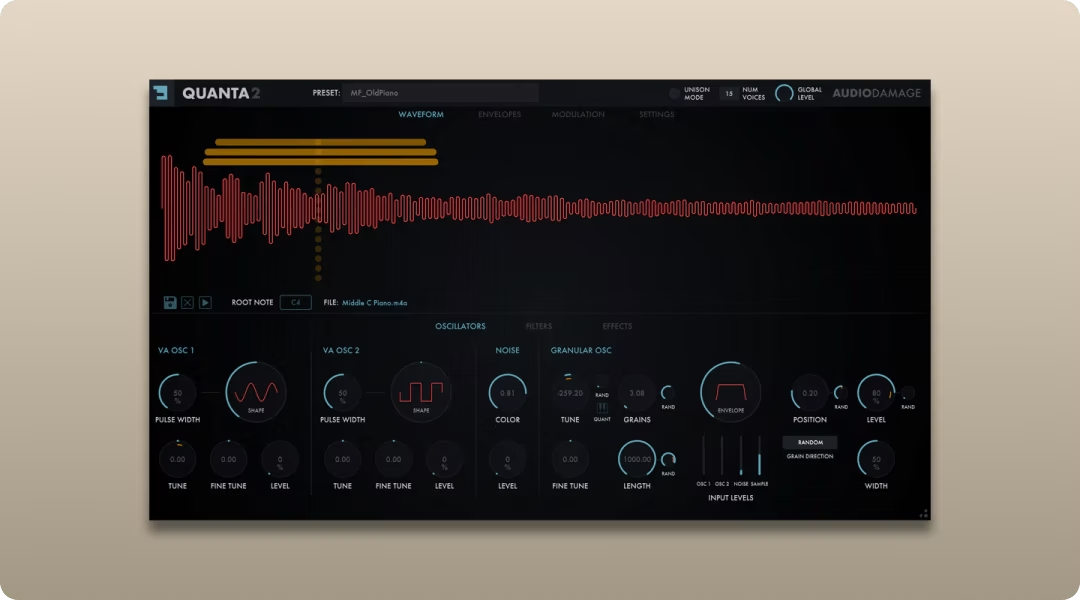
Audio Damage Quanta 2 takes a different approach. It's a granular synth instrument rather than an FX plugin, which means you build sounds from the ground up using granular synthesis as the core engine.
- Instrument-based workflow: Build sounds from scratch using granular synthesis
- Dual grain engines: Layer two independent granular sources
- Extensive modulation: Deep routing for complex, evolving patches
Soundtoys Crystallizer
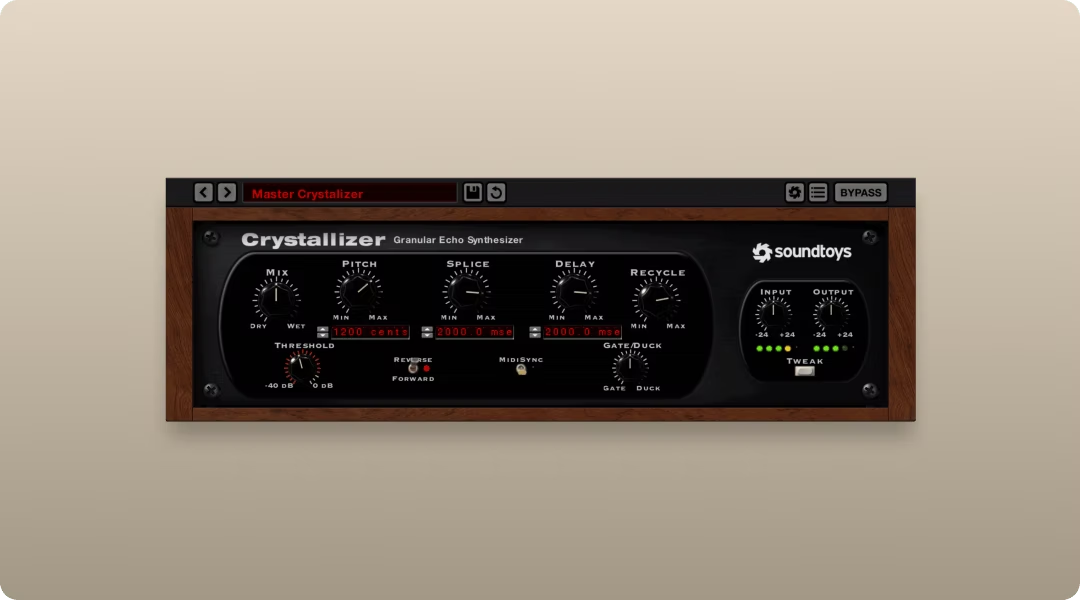
Soundtoys Crystallizer nails a specific vibe: pitch-shifted reverse echo inspired by the Eventide H3000. It's not a full granular engine, but it uses grain-based processing to create its signature crystalline textures.
- Pitch-shifted delay: Classic H3000-style reverse echo
- Splice control: Adjust grain timing for different textures
- Analog-style saturation: Adds warmth and character to the output
FAQ
Is granular synthesis the same as sampling?
Sampling plays back audio as-is or with basic manipulation like pitch and tempo changes. Granular synthesis deconstructs audio into grains and rebuilds it, enabling transformations that sampling alone cannot achieve.
What audio sources work best for granular synthesis?
Sustained, harmonically rich material like vocals, pads, strings, and ambient recordings yields the smoothest results. Percussive or transient-heavy sounds can lose punch but create interesting glitch textures when that's the goal.
Can you use granular synthesis for real-time performance?
Yes. Many granular plugins, including Output Portal, are designed for live manipulation with XY controls and tempo-synced parameters that respond to real-time input without latency issues.
Output One includes Portal, Arcade, Thermal, Movement, and Co-Producer—all in one subscription, plus FX expansions. Try them together to transform everyday audio into fresh textures and finished ideas, faster.
Try it free