Top 10 VST Plugins for Music Production in 2026
The best VSTs for music production solve real problems — bloated sessions, stale sounds, weak mixes. Here are 10 plugins working producers actually reach for in 2026, from AI-powered sample discovery to granular effects and mastering chains.

Get Co-Producer and Arcade with unlimited access to premium, royalty-free samples and instruments. Plus, unlock Portal, Thermal, and Movement.
Try it freeTop 10 VST Plugins for Music Production in 2026
The right VST plugins speed up your workflow, add character to your sounds, and stay out of your way when you're deep in a session. From sample discovery tools like Co-Producer to creative effects, wavetable synths, and mastering chains, these are the plugins that working producers actually reach for.
What makes a VST plugin worth adding to your workflow?
The best VST plugins solve specific problems without creating new ones. A plugin earns its place when it speeds up your decision-making, sounds good without heavy tweaking, and runs efficiently in sessions with 50+ tracks.
Before adding anything new, consider what's actually slowing you down. Are you spending hours searching for the right sample? Is your mix bus missing harmonic density? Do your synth patches sound static? The answer points you toward the right tool.
- Workflow speed: Does it get you to a usable result faster than your current method?
- Sound quality: Does it hold up at mix volume, or does it fall apart under scrutiny?
- CPU efficiency: Can you run multiple instances without bouncing or freezing tracks?
- Preset depth: Are the starting points actually usable, or do you have to rebuild from scratch?
The plugins below represent tools that working producers actually reach for. Some handle sound discovery, others shape tone and texture, and a few cover mixing fundamentals.
Output Co-Producer sample finder plugin

Co-Producer changes how you find samples. Instead of browsing folders or scrolling through endless search results on traditional sample platforms, you drop it on your master bus and let it listen to your session. It analyzes harmony, rhythm, tempo, and complexity, then surfaces samples that actually fit what you're building.
The drag-and-drop workflow keeps you inside your DAW. Audition samples in context, synced to your project's key and tempo, then pull them directly into your arrangement. No browser tabs, no credit systems, no rationing ideas.
- Session listening: Analyzes your track's harmonic and rhythmic content in real time. Capture 4 or 8 bars—8 bars recommended for richer harmonic and rhythmic analysis.
- Three search modes: Find samples using audio analysis alone, text descriptions, or combine both for guided results
- Drag-and-drop: Pull samples directly into your DAW without leaving your session
- Re-imagine: Generate one-of-a-kind variations of any sample using ethically trained AI
- No credits: Unlimited access to royalty-free, musician-made sounds
The Re-imagine feature transforms any sample into infinite unique variations, so you're never stuck with sounds that show up in other people's tracks. Co-Producer is available standalone or through Output One, which bundles it with Arcade, Portal, Thermal, and Movement.
Xfer Serum wavetable synthesizer
Serum remains the default recommendation for wavetable synthesis because it delivers on two fronts: visual clarity and sonic flexibility. The interface shows you exactly what's happening to your sound, which makes learning synthesis faster and troubleshooting easier.
The drag-and-drop modulation matrix lets you route any source to any destination without menu diving. LFOs, envelopes, and macros connect to parameters with a single gesture.
- Visual wavetable editor: Draw, import, or morph your own waveforms with direct visual feedback
- Modulation matrix: Drag any source to any destination for instant, flexible routing
- Preset ecosystem: Thousands of third-party presets available across every genre
Serum handles bass design, leads, pads, and atmospheric textures equally well. The CPU load is reasonable for a wavetable synth, and the sound quality holds up in professional mixes.
Output Arcade playable sampler and instrument plugin

Once you've found the right samples with Co-Producer, Arcade turns them into something you can actually perform. It's a playable sampler and instrument that locks everything to key and tempo. Set your session key once, and every sample automatically shifts to match—no manual pitch correction needed. You can flip loops, chop phrases, and build custom kits without leaving the plugin.
Arcade ships with over 80,000 samples organized into Lines—themed collections spanning drill, lofi, hyperpop, and more. Each Line contains Kits (think of them as presets) that come in two flavors: Samplers for loop-based work and Instruments for chromatic playing. But the real value is in the manipulation. Macros, modifiers, and built-in FX let you reshape any sound until it becomes yours.
- Playable samplers: Load kits and perform loops locked to your session's key and tempo
- Kit Generator: Auto-chop your own samples into playable kits
- Macros and modifiers: Shape sounds quickly with intuitive controls
The difference between Arcade and a traditional sample library is performance. You're not just dragging files into your arrangement. You're playing phrases, triggering variations, and recording performances that feel human. Playable Pitch lets you retune samples in real time, so you can write melodies and chord progressions directly with loops—not just trigger them. Arcade is included in Output One alongside Co-Producer and the FX plugins.
Native Instruments Kontakt sampler platform
Kontakt is the industry-standard host for third-party sample libraries. If you work with orchestral instruments, cinematic textures, or realistic acoustic sounds, you'll encounter Kontakt libraries constantly. Owning the full version opens access to thousands of instruments from developers worldwide.
The sampling engine handles multisampled instruments with velocity layers, round-robin variations, and complex articulation switching.
- Library ecosystem: Thousands of third-party instruments spanning orchestral, cinematic, and electronic genres
- Scripted instruments: Deep articulation switching and performance controls built into each library
- NKS integration: Browse and control libraries from compatible hardware without touching your mouse
Kontakt works best when you need realistic instrument emulations or access to specific third-party libraries. For sample manipulation and loop-based work, tools like Arcade offer a faster, more performance-oriented workflow.
FabFilter Pro-Q EQ plugin
Pro-Q sets the standard for parametric EQ in modern production. The visual spectrum analyzer shows frequency content in real time, and the dynamic EQ bands respond to input level for transparent, musical control.
Mid/side processing lets you shape the center and sides of your stereo image independently. Linear-phase mode provides transparent processing for mastering and bus work without the phase smearing that can affect transients.
- Dynamic EQ: Bands that respond to input level for transparent, frequency-specific control
- Spectrum analyzer: Real-time visual feedback with collision detection across multiple instances
- Mid/side processing: Shape center and sides independently for precise stereo control
Pro-Q appears on nearly every professional mix engineer's template for good reason. It sounds clean, the interface is fast, and it handles everything from gentle high-pass filtering to aggressive resonance control.
Soundtoys 5 creative effects suite
Soundtoys plugins add character that's difficult to achieve with stock effects. The bundle covers saturation, delay, pitch manipulation, and modulation with a consistent analog-inspired sound. These aren't transparent mixing tools. They're designed to add vibe and texture.
Decapitator handles saturation with five distinct analog styles. EchoBoy delivers versatile delay with vintage echo emulations. Crystallizer creates pitch-shifted granular textures that work for ambient production and rhythmic effects.
- Decapitator: Analog saturation with five distinct styles for adding warmth and grit
- EchoBoy: Versatile delay with vintage echo emulations and extensive timing options
- Crystallizer: Granular pitch-shifting for ambient textures and rhythmic effects
The Soundtoys sound is recognizable. If you want effects that stay invisible, look elsewhere. If you want effects that make sources sound more interesting, this bundle delivers.
iZotope Ozone mastering plugin
Ozone provides a complete mastering chain in one plugin. The module-based workflow includes EQ, dynamics, stereo imaging, and limiting, all designed to work together.
The Maximizer handles final limiting with IRC modes that balance loudness and clarity. The Imager controls stereo width per frequency band, which helps tighten low end while widening high frequencies.
- Maximizer: Transparent limiting with IRC modes for competitive loudness without distortion
- Imager: Stereo width control per frequency band for focused low end and wide highs
- Reference: Compare your master against reference tracks in real time within the plugin
Ozone works best as a finishing tool after your mix is already balanced. It won't fix fundamental problems, but it will add polish and loudness to tracks that are ready for release.
Output Portal granular effects plugin
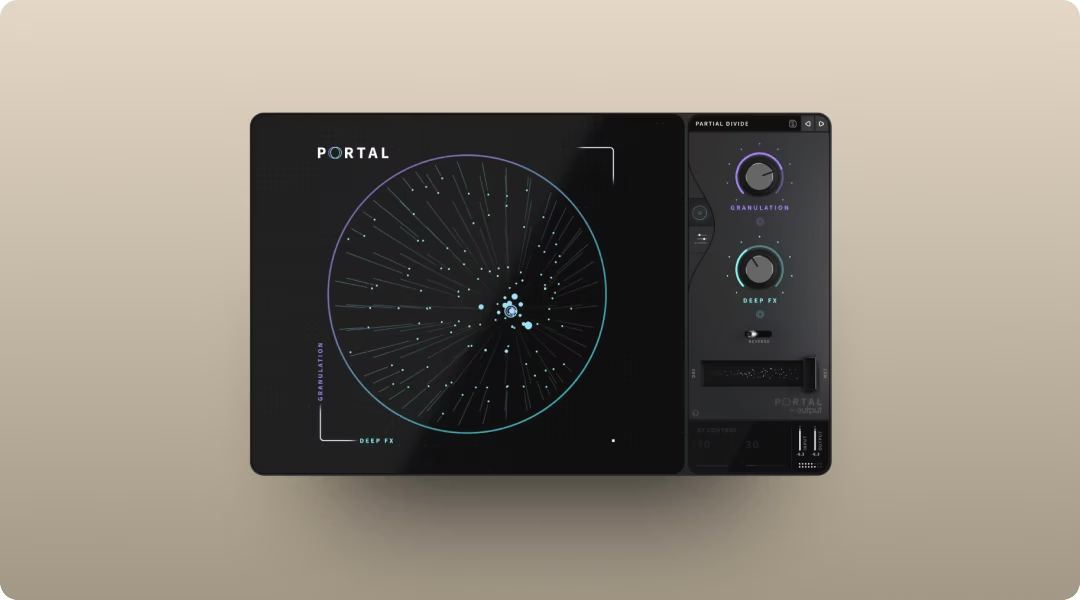
Portal turns granular processing into something you can actually use in a mix. It breaks audio into grains and re-synthesizes it in real time, but the scale-locked pitch modulation and tempo-synced timing keep results musical rather than chaotic.
The XY control lets you morph between granular parameters in real time, which makes Portal feel like an instrument rather than a static effect. The preset library offers solid starting points for different textures. Feed it drums, vocals, synths, or guitars, and it transforms them into new textures.
- Scale-locked pitch: Pitch modulation stays musical with scale quantization. Choose from scales, intervals, or chords—Portal ensures pitch shifts land on musically relevant notes rather than random semitones.
- Tempo-synced grains: Grain timing locks to your session tempo
- XY performance control: Morph between granular parameters in real time
Portal excels at turning simple ideas into complex, evolving textures. Portal's grain delay with feedback can create evolving textures, but watch your levels—certain density and grain size combinations can cause volume spikes. It's available standalone or through Output One, which includes the full FX suite alongside Co-Producer and Arcade.
Output Thermal distortion and saturation plugin
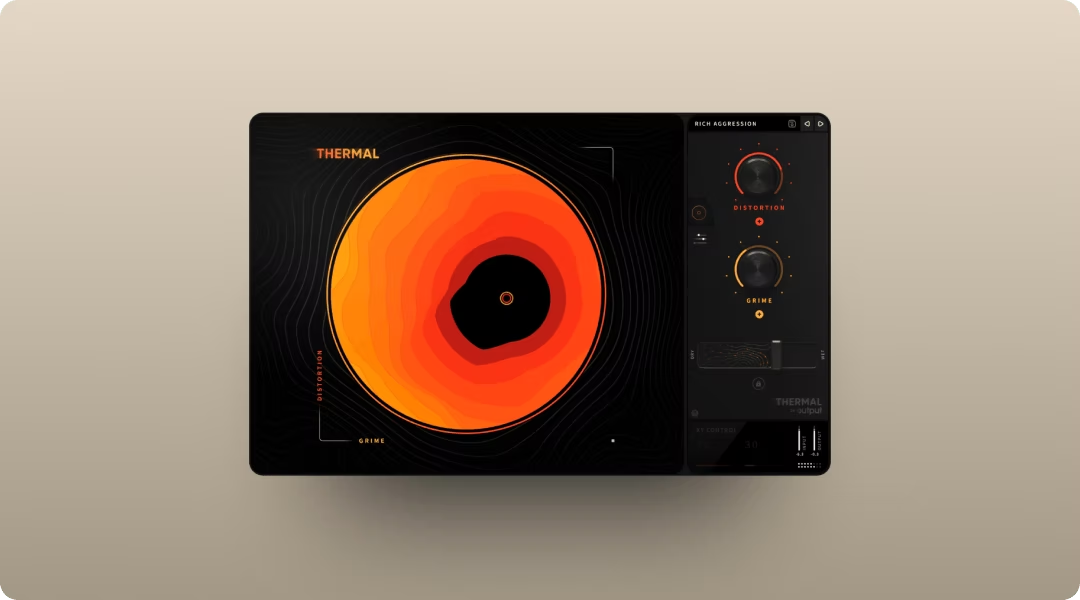
Thermal approaches distortion as a creative instrument rather than a utility effect. The multi-stage engine lets you stack multiple distortion types in series, and the XY macro control lets you blend and morph parameters visually.
Mid/side processing and stereo width tools let you shape the spatial image alongside the distortion. Each stage can target specific frequency ranges with band splitting, and the refilter option cleans up unwanted harmonics—useful for keeping low end tight while distorting mids and highs. The 250+ presets provide instant starting points, but the real value is in the interactive workflow. The envelope follower on each stage's feedback responds to input dynamics, creating distortion that breathes with your performance rather than staying static.
- Multi-stage engine: Stack multiple distortion types in series for complex harmonic shaping
- XY macro control: Blend and morph distortion parameters visually
- Mid/side and width: Shape stereo image alongside distortion processing
Thermal works on individual tracks, buses, and even full mixes. It's particularly effective for adding harmonic density to drums, synths, and vocals.
Honorable mentions: free VST plugins for music production
Not every essential tool requires a purchase. These free plugins fill gaps and deliver professional-quality results at no cost.
Xfer OTT multiband compressor
OTT adds instant energy and presence to any source—especially electronic drum loops. Originally an Ableton preset, it became so popular that Xfer released it as a free standalone plugin. The aggressive upward compression works particularly well on synths, drums, and vocals in electronic and pop production.
Valhalla Supermassive reverb and delay
Supermassive delivers massive, lush reverbs and delays without costing anything. The variety of algorithms covers everything from subtle ambience to infinite washes. It's become a go-to for ambient pads, vocal throws, and experimental sound design.
Spitfire Audio LABS free instruments
LABS offers a growing collection of free instruments including soft piano, strings, choir, and experimental textures. The quality rivals paid libraries, making it a solid starting point for cinematic and ambient production.
Youlean Loudness Meter loudness metering
Youlean monitors LUFS, true peak, and loudness range with accuracy that matches paid alternatives. It's essential for hitting streaming platform targets and maintaining consistent levels across a project.
MeldaProduction free FX bundle utility effects
The MeldaProduction free bundle includes EQ, compression, saturation, stereo tools, and more. MAutoPitch handles basic pitch correction, and the overall value makes it worth installing for producers building out their toolkit.
BBC Symphony Orchestra Discover orchestral library
Spitfire and the BBC offer a free orchestral library that covers strings, brass, woodwinds, and percussion. Registration is required, but the quality makes it worthwhile for producers wanting orchestral elements without a major investment.
Polyverse Wider stereo widener
Wider adds stereo enhancement that remains mono-compatible. It's useful for adding width to synths, pads, and background elements without introducing phase issues that collapse in mono playback.
How to build a VST plugin collection that fits your workflow
A focused toolkit beats a bloated one. Every plugin you add creates another decision point, another preset library to learn, another potential source of CPU strain.
Demo plugins in real projects before buying. Most developers offer trials, and the only way to know if a tool fits is to use it under actual session conditions.
- Start with gaps: Identify what's missing in your current workflow before adding new tools
- Demo before buying: Most plugins offer trials; use them in real projects
- Consider bundles: Subscriptions like Output One give access to multiple plugins and sounds for one monthly price
- Revisit stock plugins: Your DAW's built-in tools—whether you're running FL Studio or another workstation—are often more capable than you think
Output One bundles Co-Producer, Arcade, Portal, Thermal, and Movement together with an ever-growing sample library for one subscription. It's a practical way to access multiple creative tools without buying each one separately.
You’ve seen what Output Thermal, Output Arcade, Output Portal, Output Movement, and Output Co-Producer can do—Output One gives you all of them in one subscription, plus every FX expansion. Try the full set together to write faster, finish more tracks, and keep your sound moving.
Try it free