Best Plugins for Afrobeats: Synths, FX, and Samples That Work
From synths and samplers to FX chains and a step-by-step production workflow, these are the plugins for Afrobeats that actually deliver the clave-driven grooves, bright guitars, and punchy low end the genre demands.

Get Co-Producer and Arcade with unlimited access to premium, royalty-free samples and instruments. Plus, unlock Portal, Thermal, and Movement.
Try it freeBest Plugins for Afrobeats: Synths, FX, and Samples That Work
Afrobeats production demands specific textures: clave-driven percussion, bright nylon-string guitars, punchy brass, and sub-bass that leaves room for the groove. This breakdown covers the synths, samplers, and FX plugins that deliver those sounds, plus a step-by-step workflow for building a track from scratch.
What defines the Afrobeats sound
Afrobeats is a genre rooted in West African rhythms, blending highlife, dancehall, and contemporary pop production into something that feels both familiar and distinct. The tempo typically sits between 90 and 115 BPM, giving you room for bounce without rushing the groove.
The rhythm is where everything starts. Clave-influenced patterns drive the percussion, with syncopated shakers, congas, and log drums layering on top of punchy kicks and snappy snares. The swing matters. Afrobeats doesn't sit perfectly on the grid. It breathes.
Melodically, you're working with bright, clean guitars. Nylon-string or electric with chorus is the signature sound. Brass stabs punch through arrangements. Afro-piano riffs add rhythmic melody. Vocal chops and call-and-response ad-libs weave through everything.
The low end stays warm and round. Sub-bass or pitched 808s fill out the bottom, but they leave space for the kick transient and the dense percussion above. If your bass is fighting your drums, something's wrong.
- Drums and percussion: Layered shakers, congas, log drums, and snares with swing
- Melodic elements: Nylon-string guitar, brass stabs, Afro-piano, vocal hooks
- Low end: Sustained sub-bass or 808s that complement the kick
- Groove: Syncopation and off-grid swing that keeps things human
Afrobeats sample packs and one-shots
Samples are the fastest way to capture authentic Afrobeats textures. You're not always going to have access to live musicians, and even when you do, a well-curated sample library speeds up the writing process.
The right pack should include genre-specific percussion one-shots, guitar and melodic loops at common tempos, and vocal chops that fit the vibe without sounding generic.
Drum and percussion one-shots
A solid Afrobeats drum kit starts with punchy kicks that have controlled low-end. You want snap in your snares and rimshots. Shakers, congas, and bongos are essential for building polyrhythmic layers.
Log drum and talking drum samples add melodic percussion. These pitched elements carry rhythm and melody at the same time, which is central to the genre's sound.
Output's Co-Producer can surface percussion one-shots that match your session's tempo and groove. You load it on your master track's FX insert, let it analyze your project, and drag matching samples directly into your arrangement. Splice and Loopmasters also offer dedicated Afrobeats packs worth exploring.
- Kick drums: Tight sub presence without excessive boom
- Snares and rimshots: Snap that cuts through layered percussion
- Shakers and congas: The foundation of polyrhythmic density
- Log drums: Melodic percussion that carries pitch
Guitar and melodic loops
Guitar loops often carry the hook in modern Afrobeats. Nylon-string or clean electric with chorus creates that bright, recognizable tone. These loops need to sit in the right key and tempo to work.
Brass stabs add energy and punctuation. Afro-piano phrases provide rhythmic melodic texture. Vocal chops give you topline-ready moments without needing a vocalist.
Co-Producer finds guitar and melodic loops that fit your track's key and tempo without manual searching. Once you've found something close, Arcade lets you flip and manipulate those loops into something unique. Black Octopus and Producer Loops also offer solid third-party packs.
- Nylon-string guitar: The melodic backbone of most Afrobeats tracks
- Brass and horn stabs: Energy and punctuation
- Afro-piano loops: Rhythmic melodic texture
- Vocal chops: Ear candy and hook material
Sample-finding plugins for Afrobeats
Digging through folders kills momentum. You hear something in your head, but finding the right sample takes longer than building the rest of the track. Sample-finding plugins solve this by bringing the search inside your DAW.

Output Co-Producer listens to your session and recommends royalty-free samples matched to your track's harmony, rhythm, and tempo. Load it on your master track's FX insert, let it analyze your project, and drag matching samples directly into your arrangement.
Co-Producer offers three search modes to match your workflow: audio-only for when you can't describe what you're looking for, text-only for starting new ideas, and combined audio+text for the most precise results when filling out tracks. For Afrobeats-specific searches, try combining descriptors like "rhythmic Afrobeats guitar" or "punchy West African percussion" to get more targeted results.
The Re-imagine feature generates unique variations of any sample using ethically trained AI. You're not stuck with sounds everyone else has.
- Listen: Co-Producer analyzes your session's key, tempo, and groove
- Find: Browse recommended samples filtered by instrument or vibe
- Drag: Drop samples directly into your DAW, already synced
- Re-imagine: Generate one-of-a-kind variations
Loopcloud offers browser-based sample management with a plugin bridge for DAW preview. It's useful if you want to build a personal library across multiple sources.
- Plugin bridge: Preview samples in your DAW before downloading
- Cloud library: Access your samples from any machine
- Tagging system: Organize by key, tempo, and custom tags
Splice Bridge lets you audition samples in context before committing credits. The credit system means you're rationing downloads, but the library is massive.
- In-DAW preview: Hear samples against your track before downloading
- Massive library: Millions of samples across every genre
- Credit-based: Pay per download, which can add up
Co-Producer is available alongside Arcade and the full FX suite through Output One.
Sampler and instrument plugins for Afrobeats
Once you have samples, you need tools to play and manipulate them. Sampler plugins let you trigger loops via MIDI, chop them into playable kits, and reshape sounds with built-in effects.

Output Arcade is a playable sampler and instrument plugin. It sits on a Software Instrument track and locks samples to key and tempo, so you can play them via MIDI without pitch or timing issues.
Arcade's Playable Pitch feature lets you transpose loops in real-time while they play—so you can take a single Afrobeats guitar loop and play chord progressions with it without needing multiple loops in different keys.
The auto-chop featureturns your own samples into playable kits. This is useful for building custom percussion racks from one-shots you've collected.
- Play: Perform loops and one-shots via MIDI, locked to your session
- Chop: Auto-slice samples into playable kits
- Shape: Use macros, modifiers, and built-in FX
- Expand: New content added daily, including genre-specific Lines—themed sound collections that contain curated Kits designed to fit a musical theme, making it easier to find Afrobeats-appropriate content without browsing the entire library
Xpand!2 is an affordable multi-timbral rompler with brass, keys, and pads that work well for Afrobeats arrangements. It's been around forever, but it still delivers.
- Multi-timbral: Run four instruments in one instance
- Preset library: Thousands of sounds across categories
- Low CPU: Runs light even in dense sessions
Native Instruments Kontakt hosts third-party Afrobeats libraries if you want dedicated instruments. The platform is deep, and the ecosystem is massive.
- Third-party libraries: Access to specialized Afrobeats instruments
- Scripting: Deep customization for advanced users
- Industry standard: Works with most sample developers
Arcade is included in Output One alongside Co-Producer and the FX plugins.
FX plugins for processing Afrobeats drums, vocals, and melodies
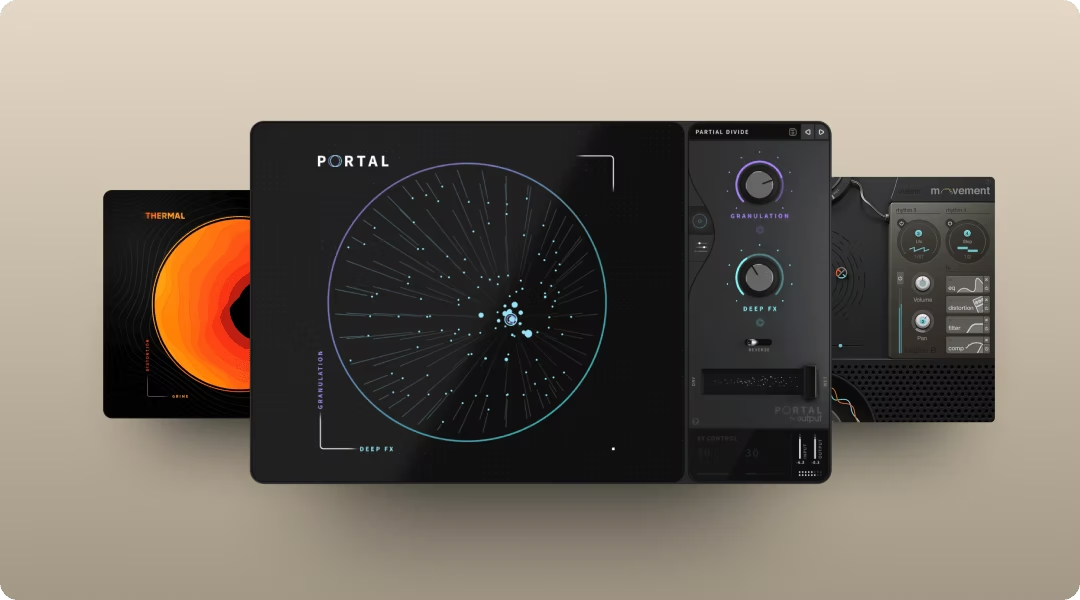
FX plugins shape raw samples and instruments into a polished mix. In Afrobeats, you're focused on three things: adding warmth and punch to drums, creating space and texture on vocals, and injecting rhythmic movement into melodies.
Output Thermal handles drum and bass processing with controlled saturation and multi-band distortion. The XY control lets you dial in warmth without destroying transients. This matters when you're layering dense percussion. Thermal's Band Split feature lets you apply saturation only to specific frequency ranges—useful for adding warmth to Afrobeats sub-bass without affecting the punch of kick transients, or adding grit to mid-range percussion while keeping the low end clean.
- 15+ distortion types: Analog warmth to digital edge
- XY control: Blend parameters in real time
- Multi-stage processing: Stack distortion and effects
FabFilter Saturn 2 offers surgical multiband saturation. It's more clinical than Thermal, but the precision is useful for mastering-leaning applications.
- Multiband design: Process frequency ranges independently
- Modulation system: Animate saturation over time
- Linear-phase option: Transparent processing for masters
Output Portal adds granular textures to vocals or guitar loops. It breaks audio into grains and re-synthesizes it in real time, turning static phrases into evolving soundscapes. Portal's Scale-lock feature ensures pitch-shifted grains stay musically in key—particularly useful when adding granular textures to Afrobeats guitar loops or vocal chops where staying in the track's key is essential.
- Tempo-synced grain delay: Rhythmic granular effects
- Scale-locked pitch: Musical pitch modulation
- XY visualizer: Playable granular control
Valhalla VintageVerb delivers lush reverb for vocal processing. It's affordable and sounds expensive.
- Multiple reverb modes: Hall, plate, room, and more
- Vintage character: Warm, musical decay
- Low CPU: Runs light in any session
Output Movement animates synths or pads with tempo-synced rhythmic modulation. The four synchronized rhythm engines can modulate up to 152 parameters simultaneously. Movement excels at adding the subtle rhythmic movement that characterizes modern Afrobeats production—where pads and synths rarely sit static but pulse and breathe with the groove.
- Sidechain, LFO, step sequencer: Multiple modulation sources
- Flux mode: Organic, evolving motion
- XY pad: Performance-ready control
Soundtoys Decapitator provides analog-style saturation with character. It's a go-to for adding grit to drums and bass.
- Five saturation styles: Tube, tape, and transistor flavors
- Punish mode: Extreme saturation for aggressive tones
- Tone control: Shape the color of the distortion
All three Output FX plugins are available together in Output One.
How to build an Afrobeats track step-by-step
Here's a practical workflow that ties the plugins and samples together. This isn't the only way to work, but it's a reliable path from blank session to finished idea.
Set tempo and groove
Start by setting your session tempo between 90 and 115 BPM. The tempo you choose affects the energy. Slower tempos feel more laid-back. Faster tempos push toward dancehall territory.
Groove comes from swing and syncopation, not just tempo. Adjust your DAW's swing setting or leave percussion slightly off-grid for a human feel. Co-Producer will automatically sync sample recommendations to whatever tempo you choose.
Build drums and percussion
Layer your drum elements. Start with a kick and snare pattern, then add shakers, congas, and hi-hats to create polyrhythmic density. Use drum one-shots from Co-Producer or your sample library.
Process the drum bus with light saturation using Thermal or a compressor to glue the layers together. Thermal's Auto gain compensation helps maintain consistent levels when adding saturation—useful when A/B comparing processed vs. dry drums to ensure you're hearing the tonal change, not just volume increase. Leave headroom for the bass. The kick should punch through, but the percussion needs space to breathe.
Add melody, bass, and FX
Drop in a guitar or Afro-piano loop that fits your key. Use Co-Producer to find something that matches, or load it into Arcade to manipulate it further.
Program or sample a sub-bass or 808 that complements the kick pattern—Substance works well for sculpting warm, sustained low end. The low end should feel warm and sustained, not boomy.
Use Portal to add subtle granular texture to the guitar. Movement can animate a pad or synth layer with tempo-synced modulation. Process vocals with reverb and light saturation for warmth.
DAWs for making Afrobeats
DAW choice matters for workflow, but any modern platform handles Afrobeats production. The plugins covered in this article work across all major DAWs that support VST, AU, or AAX formats.
FL Studio is popular among Afrobeats producers for its pattern-based sequencing. The step sequencer makes building drum patterns intuitive, and the stock plugins are solid.
Logic Pro offers Flex Time, Drummer, and quality stock instruments for Mac users. The workflow is linear, which some producers prefer for arrangement.
Ableton Live, Studio One, and other DAWs are all capable. Pick what feels natural to you.
Output One for Afrobeats production
If you want the full toolkit covered in this article, Output One bundles everything together. It's a subscription plan that includes Co-Producer for sample finding, Arcade for playable sampling and instruments, and the FX suite (Portal, Thermal, Movement) plus all preset expansions.
The plan also unlocks an ever-growing library of royalty-free sounds updated regularly. It's not a standalone plugin but an all-access subscription that gives you the complete workflow.
- Co-Producer: Find samples that fit your session instantly
- Arcade: Play, chop, and reshape samples and instruments
- Portal, Thermal, Movement: Shape any audio with granular, distortion, and rhythm FX
- Unlimited sounds: New royalty-free content added regularly
Output One includes Co-Producer, Arcade, Thermal, Portal, and Movement—everything referenced above, plus all FX expansions. Get the full Afrobeats toolkit in one subscription and try these sounds together to finish more ideas, faster.
Try it free