How to Make Your Own Music for Social Media (Fast)
Social media moves fast—your music should too. Here's how to make your own music for social media using Co-Producer, Arcade, and Output's FX plugins to build original, royalty-free loops without ever leaving your DAW.

Get Co-Producer and Arcade with unlimited access to premium, royalty-free samples and instruments. Plus, unlock Portal, Thermal, and Movement.
Try it freeHow to Make Your Own Music for Social Media (Fast)
Social media content needs music that hits fast, loops clean, and stays copyright-free. This walkthrough covers how to build original tracks for platforms like TikTok, Instagram, and YouTube using Co-Producer, Arcade, and Output's FX plugins to go from idea to finished loop without leaving your DAW.
What social media music needs to do
Music for social media has a different job than a full release. It needs to grab attention in the first second, loop cleanly when content replays, and translate on phone speakers. It also needs to stay clear of copyright strikes so you can actually post it.
You're not building a three-minute track here. You're making a usable, vibe-forward piece that supports visual content and fits the platform. Understanding these constraints upfront saves time and keeps you from overbuilding.
- Instant hook: The first beat matters more than the drop. Viewers scroll fast, and your audio has to land immediately.
- Loop-friendly structure: Content often replays automatically. Your music should feel seamless at the loop point.
- Phone-speaker translation: Most listeners hear through tiny drivers. Clarity and midrange presence beat bass weight.
- Royalty-free clearance: No Content ID flags, no takedowns, no licensing headaches.
Pick the mood, tempo, and genre for your track
Before opening a session, decide on the emotional direction. Mood sets the vibe. Tempo locks the pace. Genre provides the sonic vocabulary. These choices should match the content the music will accompany.
A product reveal needs different energy than a travel montage or a talking-head clip. Making these decisions early prevents aimless browsing and keeps your session focused.
- Mood: What feeling should the viewer walk away with? Energetic, chill, dark, uplifting?
- Tempo: Fast cuts favor higher BPM. Talking-head content often sits mid-tempo.
- Genre: Electronic, lo-fi, cinematic, or hybrid? This shapes your instrument and sample choices.
Find samples that fit your track with Co-Producer

Once you have a direction, the fastest way to surface samples that match is to let your session do the searching. Co-Producer is a plugin that listens to your DAW session, analyzes harmony, rhythm, tempo, and complexity, then recommends royalty-free, musician-made samples synced to your key and tempo.
This means you're not typing keywords into a search bar and hoping something works. You play your session, and Co-Producer surfaces samples that actually belong in the track. You can search using audio analysis alone, text descriptions, or combine both for the most targeted results. Audition them in context, then drag and drop directly into your DAW without leaving the session.
- Session-aware recommendations: Co-Producer analyzes what you're building and surfaces samples that fit, not just samples that match a keyword.
- Drag-and-drop workflow: No exporting, no file management, no context switching.
- Re-imagine variations: The Re-imagine feature uses ethically trained AI to generate one-of-a-kind versions of any sample. The AI is trained exclusively on Output's royalty-free library and properly licensed content—never on scraped material—so every generated variation is legally clear for commercial use.
Co-Producer is available standalone or as part of Output One, which bundles it with Arcade and the full FX suite.
Turn samples into playable parts with Arcade

After finding samples, the next step is shaping them into something personal. Arcade is a playable sampler and instrument plugin that lets you play, chop, and manipulate samples in real time. This means you're not just dragging loops into your timeline. You're performing them.
Arcade's Sampler mode lets you load kits and perform loops live, locked to your session's key and tempo. The Kit Generator auto-chops any sample you drag in, slicing it into a playable kit. Macro controls and built-in FX let you shape tone and add movement without menu diving.
- Playable samplers: Load curated kits, lock to key and tempo, and perform loops live. Arcade automatically shifts sample pitch to match your session key, so everything stays in tune.
- Auto-chop your own audio: Drag in any sample, slice it into a playable kit, and add FX.
- Macro controls and FX: Shape tone and add movement without deep routing or automation.
- Modifier keys for live performance: Black keys trigger real-time effects like stutters, reverses, and glitches—perfect for adding ear candy without stopping playback.
Arcade is included in Output One alongside Co-Producer and the FX plugins.
Build a loop that holds attention
Social music lives or dies in the first few seconds. An 8-bar loop, or even shorter, is often all you need. Front-load interest and make sure the transition from end to start feels seamless.
Start with rhythm. A kick, snare or clap, and a hi-hat pattern set the foundation. Keep it tight and punchy. Add a melodic anchor next, whether that's a short phrase, vocal chop, or pad that carries the vibe.
Layer ear candy like risers, impacts, or subtle FX hits that reward repeat listens. These small details make the difference between a loop that feels finished and one that feels like a sketch.
Finally, test the loop point. Play it on repeat and listen for any jarring transitions. If the end doesn't flow into the beginning, adjust your arrangement or add a subtle transition element.
Add motion and texture with Movement and Portal
Static sounds don't hold attention on social. Movement and Portal transform flat audio into evolving, animated textures suited for scroll-stopping content.
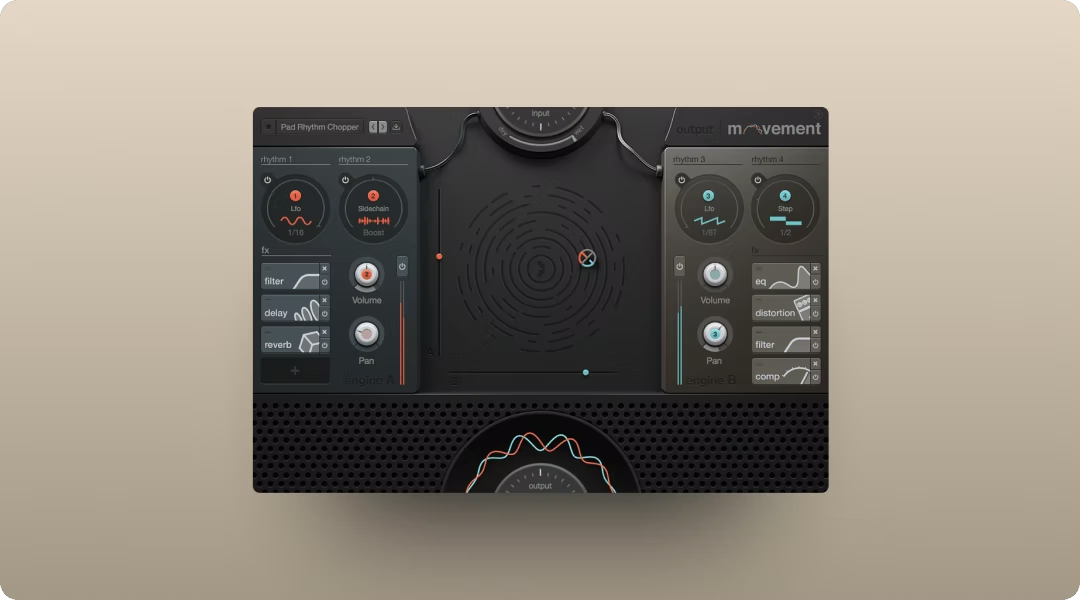
Movement is a tempo-locked rhythmic FX engine. It modulates filters, volume, pan, and more using sidechain, LFO, or step sequencer. Feed it a pad or synth line, and it imprints groove and pulse without dense automation. You can add pump and motion to pads, synths, or full mixes in seconds.
- Sidechain, LFO, and step sequencer modulation: Create pumping rhythms, sweeping filters, or complex polyrhythmic movement—all locked to your tempo.
- XY pad for performance: Morph between settings live.
- 300+ presets: Get to a printable groove fast.
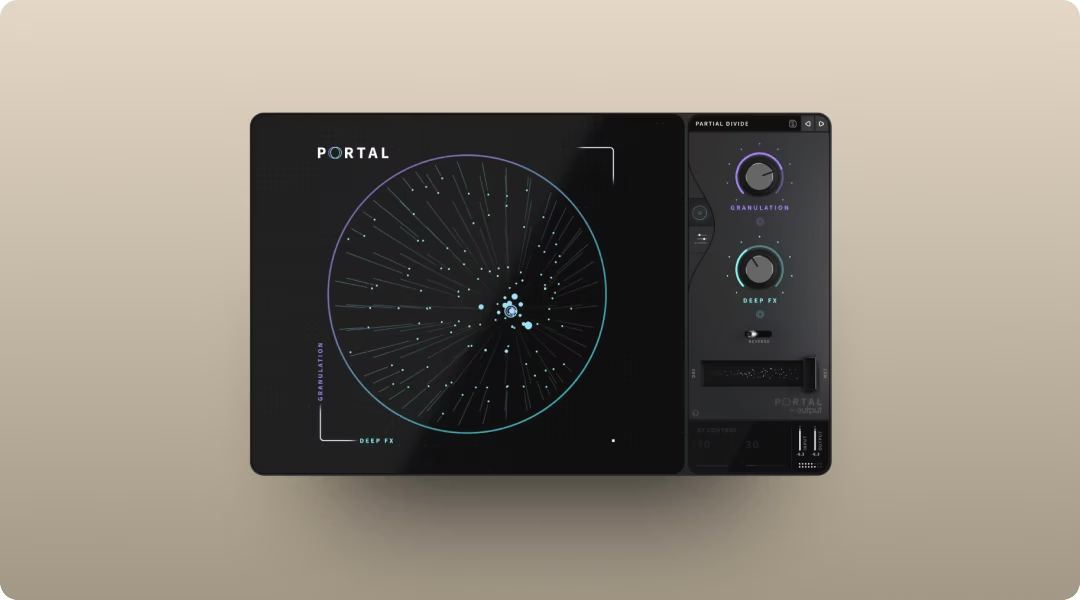
Portal uses granular synthesis to smear, scatter, or pitch-shift audio into new territory. It's scale-aware and tempo-synced, so the results stay musical—pitch shifts automatically quantize to your chosen scale, keeping random variations harmonically coherent. Turn a simple loop into something that evolves and breathes.
- Granular FX for texture and space: Break audio into grains and re-synthesize in real time.
- Scale-locked pitch modulation: Keep pitch shifts musical.
- Tempo-synced grain delay: Stay locked to your session.
Both plugins are included in Output One.
Add heat and character with Thermal
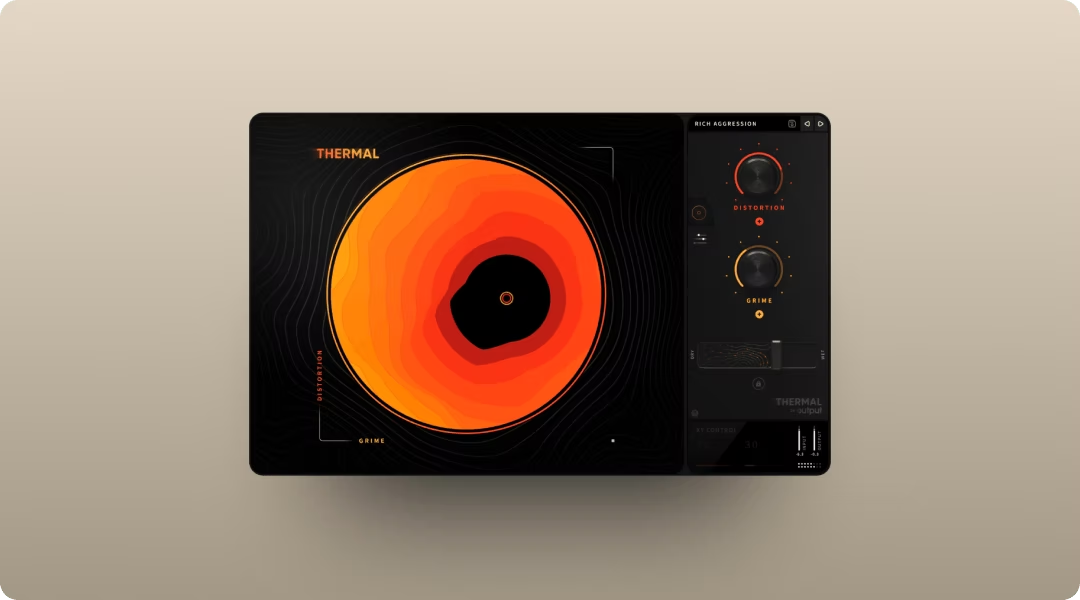
Thermal is a multi-stage distortion plugin for adding warmth, saturation, or aggressive distortion to any element. This means you can go from subtle analog-style warmth to full-on destruction within the same plugin.
The multi-stage engine lets you stack and blend multiple distortion types in one chain. The XY macro control lets you morph between settings in real time—drag the handle to adjust both macro parameters simultaneously, making it easy to perform dynamic distortion changes.
- 15+ distortion types: Analog-inspired and digital flavors.
- XY macro control: Morph between settings in real time.
- Mid-side and stereo width: Shape how distortion sits in the stereo field.
Thermal is part of Output One.
Keep it royalty-free and brand-safe
Licensing is the silent killer of social music. A Content ID flag can mute your video or trigger a takedown. Unclear licensing creates legal gray areas that aren't worth the risk.
All sounds in Co-Producer and Arcade are royalty-free and cleared for commercial use, including monetized social media content. Output's library is ethically sourced from real musicians, not scraped or AI-generated in ways that create legal uncertainty.
- No Content ID flags: Output sounds are cleared for use on YouTube, TikTok, Instagram, and other platforms.
- Commercial use included: Monetize your content without additional licensing fees.
- Ethically sourced: Every sample is made by musicians and properly licensed.
Mix and export music for social media
Preparing a track for social platforms doesn't require a full mastering chain. But a few essentials make the difference between a track that translates and one that falls flat.
Check mono compatibility first. Collapse to mono and listen for phase issues or disappearing elements. Most phone speakers are essentially mono, so this step matters more than you might think.
Target appropriate loudness. Social platforms normalize audio, so pushing your master to the absolute limit doesn't help. Aim for integrated loudness that translates without distortion.
Export as WAV or high-bitrate MP3/AAC, matching the platform's preferred specs. Leave headroom and avoid clipping the master bus. A limiter on the master can catch peaks, but don't rely on it to fix a mix that's already too hot.
Other tools worth considering
Soundtrap is a browser-based music production platform that works well for quick sketches when you're away from your main setup. It runs entirely in your browser, so there's nothing to install.
- Browser-based DAW: Make music from any computer with an internet connection.
- Collaboration features: Work with others in real time.
- Loop library included: Access sounds without additional subscriptions.
BandLab is another browser-based option with a strong mobile app. It's free and includes a decent library of sounds and instruments.
- Free to use: No subscription required for core features.
- Mobile app: Sketch ideas on your phone.
- Built-in mastering: Quick export options for social.
Soundation offers a browser-based studio with a focus on electronic music production. The interface is clean and the learning curve is gentle.
- Browser-based workflow: No installation required.
- Electronic music focus: Sounds and tools geared toward beat-making.
- Preset-driven: Get started quickly with ready-made sounds.
Get started with Output One
Output One is the single subscription that unlocks Co-Producer, Arcade, Portal, Thermal, and Movement, plus the full library of royalty-free sounds. One price, all tools, and a direct path from idea to finished track.
- Co-Producer: Find samples that fit your track instantly.
- Arcade: Play, chop, and reshape samples into something yours.
- Portal, Thermal, Movement: Shape texture, heat, and rhythm with flagship FX.
- Unlimited royalty-free sounds: New content added regularly, no credits.
Frequently asked questions
Can you post music made with Output sounds on YouTube and TikTok without copyright issues?
Yes. All sounds in Co-Producer and Arcade are royalty-free and cleared for commercial use, including monetized social media content on YouTube, TikTok, Instagram, and other platforms.
How do you make sample-based music sound unique instead of generic?
Use Arcade's manipulation tools and Co-Producer's Re-imagine feature to transform samples into unique variations. Then process through Portal, Thermal, or Movement to add your own sonic fingerprint.
Does Co-Producer work better than browsing sample sites like Splice?
It changes the workflow entirely. Instead of searching by keyword, Co-Producer listens to your session and surfaces samples that fit. You spend less time digging and more time making.
Does Output One work in Ableton, Logic, FL Studio, and other DAWs?
Yes. Output plugins support VST, VST3, AU, and AAX formats. They run in Ableton Live, Logic Pro, FL Studio, Pro Tools, Cubase, Studio One, and other major DAWs on Mac and Windows.
Output One includes Co-Producer, Arcade, Movement, Portal, and Thermal—everything you used in this guide, plus all FX expansions. Get them together in one subscription so you can write, flip, and finish social-ready tracks faster.
Try it free