
Best Plugins for Loops: 8 Tools to Shape and Remix Audio
Eight top loop plugins for finding, performing, chopping, and transforming samples—each matched to a specific part of your workflow so you spend less time browsing and more time building.

Get Co-Producer and Arcade with unlimited access to premium, royalty-free samples and instruments. Plus, unlock Portal, Thermal, and Movement.
Try it freeBest Plugins for Loops: 8 Tools to Shape and Remix Audio
Loop plugins range from content browsers to playable instruments to audio processors, and the right choice depends on whether you need to find material, perform it, or transform it into something new. The plugins below cover session-aware sample discovery, real-time loop manipulation, pattern editing, and granular processing to help you move faster without losing creative control.
What makes a great loop plugin?
A great loop plugin keeps you moving. It syncs content to your session's key and tempo, lets you manipulate material in real time, and delivers sounds that sit in a mix without heavy processing.
The difference between a useful tool and a time sink comes down to speed. How quickly can you go from browsing to playing to printing?
- Key and tempo lock: The plugin should automatically sync loops to your session. Manual adjustment kills momentum.
- Manipulation depth: Can you chop, stretch, pitch, and process loops within the plugin? The best tools let you reshape material without bouncing to a separate editor.
- Library quality: Are the sounds production-ready? Professional loops should drop in and sit without heavy EQ and compression.
- Workflow integration: Does it function as a playable instrument, or is it just a browser with a preview button?
The plugins below cover different parts of the loop workflow. Some focus on finding the right material fast. Others turn loops into instruments you can perform. A few specialize in transforming existing audio into something new.
Output Co-Producer

Co-Producer solves the biggest time drain in sample-based production: digging through folders and websites for loops that actually fit your track.
Instead of keyword searches and endless previewing, Co-Producer listens to your session and recommends samples that match your harmony, rhythm, and tempo. You audition in context, then drag directly into your DAW.
The plugin sits on your master track's FX insert, analyzing your session in real time. Results update as your track evolves, so you're always seeing relevant options. Co-Producer offers three search modes: audio-only analysis of your session, text-based descriptive searches, or a combination of both for guided results. Every sample syncs to your project's key and tempo automatically.
- Session-aware recommendations: Co-Producer analyzes what you're making and surfaces loops that fit the harmonic and rhythmic context.
- Drag-and-drop integration: Pull loops directly into your DAW without leaving your session or managing external files.
- Re-imagine variations: Create one-of-a-kind versions of any loop using ethically trained AI, avoiding the problem of overused sounds.
- No credit system: Unlimited access to a growing library of musician-made, royalty-free content.
The Re-imagine feature generates unique variations of any sample in the library. This keeps your productions distinct even when working from shared source material. Re-imagine's AI is trained exclusively on Output's royalty-free library and Creative Commons-licensed content, ensuring generated variations are both legally clear and production-ready.
Co-Producer is available as part of Output One alongside Arcade, Portal, Thermal, and Movement.
Spectrasonics Stylus RMX
Spectrasonics Stylus RMX takes a pattern-based approach to loop work. The Groove Control engine slices loops into editable components, letting you rearrange, mute, and manipulate individual hits within a phrase.
Time Designer handles tempo manipulation without affecting pitch. This keeps loops musical across a wide BPM range. Chaos Designer introduces controlled randomization, adding subtle or dramatic variation to grooves over time.
- Groove Control: Slice-based engine that lets you rearrange and edit loop patterns at the hit level.
- Time Designer: Manipulate tempo and feel without affecting pitch.
- Chaos Designer: Introduce controlled randomization for evolving grooves.
The library focuses on rhythmic content, with extensive drum set loops and percussion material. Stylus RMX works well for producers who want deep pattern editing rather than simple loop playback.
Output Arcade

Arcade turns loops into playable instruments. Where most sample platforms stop at download and drag, Arcade ships cohesive kits you can perform and manipulate in real time.
Load a sampler, trigger slices, twist the macros, and record variations directly into your session. The plugin operates in three modes that cover different creative needs.
Samplers give you curated kits with 15 samples each, ready to play and reshape with modifiers like Playhead, Repeater, and Resequence. Samplers map 15 loops across the white keys between C2-C4 for quick triggering, while Instruments spread up to three layered sources chromatically across the full keyboard range. Instruments offer chromatic, layered sounds with arpeggiator control and deep envelope editing. Kit Generator lets you import your own samples to auto-chop and build custom playable kits.
- Playable samplers: Load curated kits and perform loops with real-time manipulation. These modifiers—Playhead for speed and direction changes, Repeater for rhythmic stutters, and Resequence for pattern rearrangement—let you reshape loops in real time with single key presses.
- Chromatic instruments: Play loops as layered, tweakable instruments with full arpeggiator control.
- Kit Generator: Import your own samples to auto-chop and create custom kits with FX.
- Macro workflow: Shape tone and texture quickly with four assignable FX macros per kit.
Arcade's library spans genres from drill and hyperpop to lofi and orchestral, with new content added daily. Everything locks to your session's key and tempo, and all sounds are royalty-free. Arcade's Session Key selector automatically transposes all samples in a kit to match your song's key, with options to shift octaves up or down and lock the key across kit changes.
Arcade is an instrument plugin, which means it goes on a Software Instrument or MIDI track in your DAW. It's included in Output One alongside Co-Producer and the Output FX plugins.
Native Instruments Kontakt
Native Instruments Kontakt functions as the industry-standard sampler platform. Thousands of third-party loop and instrument libraries are built specifically for it, making it a hub for professional content across genres.
The free Kontakt Player handles commercial library playback. The full version unlocks deep editing and custom instrument building.
The sampler engine supports time-stretch, pitch-shift, slicing, and layering with full control over every parameter. Scripting capabilities let developers create custom interfaces, which is why Kontakt libraries often feel like standalone instruments.
- Platform for libraries: Thousands of third-party loop and instrument libraries built specifically for Kontakt.
- Deep editing: Time-stretch, pitch-shift, slice, and layer samples with full parameter control.
- Kontakt Player: Free version for playing commercial libraries without the full purchase.
Kontakt's strength is breadth. If you need a specific sound or genre, there's likely a Kontakt library for it. The tradeoff is that you're managing multiple libraries and interfaces rather than working in a curated experience.
Serato Sample
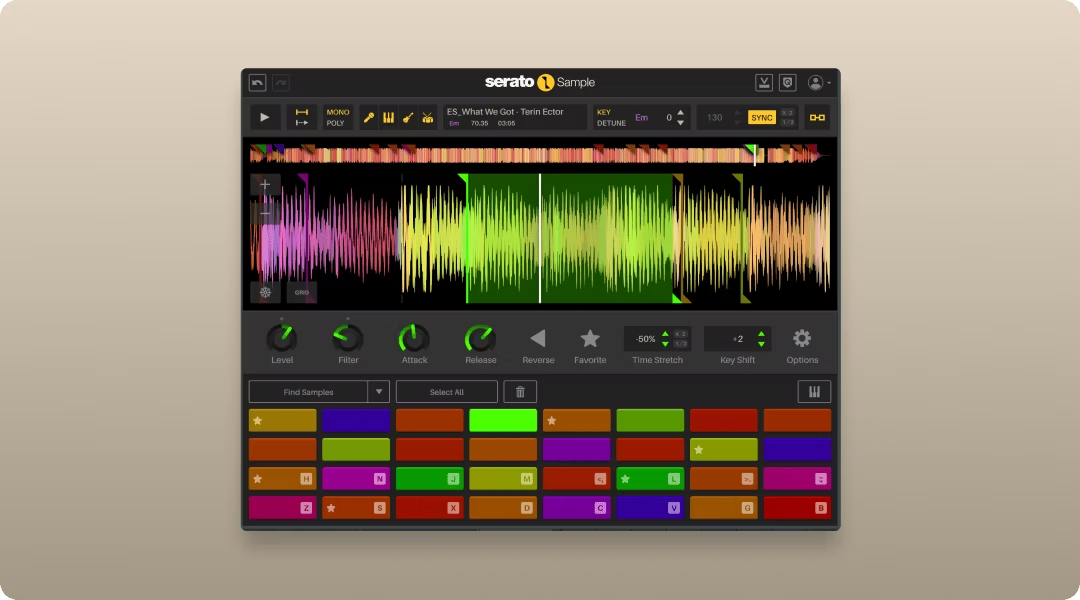
Serato Sample focuses on chopping and pitching loops quickly. The plugin detects the key of any audio you load, then lets you pitch-shift to match your session.
An eight-pad interface triggers slices, making it easy to perform chopped phrases or build new patterns from existing material. The workflow is intentionally streamlined.
Load audio, let the plugin analyze it, adjust pitch to fit your track, and trigger slices from the pads. Transient detection handles slicing automatically, though you can adjust slice points manually.
- Key detection: Automatically identifies the key of any loop you load.
- Pitch-shift to fit: Match loops to your session key with quality algorithms.
- Eight-pad interface: Trigger slices with a simple, performance-ready layout.
Serato Sample works best when you already have source material and need to chop and repitch it fast. It's not a content library, so you'll need to supply your own loops or use it alongside a sample service.
Toontrack EZdrummer
Toontrack EZdrummer approaches loops from the MIDI side. Instead of audio loops, it provides drum patterns you can drag into your DAW and edit note by note.
Song Creator builds full arrangements from genre-specific patterns. Tap2Find lets you tap a rhythm and search for matching grooves.
The distinction matters for producers who want control over individual hits. Audio loops are fixed, but MIDI patterns let you swap sounds, adjust velocities, and edit timing after the fact.
- Song Creator: Build full drum arrangements from genre-specific patterns with intro, verse, chorus, and fill sections.
- Tap2Find: Tap a rhythm and find matching grooves in the library.
- MIDI drag-and-drop: Pull patterns directly into your DAW for editing.
EZdrummer works well for songwriters who need complete drum tracks quickly and want the flexibility to edit after committing. The MIDI-based approach gives you more control than audio loops, though it's limited to drums.
XLN Audio XO
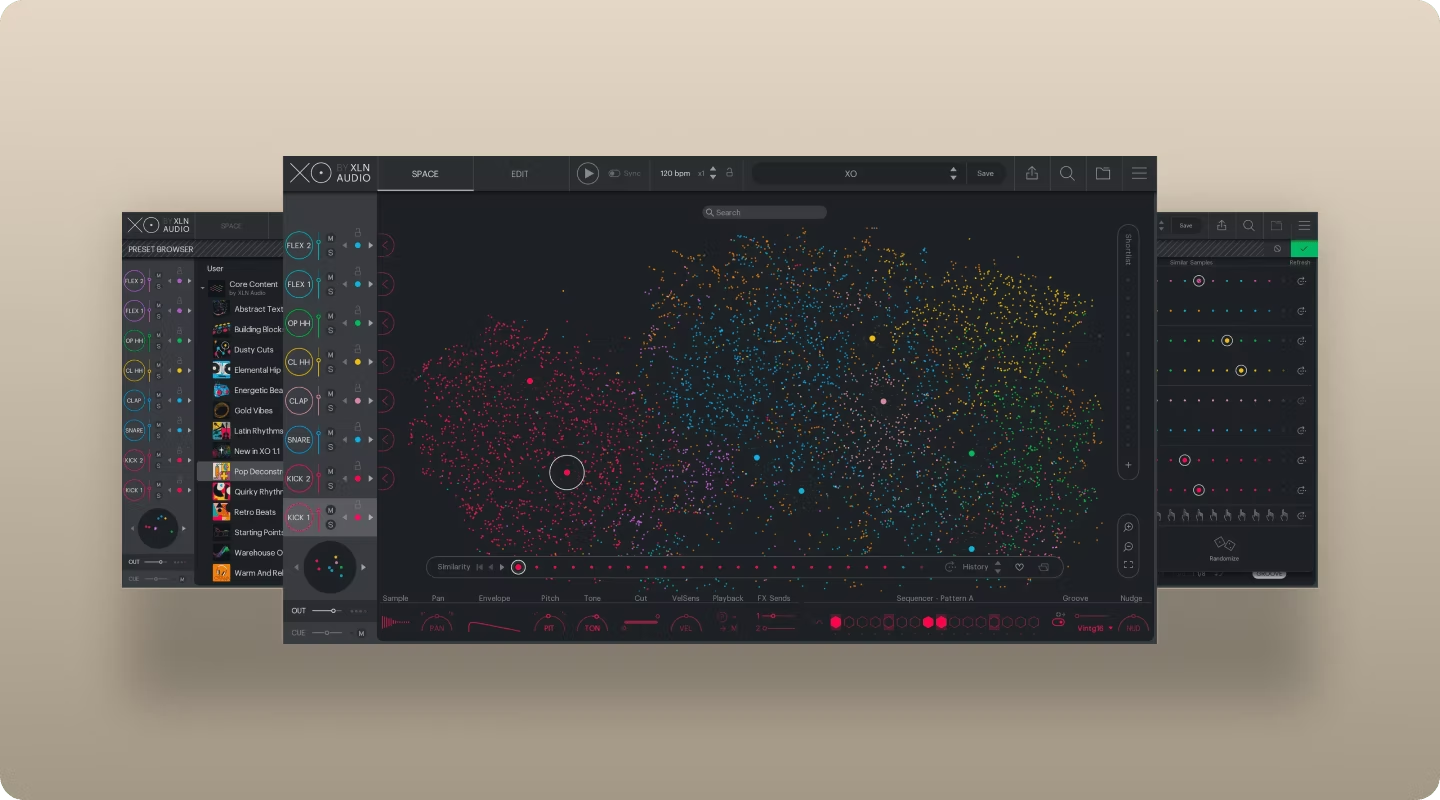
XLN Audio XO solves the problem of disorganized drum samples. The plugin scans your existing sample library and organizes everything visually using sonic clustering.
Similar sounds appear near each other in a visual space. This makes it easy to find the right kick or snare without scrolling through folders.
A built-in sequencer lets you program patterns directly in the plugin, auditioning sounds as you build. XO works with one-shots and loops, though its strength is helping you navigate large collections of individual hits.
- Space view: Visual clustering organizes samples by sonic characteristics, not folder structure.
- Library scanning: Analyze and organize your existing sample collection automatically.
- Built-in sequencer: Program patterns directly in the plugin while auditioning sounds.
XO is particularly useful if you've accumulated thousands of samples over the years and struggle to find what you need. The visual approach cuts through folder chaos.
Output Portal
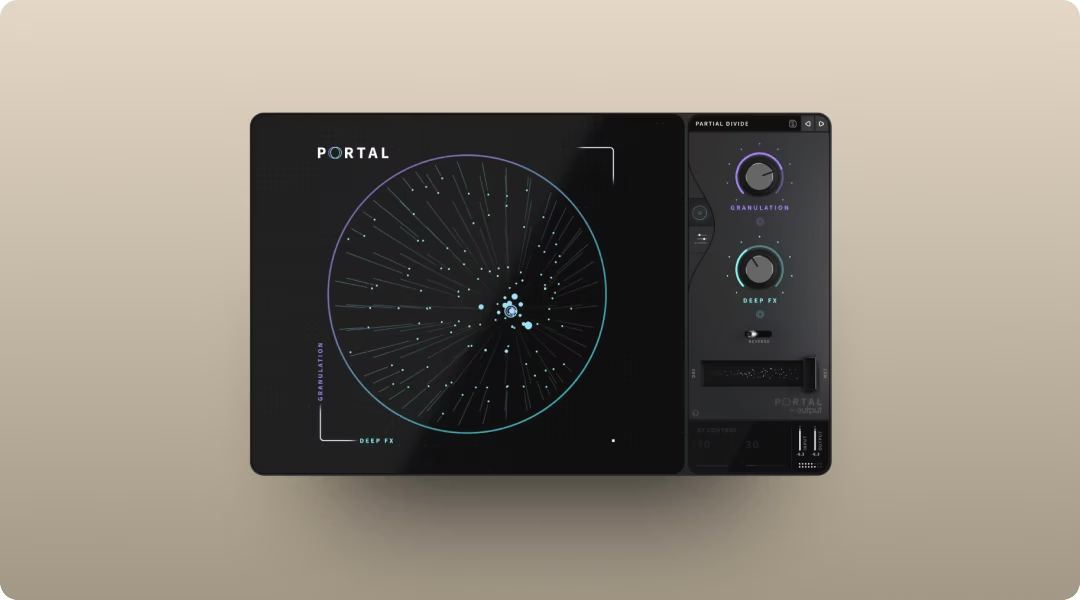
Portal transforms existing loops into new textures using granular processing. Unlike the plugins above, Portal doesn't provide content. It processes audio you feed it.
The plugin breaks loops into grains and re-synthesizes them in real time. The result ranges from subtle shimmer to full-on glitch and smear.
The XY control simultaneously adjusts both macro parameters as you drag the handle around the circle, with the visualizer responding dynamically to your granulator settings, letting you morph between states with a single gesture. Scale-locked pitch modulation quantizes pitch shifts to your chosen scale, interval, or chord, ensuring that random grain pitch variations stay harmonically coherent with your session. Tempo-synced grain timing maintains rhythmic coherence.
- Granular engine: Break loops into grains and re-synthesize in real time for texture and movement.
- XY performance control: Morph between granular parameters with one gesture.
- Scale-locked pitch: Keep pitch modulation musical and in key with your session.
- Tempo sync: Grain timing locks to your session for rhythmic results.
Seven built-in effects plus a master compressor and filter let you finish sounds inside the plugin. Portal works as an insert effect on any audio track.
Feed it a simple loop and push it into evolving, complex territory without leaving your DAW. Portal is included in Output One alongside Co-Producer, Arcade, Thermal, and Movement.
How to choose the right loop plugin for your workflow
Different plugins solve different problems. Matching your primary need to the right tool saves time and keeps you focused on making music.
- Finding loops that fit: Co-Producer analyzes your session and surfaces matching content, eliminating keyword searches and folder digging.
- Playing and performing loops: Arcade turns loops into playable instruments with real-time manipulation and macro control.
- Chopping and rearranging: Serato Sample and XO focus on slicing and reorganizing material you already have.
- Transforming loops into new sounds: Portal processes loops into textures, adding movement and character.
If you work primarily with samples and want both discovery and manipulation in one ecosystem, Output One bundles Co-Producer, Arcade, Portal, Thermal, and Movement together. The combination covers finding, playing, and transforming loops without switching between disconnected tools.
FAQ
Are the loops in these plugins royalty-free?
Royalty-free status depends on the specific plugin and library. Co-Producer and Arcade provide royalty-free content with unlimited access, meaning you can use any sound in commercial releases without additional fees.
Can you use loops from plugins in professional releases?
Yes. Loops from royalty-free libraries can be used in commercial releases, including streaming, sync licensing, and physical distribution. Always check the license terms for each source.
What is the difference between a loop plugin and a sampler?
Loop plugins often include content libraries and playback features designed for specific workflows. Samplers are more general instruments for loading and manipulating any audio. Some tools, like Arcade, combine both by providing content and deep manipulation in one plugin.
You saw how Output Co-Producer, Output Arcade, Output Portal, Output Thermal, and Output Movement can reshape loops—Output One includes all of them, plus more FX expansions in one subscription. Build ideas faster by using the whole toolkit together.
Try it free