FattMack Type Beat Production: Key Sounds and Techniques
Break down the FattMack type beat from tempo and 808 tuning to drum programming, melody writing, and arrangement, plus exact workflows using Co-Producer, Arcade, Portal, Thermal, and Movement to build the sound from scratch.

Get Co-Producer and Arcade with unlimited access to premium, royalty-free samples and instruments. Plus, unlock Portal, Thermal, and Movement.
Try it freeFattMack Type Beat Production: Key Sounds and Techniques
FattMack type beats hit hard with aggressive 808s, dark melodies, and drums that punch through any speaker. This breakdown covers tempo, drum programming, 808 tuning, melody writing, arrangement, and how to use Co-Producer, Arcade, Portal, Thermal, and Movement to build the sound from scratch.
What is a FattMack type beat?
A FattMack type beat is a hard-hitting trap instrumental built around aggressive 808s, punchy drums, and dark minor-key melodies. The sound balances raw energy with emotional weight, leaving space for rap vocals to sit on top.
You'll recognize the style by its sliding 808 bass lines, crisp hi-hat rolls, and sparse arrangements. The melodies stay simple enough to loop without fatigue, but they carry enough mood to stand alone as instrumentals.
Tempo and bounce for a FattMack type beat
The groove starts with your tempo and swing settings. Lock these in early, and everything else falls into place.
Pick a BPM range that stays aggressive
Most FattMack type beats sit between 140 and 155 BPM. This range keeps the energy up without pushing into rushed double-time territory.
Start around 145 BPM and adjust based on how your 808 pattern feels against the kick. Faster tempos work for harder beats. Slower tempos give the bass more room to breathe.
Set swing so the hi-hats talk back
Swing adds a human feel to programmed drums. A subtle setting between 5% and 15% makes hi-hats feel alive instead of robotic.
Straight quantization can work, but the groove often benefits from that slight push and pull. Trust your ear over the numbers.
Lock the groove before you add layers
Commit to tempo and swing before stacking elements. Changing these settings later forces you to reprogram patterns you already liked.
The relationship between your drums and 808 depends on these foundational choices. Get them right first.
Drum patterns that feel like a FattMack type beat
The drums in this style are direct and punchy. Each element has a job, and overwriting any part kills the pocket.
Program the kick pattern around the 808
Your kick drum and 808 work as a unit. Place kicks on downbeats where you want the 808 to punch through, then let the 808 carry sustain between hits.
- Kick placement: Hit the downbeats where you need punch
- 808 sustain: Let the bass carry between kick hits
- Avoid doubling: Don't put a kick on every 808 note
Place the snare for maximum forward lean
Snares land on the 2 and 4, sometimes layered with a clap or rimshot. Velocity variation adds life, especially with multiple hits per bar.
Keep the snare cutting through without competing with the 808's midrange. A clean snare makes the whole beat feel tighter.
Write hi-hats with real pocket and space
Hi-hat rolls define this style, but restraint matters. Use velocity curves to create dynamics within the roll, and leave gaps where the beat can breathe.
A constant stream of 32nd notes sounds mechanical. Let the hats respond to the groove instead of dominating it.
Add percussion that pushes the groove
Shakers, open hats, or rim clicks fill space without cluttering the arrangement. Use these sparingly to support the main pattern.
808s for a FattMack type beat without the mud
The 808 is the center of this style. Everything else orbits around it.
Tune the 808 to the root note on purpose
An out-of-tune 808 ruins the low end. Use a tuner or reference your 808 against a sine wave to make sure it sits in key.
This step takes seconds and saves hours of mix frustration later.
Use slides like a hook instead of a gimmick
Portamento creates melodic movement in the 808 line. A well-placed slide can become the most memorable part of the beat.
Use slides to connect notes intentionally. Random slides sound amateur. Purposeful slides sound like hooks.
Shape the 808 envelope for punch and length
Attack, decay, and sustain settings determine whether your 808 punches hard or sustains through the bar.
- Short envelopes: Work for faster patterns with quick hits
- Long sustains: Carry the groove when notes ring out
- Fast attack: Keeps the punch tight on every hit
Clip and limit the low end with control
Soft clipping and saturation add harmonics that help the 808 translate on smaller speakers. Thermal, available in Output One alongside Co-Producer, Arcade, Portal, and Movement, handles this well.
- Multi-stage saturation: Stack distortion types for complex harmonics
- XY control: Drag the handle to adjust both Macro parameters at once—the visual feedback changes based on your distortion settings, so you can see the intensity of your processing in real time
- Frequency-focused drive: Enable Band Split to distort only the upper harmonics of your 808 while leaving the sub frequencies clean. Use Refilter to cut any harsh harmonics the distortion creates
Insert Thermal on your 808 bus to add controlled aggression without losing definition.
Melodies that fit a FattMack type beat
Melodies in this style stay simple and repetitive. The goal is a motif that survives looping.
Pick a main motif that survives repetition
Write a short phrase, usually two to four bars, that works on repeat. The melody should feel like a hook, not a solo.
Complexity kills replay value in this lane. Simple wins.
Add chords that leave space for the vocal
Sparse chord voicings keep the midrange open for vocals. Pads or sustained synths work well here.
Avoid stacking too many notes in the same frequency range as a typical rap vocal. Leave room for the artist.
Use minor color tones without overwriting the loop
Seventh chords, ninths, or chromatic passing tones add emotional depth. Use these sparingly to keep the loop from feeling busy.
Add ear candy that shows up once per section
One-shot textures, reversed hits, or filtered sweeps mark transitions without dominating the beat. Portal, also included in Output One, turns a single sound into evolving texture.
- Granular engine: Breaks audio into grains and reshapes them
- Scale-locked pitch: Quantizes pitch shifts to your chosen scale, interval, or chord—so random grain pitch variations stay musical. Set it to Minor for dark FattMack vibes
- Tempo-synced delay: Ties textures to your groove
Insert Portal on a pad or vocal chop to create ear candy unique to your beat.
Sample workflow for a FattMack type beat with Co-Producer and Arcade
Finding the right samples fast keeps you in flow. Co-Producer and Arcade handle different parts of the workflow.
Find a loop that fits your track with Co-Producer

Co-Producer listens to your session and recommends samples that match your key, tempo, and vibe. Load it on your master track's FX insert, and it analyzes what you're making in real time.
For best results, capture 8 bars of audio when possible—this gives Co-Producer more harmonic and rhythmic content to analyze. You can also combine audio capture with text descriptions like 'dark trap melody' or 'aggressive 808 pattern' to guide the results.
You spend less time digging through folders and more time building the beat.
Re-imagine variations until the sample feels personal
The Re-imagine feature generates unique variations of any sample in Co-Producer. Use it to push a loop into something that doesn't sound like everyone else's beat.
Every Re-imagined sample is unique to you and 100% royalty-free—the AI is trained only on Output's owned library and open-source material, not on music without legal rights.
Drag and drop audio straight into your DAW timeline
Preview samples in context, then drag them directly into your session. No exporting, no file management, no leaving your DAW.
Turn chops into a playable part in Arcade

Send samples to Arcade for chopping, flipping, and playing as a kit. Load Arcade on a software instrument track, and you can perform variations in real time.
- Auto-chop: Slices audio into playable pieces automatically using four different slice algorithms. Choose an FX preset before saving to bake in Macro-controlled effects like filters and delays
- Key and tempo lock: Keeps everything synced to your session
- Macro controls: Shape sounds fast without deep menu diving
Pitch the sample to match your key and move on
Both Co-Producer and Arcade lock samples to your session's key and tempo. Adjust the key in the plugin to match your project, and the sample fits without extra processing. Lock the Session Key to ensure every new kit loads in your project's key automatically.
Arrangement moves that make a FattMack type beat feel finished
A beat that loops well still needs arrangement to feel complete.
Build an intro that sets the mood in 4 bars
Open with a filtered loop, sparse drums, or a single melodic element. The intro establishes vibe without giving everything away.
Hit the hook with one big change
The hook should feel like an arrival. Full drums, 808 in, melody unmuted. Contrast with the intro creates impact.
Strip the verse without killing the energy
Mute elements, filter the melody, or drop the 808 to create space for vocals. Don't strip so much that the beat loses momentum.
Add a switch that sounds like a new scene
A bridge or breakdown resets the listener's ear. Movement, included in Output One, adds rhythmic motion to static elements during switches.
- Sidechain modulation: Creates pumping without manual automation
- LFO-driven motion: Animates filters and effects in sync
- XY performance pad: Tweak in real time while you arrange
Insert Movement on a pad or synth to create filter sweeps that mark transitions.
Mix and sound design for a FattMack type beat
The mix keeps the low end loud and the arrangement clear.
Keep the low end loud without losing definition
- Mono the sub frequencies: Keep everything below 100 Hz in mono
- Carve space with EQ: Cut low-mid buildup from elements that don't need it
- Sidechain the 808 to the kick: Let the kick punch through the bass
Add controlled heat with Thermal
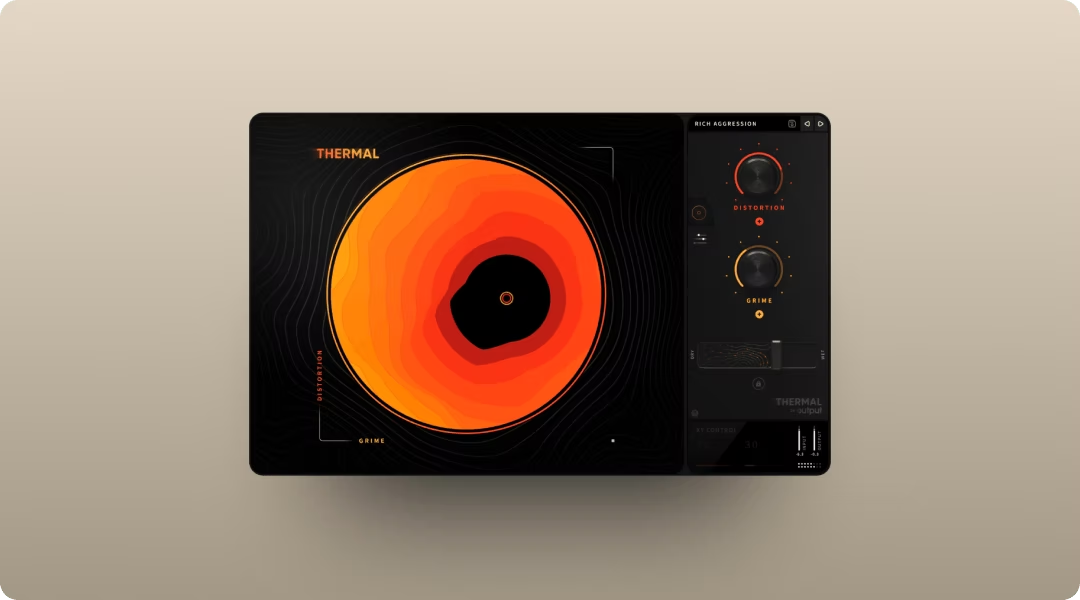
Thermal's multi-stage distortion engine adds saturation to drums, 808s, or the mix bus without losing clarity. The XY control makes it easy to find the right grit fast.
Turn one sound into texture with Portal
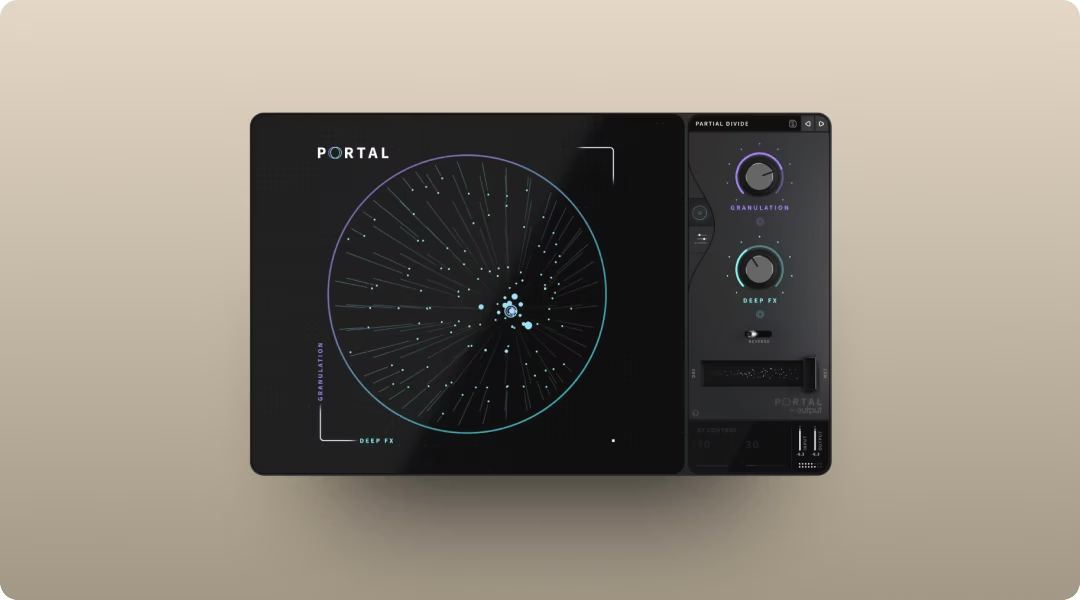
Portal's granular engine transforms a simple loop into evolving, atmospheric texture. Use it on pads or vocal chops to create depth behind the main arrangement.
Portal's grain delay feeds processed audio back into the granulator for evolving textures. Keep feedback moderate when using small density and large grain sizes to avoid volume spikes.
Add rhythmic motion with Movement
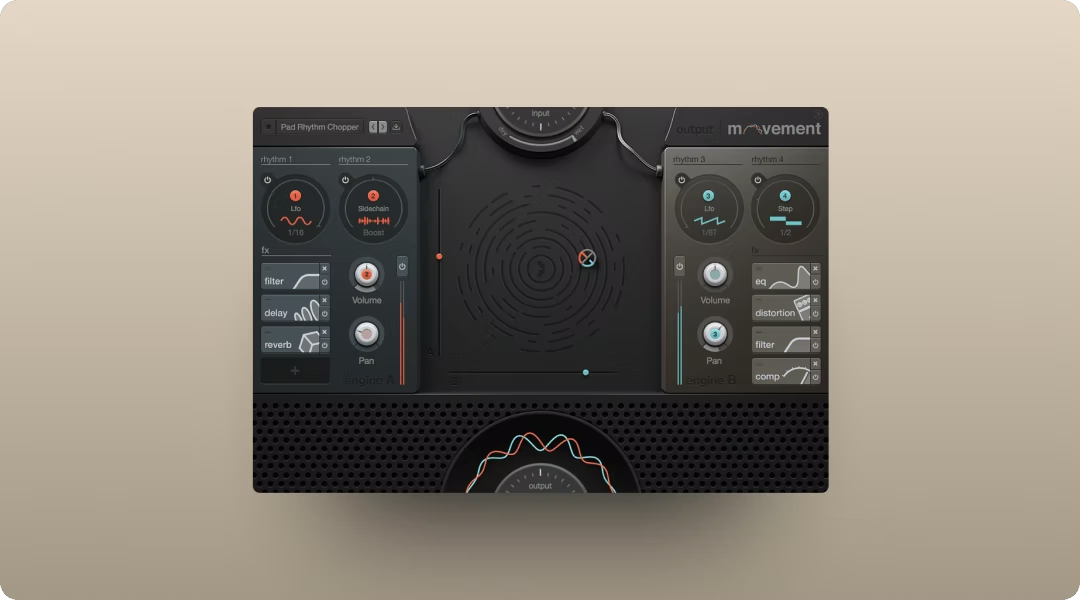
Movement adds sidechain-style pumping, filter sweeps, or LFO-driven motion to static elements. Insert it on synths or pads to add life without drawing automation.
FattMack type beat variations people actually search for
Different search modifiers signal different sonic expectations. Tailor your beat to match the intent.
Hard FattMack type beat with distorted drums
Clipped 808s with visible harmonic distortion. Aggressive snare with minimal reverb. Sparse melody or no melody at all.
Melodic FattMack type beat with a simple motif
Clear, repeating melodic phrase over hard drums. Balance between aggression and emotion.
Sad FattMack type beat with sparse harmony
Minor chords with slow movement. Slower hi-hat rolls. Reverb on the snare for depth.
Love and pain FattMack type beat with vocal texture
Vocal chops or processed ad-libs add emotional weight. Arcade works well for playing vocal samples as instruments.
Use Arcade's Playable Pitch to retune vocal chops in real time—play melodies and chord progressions with a single vocal sample mapped across the keyboard.
FattMack type beat sample flip with a new pocket
Chopped and rearranged sample with a new drum pattern. Co-Producer and Arcade handle the flip workflow together.
FattMack type beat sample sad with space for a verse
Sample-based production with sad melodic elements. Sparse verses, fuller hooks. Room for vocals throughout.
FattMack type beat 2026 titles and tags that match intent
Title your beats with year, mood modifiers, and artist comparisons. Examples include "FattMack x YFG Fatso Type Beat" or "FattMack Type Beat 'My Biggest Opp' 2026." Tags improve discoverability on YouTube and BeatStars.
Start your FattMack type beat with Output One
Co-Producer finds samples that fit your track. Arcade turns them into playable instruments. Portal, Thermal, and Movement shape the sound into something yours.
Output One bundles all of these tools for one price, with unlimited access to a growing library of royalty-free sounds. Try it free and build your next FattMack type beat with the full Output workflow.
You used Output Thermal, Arcade, Portal, Movement, and Co-Producer to shape those FattMack-style sounds—Output One includes all of them (plus every FX expansion) in one subscription. Try them together to move faster from idea to finished beat.
Try it free