Melodic Hard Type Beats: The Sounds and Workflow Behind Them
Learn how to balance emotional melodies against aggressive drums in a melodic hard type beat—from drill snare drags and 808 saturation to guitar processing, granular textures, and a sample workflow that keeps you creating instead of browsing.

Get Co-Producer and Arcade with unlimited access to premium, royalty-free samples and instruments. Plus, unlock Portal, Thermal, and Movement.
Try it freeMelodic Hard Type Beats: The Sounds and Workflow Behind Them
Melodic hard type beats live in the tension between emotional melodies and aggressive drums, and getting that balance right means understanding how each element supports the other. This breakdown covers drum programming for trap and drill, guitar and 808 processing, texture and space, and a sample workflow that keeps you moving.
What makes a type beat feel melodic and hard
A melodic hard type beat is a track that combines emotional melodies with aggressive drums and bass. The melody pulls you in with minor-key chord progressions and counter-melodies. The drums and 808s hit with enough force to anchor everything in trap or drill territory.
That contrast is the whole point. The melody creates space for the aggression. The aggression gives the melody weight. Without both, the beat feels flat.
Most producers working in this lane stick to minor keys. The harmonic content tends to be simple but effective. Two to four chords that loop and leave room for a topline. Counter-melodies respond to the main motif, creating a call-and-response dynamic that keeps the listener engaged.
On the hard side, you need punchy kicks, snappy snares, dense hat patterns, and 808s with real presence. The drums need to hit, but they also need to breathe. If the low end is muddy or the transients are buried, the beat loses its edge.
- Melodic layer: Minor keys, emotional progressions, counter-melodies that answer the main motif
- Hard layer: Punchy kicks, snappy snares, rolling hats, 808s that translate across playback systems
- Contrast principle: The melody creates space for aggression, and the aggression gives the melody weight
Drum bounce and pocket for melodic hard trap type beats
The rhythmic foundation of a melodic hard trap beat is all about groove. Quality trap drum loops hit hard but still leave room for the melodic elements to breathe. Complexity isn't the goal. Pocket is.
Kick placement matters more than kick selection. Where the kick lands relative to the 808 tail determines whether the low end feels tight or sloppy. If the kick and 808 are fighting for the same space, the whole beat suffers.
Snare and clap timing is equally important. Placing them slightly behind the grid adds swing and human feel. Dead-on placement works when you want pure aggression.
Hat density is a stylistic choice. Sparse hats leave room for the melody to carry the track. Rolling triplets add energy and forward motion. Ghost notes and fills inject human feel without cluttering the pocket.
Velocity variation is non-negotiable. Flat velocities sound lifeless. Even subtle changes in velocity make the drums feel like a performance instead of a sequence.
- Kick placement: Align with the 808 tail to keep the low end tight
- Snare timing: Behind the grid for swing, on the grid for aggression
- Velocity variation: Essential for making drums feel alive
Drum bounce and pocket for melodic hard drill type beats
Drill drums have a different feel than standard trap. The tempo typically sits higher, around 140 to 150 BPM. The rhythmic approach leans into syncopation and off-beat accents. UK drill influence is strong here, though NY drill samples bring a different melodic character to the same aggressive foundation.
The snare drag is the move that defines drill. Placing the snare slightly behind the beat creates a lazy, swinging feel that contrasts with the aggressive 808 work. Off-beat hi-hats reinforce this bounce, landing between the main beats to create forward momentum.
808 slides and glides add aggression and melodic interest. Pitch movement in the bass keeps the low end active and unpredictable. Halftime feel is useful for contrast, pulling back the energy before dropping back into the main groove.
- Snare drag: Behind-the-beat placement for that lazy swing
- Off-beat hats: Create the signature drill bounce
- 808 slides: Pitch movement adds aggression and melodic interest
Melodic hard guitar type beats without the same old riff
Guitar-driven melodic hard beats are everywhere. That means the clichés are everywhere too. The challenge is finding or creating guitar content that doesn't sound like every other beat on YouTube.
Chord voicing choices matter. Avoid the overused progressions and look for voicings that add harmonic interest without being complicated. Processing the guitar is where you can really differentiate. Saturation, filtering, and spatial effects add character and help the guitar sit in a mix without sounding stock.
Layering with synths extends the harmonic content. Doubling the guitar with pads or leads adds depth and width. One-shots versus loops is a workflow decision. Building custom progressions from single notes gives you more control and avoids the loop-based sound that listeners recognize immediately.
Arcade's guitar-based kits offer playable content that sidesteps generic loops. You can manipulate the material in real time, chopping and reshaping it until it sounds like something only you would make. Load Arcade on a Software Instrument track and play the guitar content chromatically using Playable Pitch (keys G-1 to G1) to retune loops in real time—turn a C Major guitar phrase into a full chord progression by playing the root notes of each chord while the sample plays, then process it further with the built-in FX.
- Arcade guitar kits: Playable content you can chop, flip, and reshape in real time
- Built-in FX: Shape the sound without leaving the plugin
- Key and tempo lock: Everything stays in sync with your session (see how to set your session key)
Arcade is available as part of Output One alongside Co-Producer, Portal, Thermal, and Movement.
Melodic hard 808 and bass that hit without mud
The 808 is what makes a melodic hard beat feel hard. If the bass doesn't translate, the whole track falls apart. Clarity and punch are the goals.
Tuning to key is fundamental. Out-of-tune 808s kill the vibe and clash with the melodic content. Saturation adds upper harmonics, which helps the bass translate on small speakers like phones and laptops. Without those harmonics, the 808 disappears on anything smaller than studio monitors.
Soft clipping versus hard clipping is a tonal choice. Soft clipping adds controlled distortion and punch without destroying the waveform. Hard clipping is more aggressive and works when you want the bass to bite.
The sidechain relationship between the kick and 808 determines whether the low end feels tight or muddy. Mono compatibility keeps the bass focused and prevents phase issues.
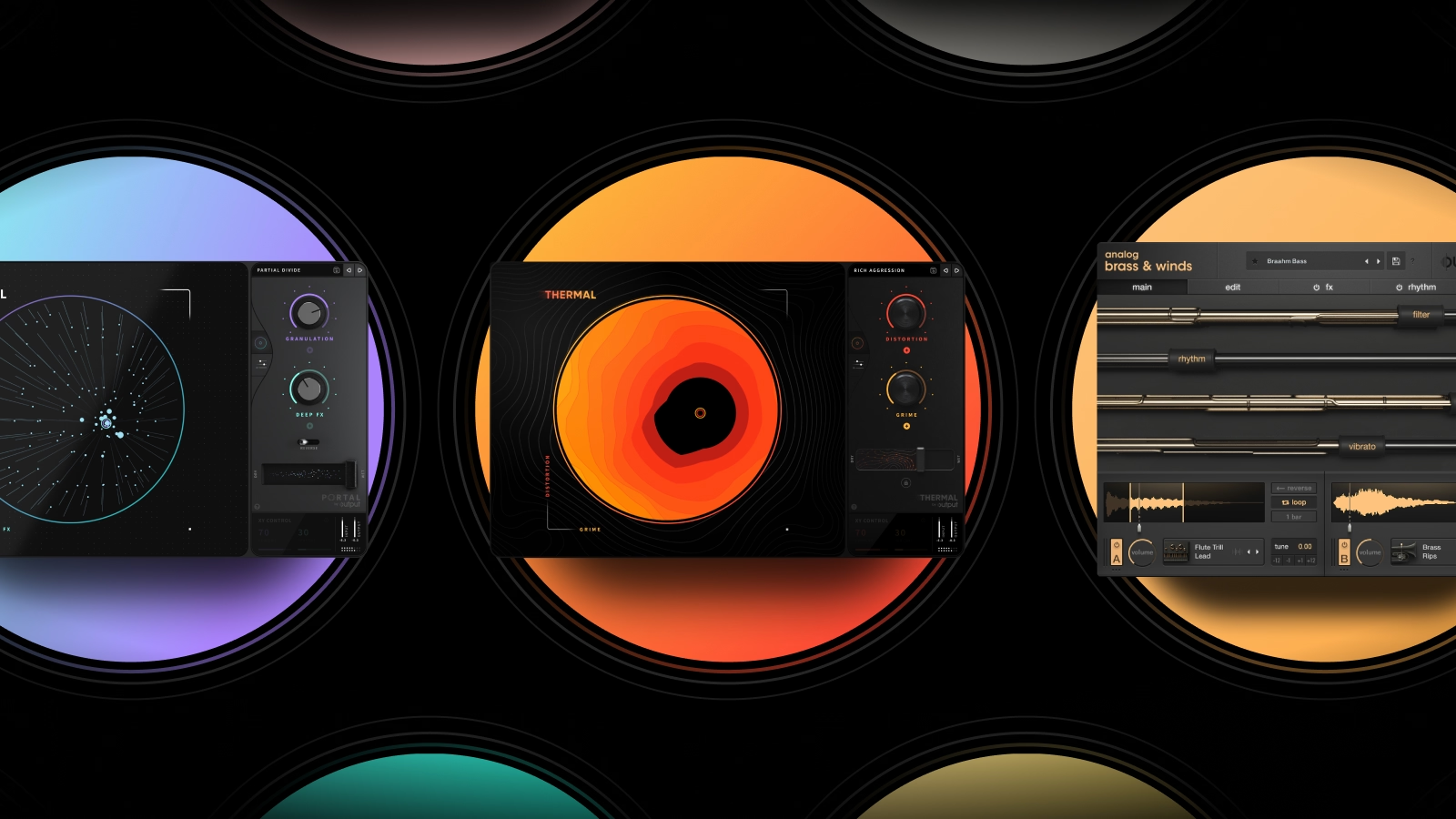
Thermal's multi-stage saturation is built for processing 808s. The three independent stages let you process different frequency ranges separately—add upper harmonics to help 808s translate on small speakers while keeping the sub frequencies clean and unprocessed. The XY control lets you dial in the exact amount of aggression you need.
- Thermal saturation: Multi-stage processing that adds harmonics without losing low-end definition
- XY control: Dial in the exact amount of aggression you need
- 15+ distortion types: From subtle warmth to aggressive bite
Thermal is available as part of Output One.
For a different approach, FabFilter Saturn 2 offers surgical multiband saturation with deep modulation options. It's more clinical than Thermal but excellent for precise harmonic control.
- Saturn 2 multiband: Process different frequency ranges independently
- Modulation system: Automate saturation parameters over time
- Linear-phase processing: Clean crossovers for mastering-level work
Texture, distortion, and space that make it feel expensive
This is where a beat goes from functional to memorable. Ear candy, transitions, and spatial processing elevate melodic hard beats from good to great.
Parallel distortion adds grit without destroying the source. Running a clean signal alongside a distorted version lets you blend to taste. Stereo width on melodic elements creates space for vocals and keeps the center of the mix clear for the low end.
Reverb and delay choices depend on the vibe. Short tails keep things tight. Long tails add atmosphere and space. Modulation and movement keep static sounds alive. A pad that doesn't move sounds flat. A pad with subtle modulation sounds expensive.
Transition FX like risers, downlifters, and impacts add energy without sounding stock if you process them or source them carefully.
Portal'sgranular processing turns simple melodies into evolving soundscapes. You can stretch, pitch, and scatter audio in ways that feel musical rather than chaotic. Insert Portal on any audio or instrument track and use the XY control to find textures that work.
- Portal granular processing: Turn simple melodies into evolving textures
- Tempo-synced grain delay: Keep everything locked to your session
- Scale-based pitch modulation: Quantize granular pitch shifts to scales, intervals, or chords—set it to Major Chord and Portal will only hit the root, third, and fifth, keeping textures musical even at extreme settings
Movement adds rhythmic animation to pads and leads without manual automation. The step sequencer and LFO modulation create pulse and motion that would take hours to program by hand.
- Movement rhythm engine: Add pulse and motion to static sounds
- Deep modulation routing: Assign rhythmic patterns to filters, panning, volume, and effects simultaneously—creating complex motion that would take hours to automate manually
- 300+ presets: Find a starting point fast
Both Portal and Movement are included in Output One.
A fast sample workflow for melodic hard type beats
Speed matters in type beat production. The faster you can find sounds that fit, the more time you have for the creative work that actually matters. Knowing the right sample source alternatives keeps you from wasting hours in browser tabs.
Starting with a reference vibe helps. Use existing tracks as direction without copying. Co-Producer listens to your session and surfaces samples that match key, tempo, and feel. Load it on your master track's FX insert, let it analyze what you're making, and drag samples directly into your DAW without leaving the session.
- Co-Producer session listening: Analyzes your track and recommends samples that fit
- Tempo and key sync: Audition samples in context before committing
- Drag-and-drop workflow: Stay in your DAW instead of browser-hopping
- Capture options: Choose 4-bar capture for quick ideas or 8-bar capture when you need samples that match more harmonic and rhythmic content
- Re-Imagine variations: Generate infinite AI-powered variations of any sample you find—each one unique to you and royalty-free
No credits, no rationing ideas. Just unlimited access to royalty-free, musician-made content—including deep trap sample packs built for this exact workflow.
Once you find a sample, Arcade lets you chop it, flip it, and make it yours. Load Arcade on a Software Instrument track and use the modifiers mapped to your black keys (C2-C4) to resequence, repeat, or reverse material in real time while samples play. One-shots versus loops is a workflow decision. Building from scratch gives you more control. Working with pre-made phrases gets you to a finished idea faster.
Co-Producer and Arcade are both available in Output One.
Serato Sample is another solid option for chopping and manipulating audio. It's built for quick slicing and pitch-shifting.
- Serato Sample auto-slice: Chop loops into playable pads instantly
- Key and tempo detection: Match samples to your session
- Pitch-shifting: Transpose without artifacts
Free for profit licenses and upload prep for type beats
Type beat culture runs on licensing. Understanding the basics keeps you out of trouble and helps you prepare beats for upload.
Free for profit means non-exclusive use, typically with credit requirements. The artist can use the beat without paying upfront, but you retain ownership and can lease or sell it to others.
Lease versus exclusive rights is a spectrum. Leases are cheaper and non-exclusive. Exclusives transfer full ownership to the buyer.
File formats matter for upload. MP3 works for streaming and preview. WAV is standard for leases and exclusives. Metadata basics like BPM, key, and genre tags improve discoverability on platforms like YouTube and BeatStars.
Royalty-free sample sources avoid Content ID issues. Using cleared content from libraries like Output's means you won't get flagged or have revenue claimed by sample owners. This is one of the reasons Co-Producer and Arcade use only royalty-free, musician-made content.
Build your melodic hard type beat workflow with Output One
Output One brings together the tools that make melodic hard type beat production faster and more creative.
Co-Producer finds samples that fit your session instantly. Arcade lets you play and manipulate samples as instruments. Portal adds granular texture and space to melodies. Thermal shapes 808s and adds controlled aggression. Movement injects rhythmic motion without automation.
One subscription gives you access to all of it, plus an ever-growing library of royalty-free sounds and all FX preset expansions.
FAQ
Can you use melodic hard type beats for commercial releases without clearing samples?
Yes, if the samples are royalty-free. Content from Co-Producer and Arcade is cleared for commercial use, so you won't face Content ID claims or licensing issues.
What tempo range works best for melodic hard trap versus drill type beats?
Trap typically sits between 130 and 145 BPM. Drill runs higher, usually 140 to 150 BPM. The higher tempo in drill creates more urgency and leaves less space between hits.
How do you keep 808s from clashing with the melodic elements in a type beat?
Tune the 808 to the key of your track and use sidechain compression to duck the bass when the kick hits. Saturation adds upper harmonics that help the 808 cut through without fighting the melody.
You used Portal, Movement, Co-Producer, Thermal, and Arcade to shape melodies, bounce, and transitions—Output One includes all of them, plus every FX expansion. Get the full workflow in one subscription and move from idea to finished type beat faster.
Try it free