5 Plugins for Shoegaze Guitar and Synth Textures
Five shoegaze plugins, one signal chain strategy, and the sound design techniques behind those dense, drenched guitar and synth textures—from granular reverb to multiband saturation.

Get Co-Producer and Arcade with unlimited access to premium, royalty-free samples and instruments. Plus, unlock Portal, Thermal, and Movement.
Try it free5 Plugins for Shoegaze Guitar and Synth Textures
Shoegaze production lives in the space between clarity and chaos, where layered guitars, heavy modulation, and drenched reverb create walls of immersive texture. This breakdown covers the sound design techniques, signal chain strategies, and plugins you need to build authentic shoegaze tones on guitar and synth.
What Defines the Shoegaze Sound?
Shoegaze is a genre built on density and blur. It prioritizes texture over clarity, burying melodies under layers of processed guitar, heavy modulation, and cavernous reverb. The name comes from performers staring at their pedals while playing, adjusting effects in real time rather than engaging with the audience.
The "wall of sound" approach defines everything. Multiple guitar takes stack on top of each other, often slightly detuned to create natural beating and width. Vocals sit beneath the instrumentation rather than above it, functioning as another textural element.
Here's what separates shoegaze from other guitar-driven genres:
- Layered guitars: Multiple takes panned hard left and right with slight pitch differences between them
- Heavy modulation: Chorus, flanger, and vibrato blur note definition and add constant movement
- Drenched reverb: Long decay times and generous pre-delay push sounds deep into the stereo field
- Buried vocals: Treated with the same effects as instruments, sitting low in the mix
- Distortion as texture: Fuzz and saturation add harmonic complexity without aggressive bite
The goal isn't power or precision. It's immersion.
Sound Design Techniques for Shoegaze Production
The shoegaze signal chain follows a specific order: distortion feeds modulation, which feeds time-based effects. This sequence matters because each stage interacts with what comes before it.
Reverse reverb is a signature technique. You print a reverb tail to audio, reverse the file, and layer it before the dry signal. The result is a swell that builds into each note rather than trailing after it. Portal offers a one-click Reverse toggle that applies this effect to granular textures in real-time, eliminating the need for manual audio printing and reversing.
Other essential techniques include:
- Pitch-shifted delays: Detune your delay repeats by a few cents to create disorienting, unstable trails
- Tremolo into reverb: Apply rhythmic volume modulation before your reverb so the pumping effect blooms in the decay
- Parallel distortion: Blend a heavily saturated signal with a cleaner version to maintain low-end definition
- Stereo spreading: Hard-pan doubled takes or use stereo wideners to fill the entire field
These techniques stack. A single guitar part might run through fuzz, chorus, pitch-shifted delay, and shimmer reverb before reaching the mix bus.
Shoegaze Song Structure and Arrangement
Shoegaze arrangements reject verse-chorus-verse in favor of gradual evolution. Songs build through texture accumulation rather than section changes. Dynamics come from adding or removing layers, not from volume jumps.
Extended intros are common. A track might spend 90 seconds building from a single filtered guitar swell before any recognizable melody appears.
Key structural elements include:
- Extended intros: Slow builds using swells, filtered textures, and ambient noise
- Textural verses: Guitars wash over understated drums while vocals float beneath
- Climactic choruses: Additional layers and increased saturation create intensity without volume spikes
- Long outros: Gradual decay into feedback, noise, and ambient texture
Drums typically stay understated, providing pulse rather than driving the arrangement. Bass carries the harmonic foundation while guitars handle atmosphere.
Reverb and Delay Plugins for Shoegaze Atmosphere
Time-based effects do the heavy lifting in shoegaze production. The right reverb and delay choices determine whether your guitars disappear into beautiful wash or turn into undefined mud.
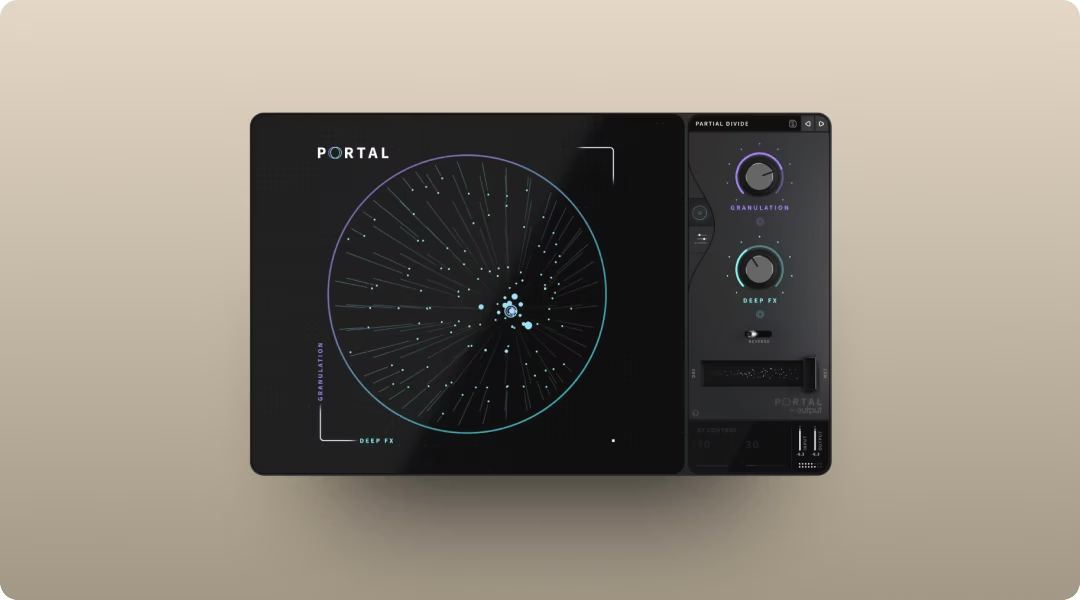
Output Portal handles granular textures and pitch-shifted ambience in ways traditional reverbs can't. It breaks incoming audio into grains and re-synthesizes them with scale-locked pitch modulation, creating evolving wash that stays in key.
- Tempo-synced grain delay: Adds rhythmic dimension to sustained chords without manual automation
- Scale-based pitch modulation: Quantizes pitch-shifted grains to a set scale, interval, or chord, ensuring pitch-shifted textures stay musical rather than dissonant—essential for maintaining harmonic coherence in dense shoegaze mixes
- XY performance control: Morph between granular states in real time
Valhalla Shimmer delivers the classic pitch-shifted reverb sound that defines much of the genre. The rising, ethereal tails work especially well on clean guitar parts and pads.
- Pitch-shifted feedback: Creates ascending or descending reverb tails
- Diffusion control: Smooths the reverb texture from grainy to lush
- Low CPU usage: Runs efficiently even with multiple instances
Soundtoys EchoBoy handles delay duties with built-in modulation and saturation. The vintage-style repeats drift and degrade naturally, which suits the genre's aesthetic.
- 30+ echo styles: From tape to digital to lo-fi character
- Built-in saturation: Warms up repeats without additional plugins
- Rhythm editor: Creates complex delay patterns synced to tempo
Portal, along with Output's other FX plugins Thermal and Movement, is available through Output One for access to the full suite.
Modulation Plugins for Movement and Texture
Modulation creates the shimmering, unstable quality that separates shoegaze from standard rock production. Chorus, flanger, and vibrato blur note definition and add constant motion to sustained chords.
Soundtoys MicroShift handles stereo widening through subtle pitch-shifting and delay. It creates wide, detuned images without obvious chorus artifacts.
- Three widening styles: Different approaches to stereo spread
- Simple two-knob interface: Fast to dial in without deep menus
- Mix control: Blend processed signal with dry for subtle or extreme width
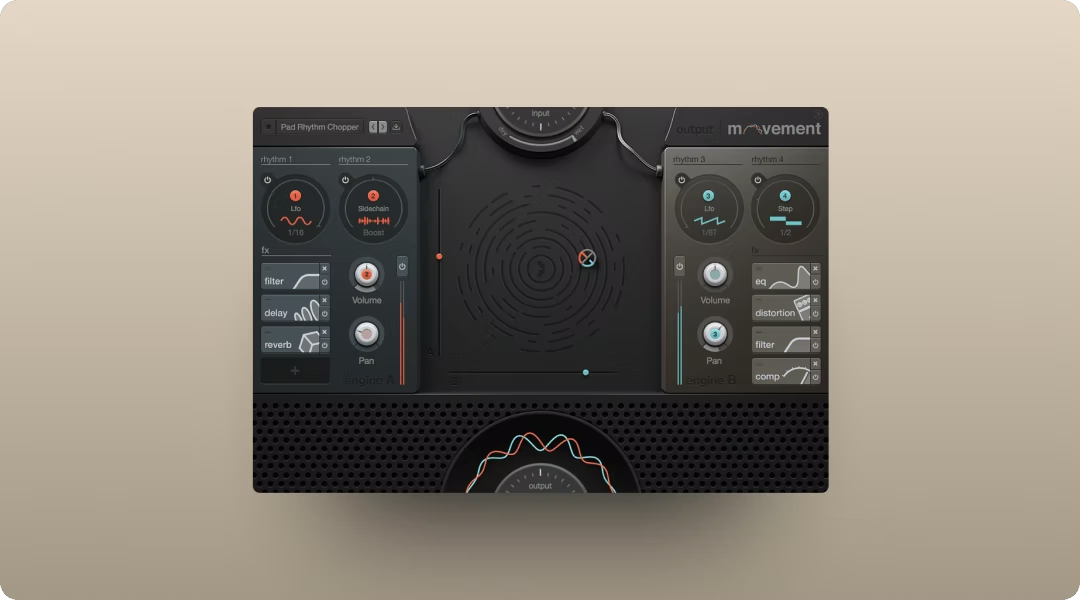
Output Movement approaches modulation differently than traditional chorus plugins. It's a tempo-synced modulation engine that can animate any parameter rhythmically, adding pulse and movement to guitars and synths.
- Four rhythm engines: LFOs, step sequencers, sidechains, and Flux mode
- XY performance pad: Morph between modulation states in real time
- Built-in effects: Filters, delay, distortion, compression, and reverb in one plugin
Arturia Chorus JUN-6 emulates the Juno chorus for lush, vintage thickening. It sits well in dense mixes without taking up too much frequency space.
- Two chorus modes: Mode I for subtle, Mode II for more intense modulation
- Analog-modeled circuit: Captures the warmth of the original hardware
- Stereo width control: Adjusts the spread of the chorus effect
Movement is included in Output One alongside Portal and Thermal.
Distortion and Saturation Plugins for Harmonic Density
Shoegaze distortion adds warmth and harmonic complexity rather than aggressive bite. The goal is density, not destruction. You want saturation that thickens the sound without making it harsh.
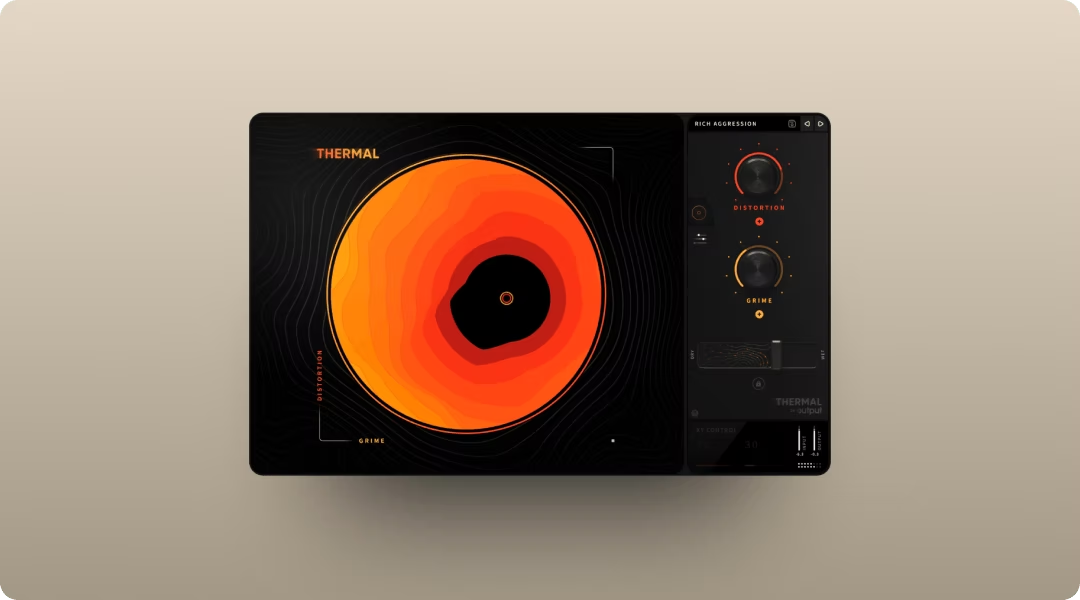
Output Thermal handles this with multi-stage distortion and band-splitting. You can saturate specific frequency ranges while leaving others clean, which prevents low-end mud while adding midrange heat. Thermal's Band Split feature lets you define exact frequency ranges for each distortion stage, while the Refilter option removes unwanted harmonics created by the saturation—particularly useful for keeping shoegaze guitars thick in the mids without harsh high-frequency artifacts.
- 15+ distortion types: Analog-inspired and digital flavors
- Band-splitting: Saturate specific frequencies without affecting others
- XY macro control: Morph between distortion states in real time
Soundtoys Decapitator delivers analog-modeled saturation with multiple character options. It ranges from subtle warmth to aggressive drive depending on how hard you push it.
- Five saturation styles: Different analog circuit emulations
- Punish button: Extreme saturation for aggressive textures
- Tone control: Shapes the frequency response of the distortion
Amplifikation Lite provides free amp simulation for authentic guitar shoegaze tones when recording DI. It's a solid starting point before adding additional saturation.
- Multiple amp models: Clean and driven options
- Cabinet simulation: Realistic speaker response
- Zero cost: Free download for any DAW
Thermal is available individually or through Output One. For guitar shoegaze, running Amplifikation Lite into Thermal gives you amp character plus frequency-focused saturation in a single chain.
How to Build a Shoegaze Guitar Signal Chain
The order of your plugins matters. Shoegaze signal chains typically run distortion first, then modulation, then time-based effects. This sequence lets each stage interact with the previous one in musically useful ways.
Here's a practical chain for processing guitar:
- Input stage: DI recording or amp sim like Amplifikation Lite for foundational tone
- Distortion: Thermal or Decapitator for harmonic saturation and warmth. For evolving shoegaze textures, use Thermal's clickable envelope modulation to automate distortion parameters over time—creating gradual saturation builds that mirror the genre's dynamic approach to intensity.
- Modulation: Movement or a chorus plugin for shimmer and stereo width
- Delay: EchoBoy or similar with modulation enabled for drifting repeats
- Reverb: Portal or Valhalla Shimmer as the final stage for wash and space
The parallel bus approach is optional but useful. Route your dry guitar to one bus and your fully processed signal to another, then blend to taste. This lets you push effects harder without losing all note definition.
Synth Textures and Pad Design for Shoegaze
Synths complement guitars in modern shoegaze production, filling frequency gaps and adding sustained harmonic content. Pad design follows similar principles to guitar processing: slow attacks, long releases, and heavy modulation.
Start with detuned oscillators. Multiple oscillators slightly out of tune create natural thickness without additional processing. Add slow filter modulation via LFO for movement that evolves over time.
Key approaches for synth textures:
- Slow attack, long release: Pads that swell in gradually and fade over several seconds
- Detuned oscillators: Two or three oscillators with slight pitch differences
- Filter modulation: Slow LFO on cutoff frequency for evolving tonal movement
- Layering with Portal: Run pads through granular processing for smeared textures

Co-Producer can help you find samples that match your existing shoegaze arrangement when you need additional textural elements. Co-Producer listens to your session—capturing up to 8 bars of audio for deeper harmonic and rhythmic analysis—and surfaces samples that complement your existing arrangement. For shoegaze productions with evolving textures, the longer capture window helps identify samples that match the gradual tonal shifts typical of the genre.

Once you find something close, Arcade lets you manipulate and reshape those samples into something unique to your track. When layering samples from Arcade with your existing shoegaze arrangement, use the Session Key feature to automatically transpose samples to match your song's key—ensuring layered textures blend harmonically rather than creating unwanted dissonance.
Mixing Shoegaze Tracks for Clarity in Density
Dense, layered productions require careful mixing to avoid frequency buildup. The challenge is maintaining the wash that defines the genre while keeping enough definition for the track to translate.
High-pass filtering is essential. Roll off low frequencies on guitars to leave room for bass and kick. Most guitar content lives in the mids and highs anyway.
Additional mixing strategies:
- Mid-side EQ: Process the sides differently from the center to maintain mono clarity
- Reverb on sends: Share reverb across multiple tracks for cohesion
- Sidechain ducking: Gently duck reverb tails when new transients hit
- Automation: Ride levels and effect wet/dry throughout the arrangement
The goal is controlled chaos. You want the wash and blur, but you also want the listener to feel the song moving forward.
All of Output's FX plugins, including Portal, Thermal, and Movement, are available together in Output One.
Frequently Asked Questions
What guitar pedals do shoegaze bands typically use?
Classic shoegaze pedalboards include reverse reverb, heavy modulation like chorus and flanger, and fuzz pedals. In the box, plugins like Output Portal, Valhalla Shimmer, and Thermal replicate these effects with additional control.
Can you create shoegaze textures without using guitar?
Yes. Synths, samples, and processed vocals can all create shoegaze textures. The genre is defined by sonic qualities rather than specific instruments, so granular processing and heavy reverb on any source achieves the aesthetic.
Which DAW works best for producing shoegaze music?
Any DAW with robust plugin support works for shoegaze. Ableton Live, Logic Pro, and FL Studio all handle heavy layering and effects processing. The plugins you choose matter more than the DAW itself.
Output One includes Thermal, Arcade, Portal, Movement, and Co-Producer—everything you just read about, in one subscription bundle. Try them together (plus all FX expansions) to quickly dial in lush guitars, hazy synths, and swirling textures.
Try it free